
Key Takeaways
- API endpoints turn browser automation into simple HTTP operations. Instead of managing browser sessions and lifecycle events, you trigger a defined task such as rendering, scraping, or generating a PDF and receive a structured result.
- Browserless makes browser workloads stateless and predictable. Each REST request runs in an isolated browser instance, executes the task, returns the result, and terminates cleanly, which simplifies scaling and reduces operational risk.
- The right API model depends on your use case. REST endpoints are ideal for single-purpose tasks, BrowserQL supports stealth automation and CAPTCHA solving, and BaaS enables full Playwright or Puppeteer control for advanced automation logic.
Introduction
Every modern API you use is built around endpoints, HTTP-accessible URLs that accept a request, perform a defined action, and return a structured response. REST endpoints have become the default model for automation and infrastructure because they're stateless, predictable, and easy to call from any environment that can send an HTTP request. Browserless applies this model directly to browser automation, exposing browser-specific capabilities through focused REST API endpoints instead of requiring you to manage long-running browser infrastructure. In this article, we'll break down how API endpoints work, explain REST mechanics in practical terms, walk through real Browserless endpoint examples, and show when and why Browserless REST APIs make sense for automation workloads.
What are API endpoints? A developer-friendly explanation
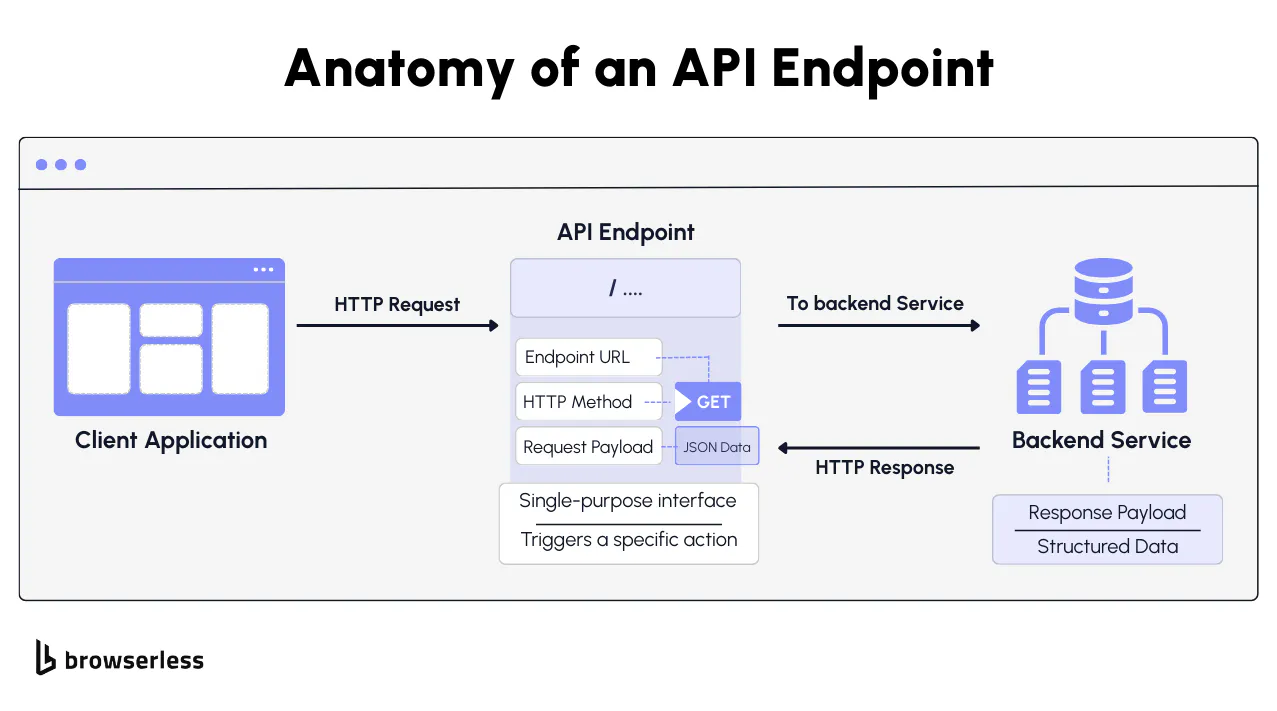
What an API endpoint is (URL, method, request, response)
An API endpoint is simply a URL that represents a specific action you can trigger over HTTP. In Browserless, that action might be /screenshot, /pdf, or /content. You send a POST request to the endpoint, include a JSON body that describes the task, such as the target URL or output options, and receive a structured response. That response might be JSON, raw binary data, or a base64-encoded payload, depending on the endpoint's output.
What's powerful here is how cleanly each endpoint maps to one discrete browser operation. When you call /screenshot, Browserless handles browser launch, page navigation, rendering, output generation, and teardown inside a single request cycle.
You're not opening a browser, waiting for events, or cleaning up resources yourself. Your application code stays focused on the rendered output while the infrastructure concerns stay behind the endpoint.
REST API endpoints vs SDKs and client libraries
Browserless REST endpoints only require an HTTP request. That means you can call them from Node, Python, Go, a serverless function, a CI pipeline, or a workflow automation tool without installing a browser automation SDK.
If your environment can send a POST request, it can use Browserless. This keeps integration lightweight and predictable, especially in distributed systems or event-driven architectures.
In contrast, SDK-based approaches like Puppeteer or Playwright give you full browser control, but you're responsible for session lifecycle, concurrency, error handling, and infrastructure management if you self-host. That flexibility is useful for complex workflows but also increases the operational surface area. For teams that want SDK-level control without the infrastructure overhead, Browserless offers BaaS.
Browserless REST endpoints let you treat common browser actions as single HTTP calls, which means no SDK installation, no browser orchestration layer, and no runtime dependencies beyond an HTTP client.
How API endpoints work in REST APIs
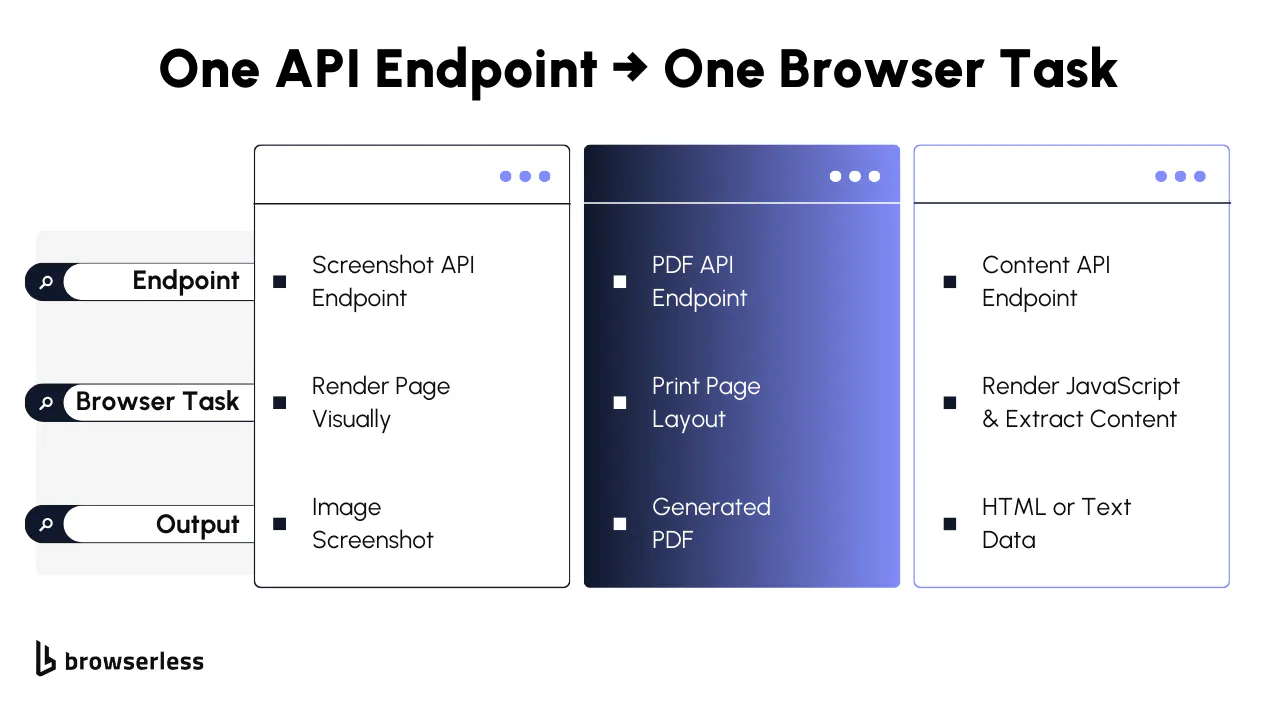
Stateless REST API endpoints in Browserless
In REST architecture, endpoints are stateless, meaning the server does not retain client session state between requests. Each call contains all the information required to execute the task.
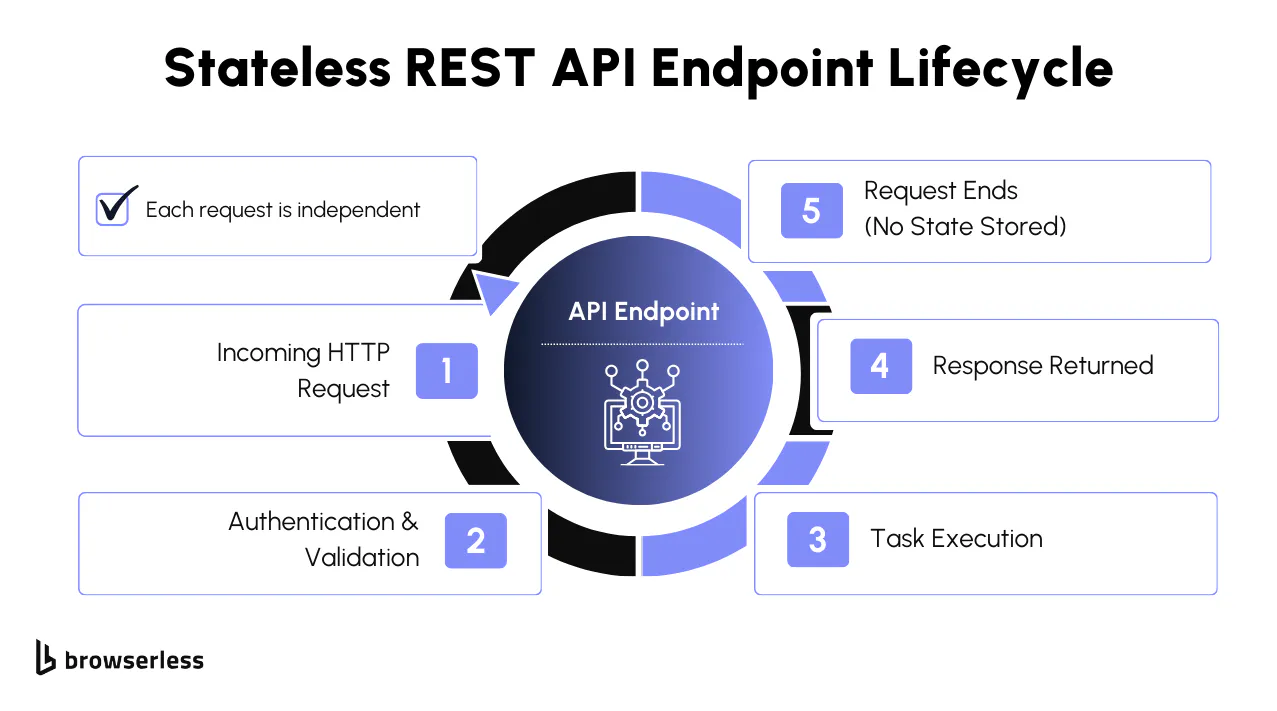
Browserless applies this model directly to browser automation. When you call a REST endpoint such as /screenshot, /pdf, or /content, the platform spins up an isolated Chromium instance per request and discards it when the response is sent.
For example, a request to generate a screenshot happens inside a single HTTP request cycle, with no setup or teardown visible to the caller. No cookies, execution context, or memory state persist beyond the request boundary.
This isolation produces deterministic behavior, supports horizontal scaling because requests are independent, and prevents session leakage that can introduce subtle bugs in stateful browser systems.
Authentication and API tokens in Browserless endpoints
Browserless REST endpoints authenticate using API tokens passed as query parameters. The token authorizes the request and associates usage with your account for rate limiting and resource tracking.
A content extraction request follows the same pattern:
curl --request POST \
  --url "https://production-sfo.browserless.io/content?token=YOUR_API_TOKEN_HERE" \
  --header "Content-Type: application/json" \
  --data '{
    "url": "https://example.com/"
  }'
This token-based model works well in automation-heavy environments because it avoids session negotiation and interactive authentication flows. In CI/CD pipelines, serverless functions, scheduled jobs, or workflow engines, the token can be injected through environment variables at runtime.
Browserless enforces rate limits and controls resource allocation at the infrastructure layer, so token-authenticated requests remain predictable under concurrency without requiring client-side throttling logic.
API endpoint examples from browser automation
Scraping and content extraction endpoints
Browserless provides endpoints such as /content and /scrape for data extraction and rendering. These endpoints accept a target URL, load the page in a real Chromium browser, execute client-side JavaScript, and return either fully rendered HTML or structured extracted content.
Because the page is processed in an actual browser environment, dynamic content, client-side routing, and JavaScript-generated DOM changes are included in the response, something raw HTTP clients cannot reliably capture.
Common use cases include:
- SEO monitoring - Retrieve fully rendered HTML to audit meta tags, structured data, canonical links, and client-side content variations.
- Market intelligence - Extract dynamically loaded pricing, availability, or product data that only appears after JavaScript execution.
- Data pipelines - Feed rendered content into ETL systems where static HTTP responses would miss critical client-side output.
This makes Browserless endpoints a direct replacement for fragile HTTP-based scraping setups that break when sites add client-side rendering or lazy loading.
Screenshot endpoint
The /screenshot endpoint renders the page visually in a real browser and returns either a binary image or a base64-encoded payload suitable for storage or transport across services.
curl -X POST \
  "https://production-sfo.browserless.io/screenshot?token=YOUR_API_TOKEN_HERE" \
  -H 'Cache-Control: no-cache' \
  -H 'Content-Type: application/json' \
  -d '{
  "url": "https://example.com/",
  "options": {
    "fullPage": true,
    "type": "png"
  }
}' \
  --output "screenshot.png"
This endpoint is commonly used for:
- Visual regression testing
- UI monitoring
- Snapshotting third-party pages for auditing
Like all Browserless REST endpoints, the browser session exists only for the duration of the request.
PDF endpoint
The /pdf endpoint uses the browser's native rendering engine to generate a PDF that preserves layout, fonts, styles, and print media rules.
curl -X POST \
  "https://production-sfo.browserless.io/pdf?token=YOUR_API_TOKEN_HERE" \
  -H 'Cache-Control: no-cache' \
  -H 'Content-Type: application/json' \
  -d '{
  "url": "https://example.com/",
  "options": {
    "displayHeaderFooter": true,
    "printBackground": false,
    "format": "A4"
  }
}'
This endpoint is commonly used for:
- Compliance archiving
- Automated reporting
- Generating printable artifacts from web applications
Because rendering occurs in a full browser environment, output fidelity matches what a user would see when printing the page. Browserless handles print-specific rendering concerns like header/footer injection and background graphics. Note that the /pdf endpoint generates paginated output by default; for single-page full-length PDFs, use the /function API with custom page dimensions.
Unblock endpoint
Some sites don't want to be scraped; they run Cloudflare, Turnstile, or custom bot-detection systems that block your requests before the page even loads. The /unblock endpoint handles that for you. It applies anti-detection techniques automatically and returns the rendered content once it gets through.
You choose what comes back: HTML content, cookies, a screenshot, or a browserWSEndpoint if you want to hand the session off to Puppeteer or Playwright for further automation.
Here's a request that pulls content and cookies from a protected review page:
curl -X POST \
  "https://production-sfo.browserless.io/unblock?token=YOUR_API_TOKEN_HERE&proxy=residential&proxyCountry=us" \
  -H "Content-Type: application/json" \
  -d '{
  "url": "https://www.g2.com/products/browserless/reviews",
  "content": true,
  "cookies": true,
  "screenshot": false,
  "browserWSEndpoint": false
}'
Set the fields you need to true, everything else to false. You get back fully rendered HTML and the session cookies, which you can reuse in direct HTTP requests to the target site without going through detection again. For continued browser automation, set browserWSEndpoint to true to keep the session alive and connect with Puppeteer or Playwright. You can pair it with residential proxies for the best hit rate on heavily protected sites.
Function endpoint
Unlike other endpoints that are task-specific, the /function endpoint works differently; You send your own code, and Browserless runs it inside a cloud browser with full Puppeteer access.
Think of it as a serverless function that happens to have a real browser attached. You get a page object, do whatever you want with it, and return the result. Note that /function expects application/javascript or application/json as the content type and uses export default async for the function signature.
Here's a request that navigates to a bookstore, scrapes every product listing on the page, and returns structured JSON:
curl -X POST \
  "https://production-sfo.browserless.io/function?token=YOUR_API_TOKEN_HERE" \
  -H "Content-Type: application/javascript" \
  -d 'export default async ({ page }) => { await page.goto("https://books.toscrape.com", { waitUntil: "networkidle2" }); const books = await page.$$eval("article.product_pod", cards => cards.map(card => ({ title: card.querySelector("h3 a").getAttribute("title"), price: card.querySelector(".price_color").textContent.trim(), inStock: card.querySelector(".availability").textContent.includes("In stock") }))); return { data: { books }, type: "application/json" }; }'
The function navigates to the target, waits for the network to stabilize, queries the DOM for each product card, and extracts the title, price, and stock status from each card. The result comes back as a JSON array. Fresh browser instance, full page API, no infrastructure on your end.
Use /function when the single-purpose endpoints don't cover your workflow. Multi-step navigation, form submissions, conditional logic, and data transformation that needs to happen inside the browser before anything comes back. If you can write it in Puppeteer, you can run it through /function without managing the browser yourself.
Browserless also exposes /download to trigger file downloads, /export to fetch and stream files in their native format, and /performance to run Lighthouse audits. Same stateless pattern, same single request flow. To see these API endpoints in action, visit our API Playground.
How Browserless designs API endpoints for reliability
Task-specific endpoints instead of generic browser control
Browserless REST APIs are purpose-built and optimized around specific browser outcomes such as screenshots, PDFs, and rendered content extraction. Each endpoint focuses on a single task, reducing configuration errors, speeding up execution, and lowering the amount of browser lifecycle logic you need to manage.
Instead of exposing low-level browser control where you handle navigation timing, teardown, and error states yourself, Browserless packages those concerns into outcome-driven APIs. Generic browser-control models offer greater flexibility but also increase operational complexity and the number of failure points you must account for.
Stateless execution with automatic cleanup
Each REST API request launches an isolated Chromium instance, executes the task, and tears down the browser when the response is sent. Nothing carries over between requests - no cookies, no execution context, no accumulated memory. This eliminates common reliability issues that come with persistent browser infrastructure: leaked sessions that consume resources in the background, memory buildup from long-running instances that degrade performance over time, and state contamination where leftover cookies or cached data from one task interfere with the next. Every request starts from a clean environment and ends with a full teardown, so you don't need to build browser pool management, garbage collection, or session reset logic into your application.
When to use Browserless REST API endpoints vs other browser APIs
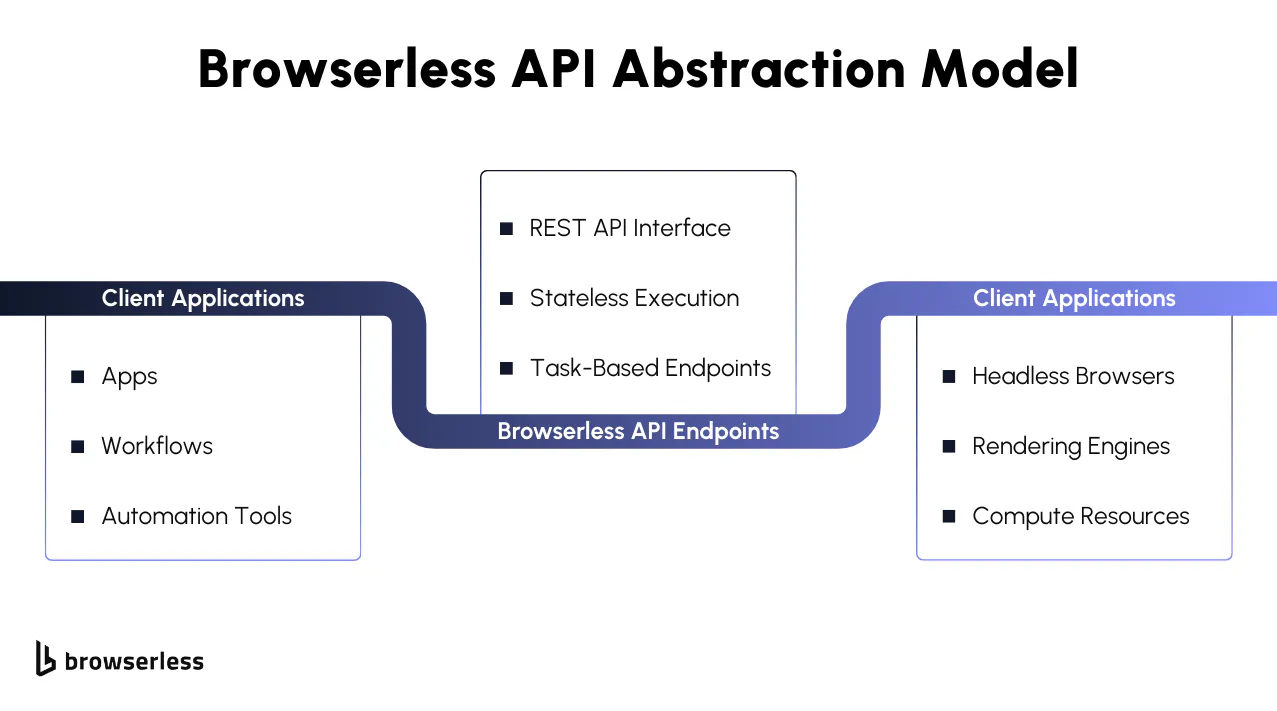
When REST API endpoints are the best choice
Browserless REST API endpoints are well-suited for simple automation, high reliability, and minimal ongoing maintenance. If the task can be expressed as "load this page and return an artifact," a single-purpose endpoint is often the cleanest solution.
They are especially well-suited for microservices, scheduled jobs, workflow automation platforms, and AI agent tools where stateless execution and predictable outputs matter more than granular browser control.
REST APIs vs BrowserQL vs BaaS
REST API endpoints are designed for single-purpose browser tasks with minimal setup. You send a single request and receive a final result, without managing sessions or browser state. However, REST endpoints have limited bot detection bypass. The /unblock endpoint handles basic protections, but sites with advanced fingerprinting or interactive CAPTCHAs need BrowserQL for stealth automation.
BrowserQL is a stealth-first automation tool with advanced bot-detection bypass and automatic CAPTCHA solving. It also supports multi-step workflows through declarative GraphQL mutations, making it the right choice when you need both evasion and complex browser interactions.
Browsers-as-a-Service (BaaS) is the right fit when you need full Puppeteer or Playwright control, want to run existing scripts with custom logic, or require persistent browser sessions. The choice depends on how much control you need and whether your use case requires stealth, statefulness, or simple task execution.
Conclusion
API endpoints are what make automation scalable: one request in, one predictable result out. Browserless takes the complexity of running a real browser and turns it into stateless, task-focused REST API endpoints that handle rendering, execution, and cleanup behind the scenes. Instead of maintaining browser infrastructure, you work with clear, outcome-driven APIs designed for reliability and consistency under load. If you're building scraping services, reporting systems, AI agents, or automation pipelines, the fastest way to understand the difference is to try it yourself. Explore the Browserless REST API documentation, review the available endpoints, and sign up for a trial to run your first request in minutes. Browserless is built as an API-first browser automation platform so you can focus on results, not browser management.
FAQs
What is an API endpoint?
An API endpoint is a specific HTTP-accessible URL that accepts a request, performs a defined action, and returns a structured response. In browser automation platforms like Browserless, each endpoint maps to a discrete browser task such as generating a screenshot or extracting rendered content.
How do REST API endpoints work in browser automation?
REST API endpoints receive a request with a target URL and task configuration, launch a browser instance, execute the action, return the result, and terminate the session. This stateless execution model makes scaling and integration easier in distributed systems.
Why use Browserless REST APIs instead of Puppeteer or Playwright directly?
Browserless REST APIs remove the need to manage browser lifecycle, concurrency, and infrastructure. They are well-suited for simple, high-reliability tasks where full browser control is not required.
Can Browserless handle JavaScript-heavy websites?
Yes. Browserless runs a real Chromium browser for each request, which executes client-side JavaScript, renders dynamic content, and processes asynchronous resource loading before returning results.
When should I use REST endpoints vs BrowserQL or BaaS?
Use REST endpoints for single-purpose browser tasks with minimal setup. Choose BrowserQL for stealth automation, CAPTCHA solving, and multi-step workflows. Use Browsers-as-a-Service (BaaS) when you need full Playwright or Puppeteer control or want to run existing automation scripts.