
TL;DR
- Playwright Cloudflare bypass. Use Playwright with stealth plugins, rotating proxies, and persistent sessions to clear Cloudflare's fingerprinting, JavaScript challenges, and Turnstile CAPTCHAs without getting blocked on the first request.
- Why it's tricky. Cloudflare layers TLS fingerprinting, IP reputation, behavioral analysis, and invisible challenges on top of CAPTCHAs, so a default headless browser almost always trips at least one detector.
- The escalation path. When local Playwright stalls out, BrowserQL's
solvemutation handles Cloudflare, reCAPTCHA, Turnstile, and DataDome through a single managed API call. - The realistic goal. No bypass holds forever. Cloudflare ships new detection signals on its own schedule, so the goal isn't to disappear — it's to look enough like a real user that your scraper stays under the threshold.
Introduction
Cloudflare is a leading web protection service, widely used to block bots and scrapers through sophisticated browser bot detection, JavaScript challenges, and CAPTCHAs. These defenses block most traditional scrapers before they retrieve any content. Playwright drives real Chromium, Firefox, and WebKit instances, so you can emulate genuine users far more convincingly and clear most of Cloudflare's layers. In this guide, you'll build a resilient scraping setup using Playwright, stealth plugins, residential proxies, and human-like behavior to access data from Cloudflare-protected websites. You'll also see where Browserless's managed stealth and BrowserQL pick up when a hand-rolled Playwright setup runs out of road.
How Cloudflare detects and blocks Playwright scrapers
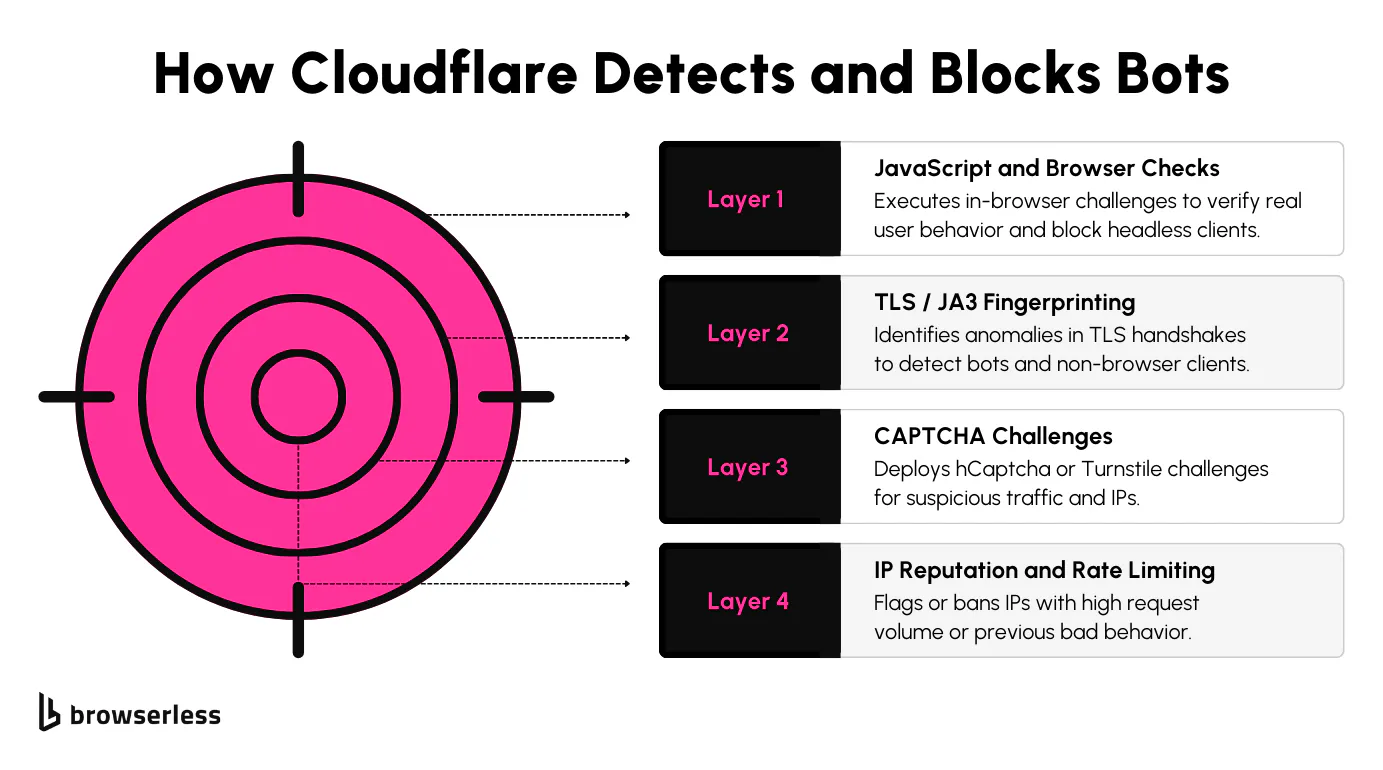
Cloudflare uses a layered anti-bot protection system to detect and block scrapers. Most of these defenses stay out of the way for regular users, but they're tuned to catch any sign of automation. To get around them, it's not enough to use a headless browser; you need to understand how these systems work and what they're looking for.
The first layer involves JavaScript challenges and browser checks. When a page loads, Cloudflare runs scripts that look for expected browser behaviors, such as how the browser renders content, how quickly it executes JS, and whether specific properties exist in the window.navigator. Tools like Playwright can run JavaScript, but using it in a default configuration often leaves signs that a real user isn't present. That's usually enough to trigger a block.
Then there's TLS and JA3 fingerprinting. Every browser has a specific way it initiates secure connections, and Cloudflare captures that fingerprint during the TLS handshake. Scrapers that use different TLS configurations, especially those that don't match popular browsers, stand out. Even if the script looks like it's coming from Chrome, the TLS fingerprint might say otherwise.
CAPTCHAs are another defense mechanism. Cloudflare uses them well beyond login forms. Cloudflare can serve Cloudflare Turnstile challenges whenever it detects something suspicious, like repeated access from the same IP, strange headers, or automation signatures. These challenges can stop your scraper completely unless you detect and solve them dynamically.
Cloudflare also looks at IP reputation and request patterns, and your IP might get flagged if it is part of a known proxy pool or has made too many requests in a short window. Even a small spike in traffic across multiple requests can result in throttling or temporary bans on certain IP addresses. Changing IPs through proxy rotation, managing session cookies, and pacing your requests are all necessary if you want to keep access to web pages over time.
To overcome these defenses, your scraper needs to behave like a real browser and a real user. That means mimicking everything from connection-level details to UI behavior, including mouse movements and random delays, without cutting corners.
Setting up Playwright with stealth plugins for Cloudflare bypass
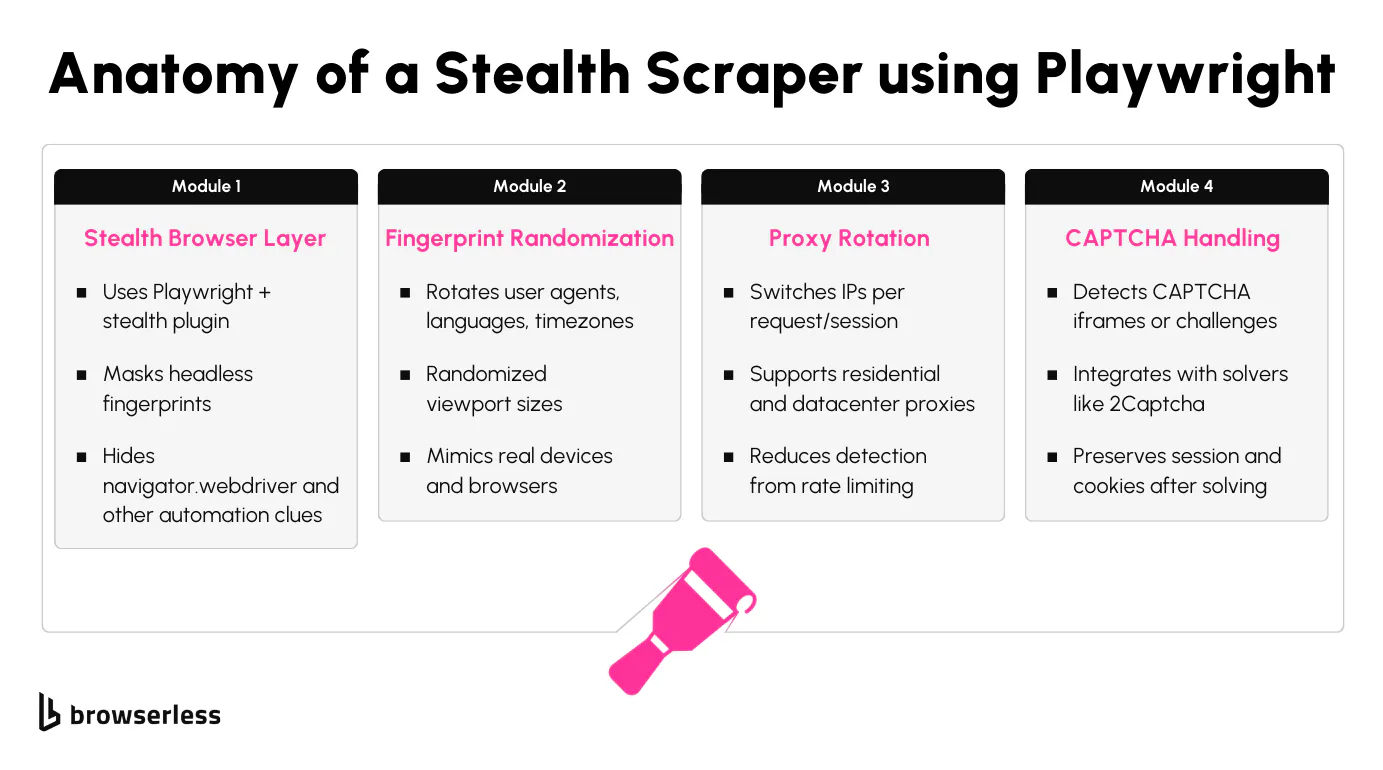
Playwright gives you direct access to real browser instances: Chromium, Firefox, and WebKit. All of them support full JavaScript execution and page rendering.
But to get past Cloudflare reliably, a standard browser session isn't enough. You'll need to take extra steps to hide signs of automation.
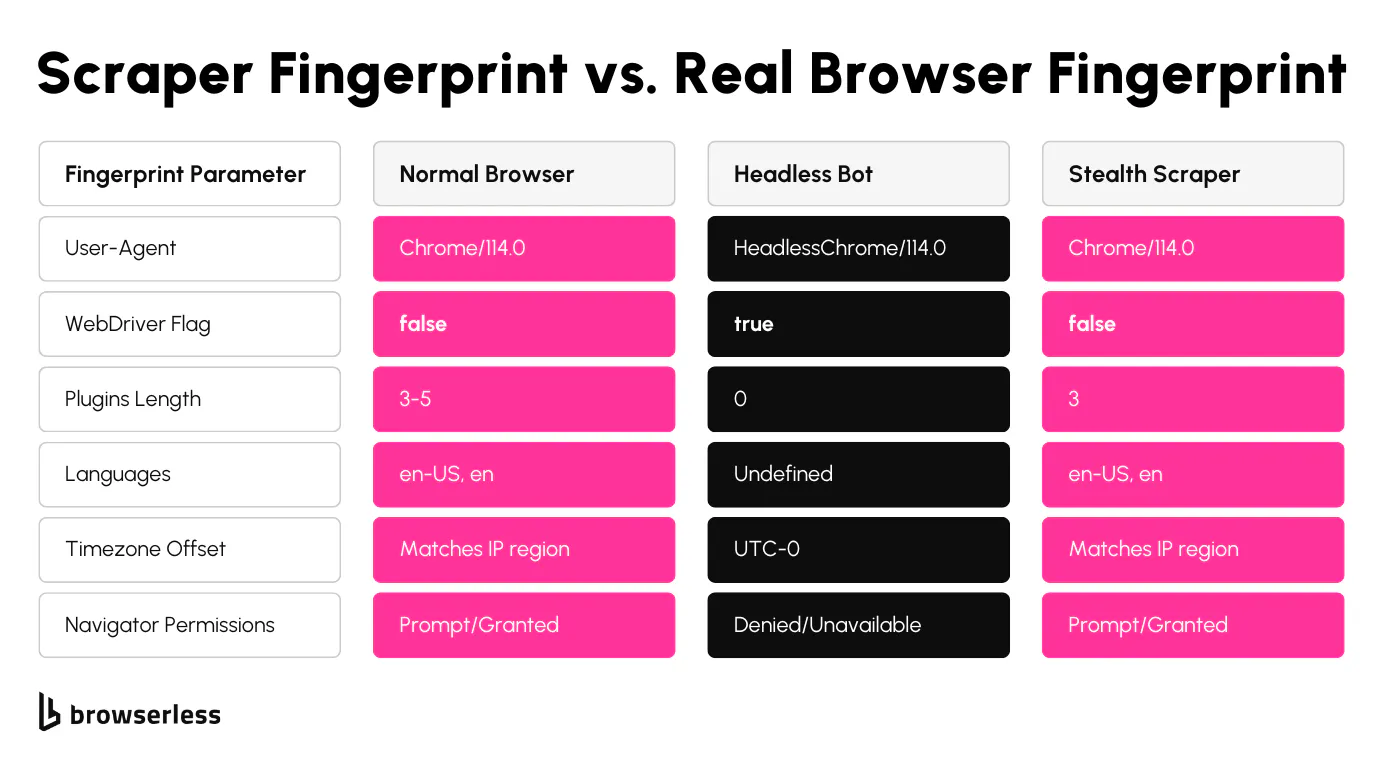
That's where playwright-extra and stealth plugins help. These tools modify browser characteristics that Cloudflare often checks, such as navigator.webdriver, missing WebGL features, or the presence of headless-specific headers. They can also spoof plugins, language headers, and other identifiers that betray automation.
To get started, install the required packages in your Node.js project:
npm install playwright-extra puppeteer-extra-plugin-stealth
Then, create a custom Playwright instance that uses the stealth plugin:
// Playwright-extra allows plugin support — needed for stealth
const { chromium } = require("playwright-extra");

// This plugin masks common headless browser fingerprints (like navigator.webdriver, plugins, WebGL quirks)
const stealth = require("puppeteer-extra-plugin-stealth")();

// Important: this step must happen BEFORE launching the browser
chromium.use(stealth); // Without this, Cloudflare will likely detect automation and serve a challenge
Once that's set up, you can randomize elements of your browser fingerprint. Viewport dimensions, user-agent strings, language headers, and timezone values all contribute to whether the session looks human or automated. These small details matter because Cloudflare's detection looks at inconsistencies across multiple signals, and different versions of Chrome leave subtly different traces.
const browser = await chromium.launch({ headless: false }); // Headed mode reduces detection; avoid headless=true if possible

const context = await browser.newContext({
  // Real users don't have consistent viewports — this helps avoid fingerprint mismatches
  viewport: {
    width: 1280 + Math.floor(Math.random() * 100), // Randomize a bit
    height: 720 + Math.floor(Math.random() * 100),
  },
  userAgent:
    "Mozilla/5.0 (Windows NT 10.0; Win64; x64) AppleWebKit/537.36 (KHTML, like Gecko) Chrome/148.0.0.0 Safari/537.36", // Use a real user-agent, ideally from your proxy location
  locale: "en-US", // Match browser locale to IP region
  timezoneId: "America/New_York", // Timezone mismatches are a red flag in Cloudflare fingerprinting
});
Sessions should be persistent; reusing cookies and local storage data across requests helps make your scraper less suspicious. You can save and load the browser context from disk instead of starting from a clean slate every time.
const userDataDir = "./session-profile"; // This folder stores cookies, localStorage, etc.

const browser = await chromium.launchPersistentContext(userDataDir, {
  headless: false, // Again, headed = more human-like
  args: ["--start-maximized"], // Optional, but full-screen windows mimic real usage
});

// Use this approach if the site expects you to "stay logged in" or keep a shopping cart session
// Note: Too many local sessions can get messy, rotate or clean up as needed
With this setup, your Playwright sessions behave more like real browser activity and less like automation. That gives your sessions a much better shot at clearing Cloudflare on the first attempt instead of being blocked immediately.
Rotating proxies and handling CAPTCHA challenges
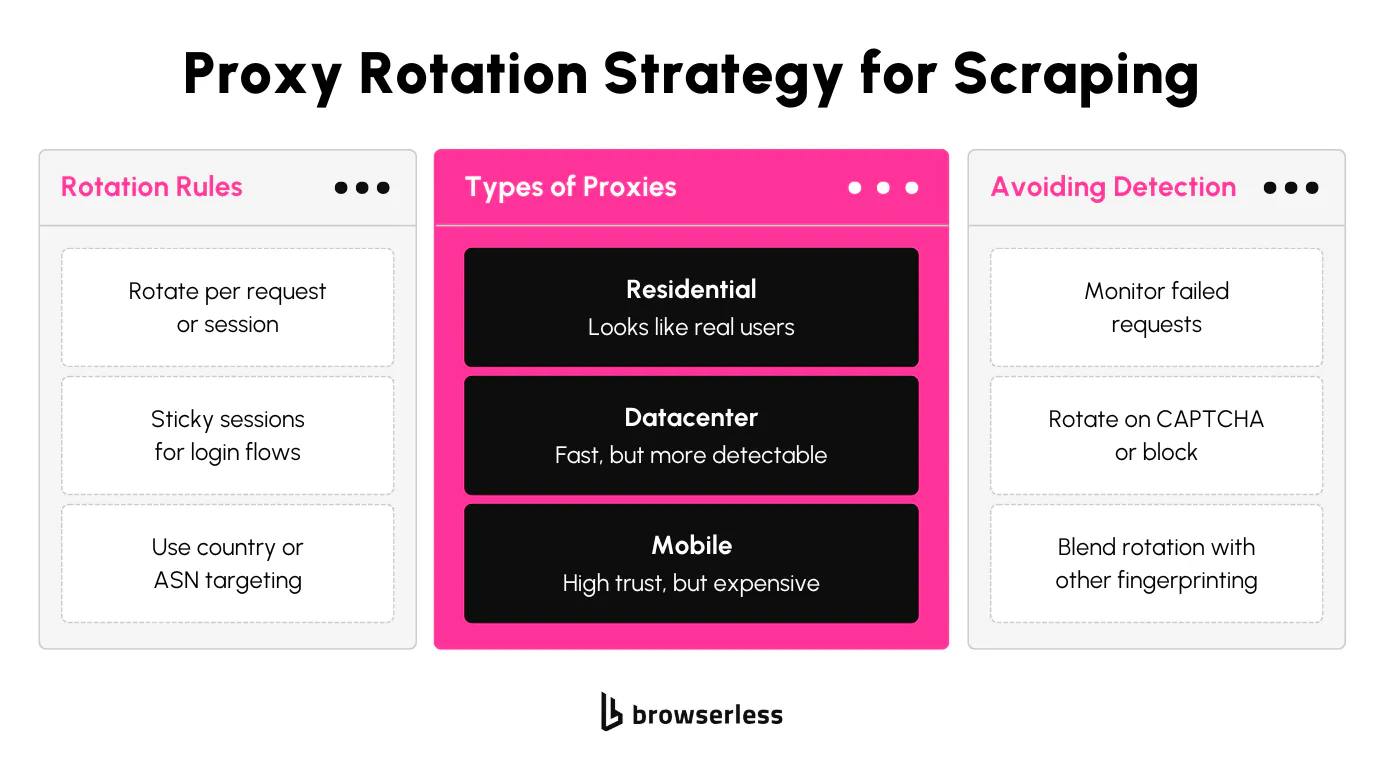
Cloudflare watches traffic patterns across IP addresses. If an IP sends too many requests, triggers multiple challenges, or matches known bad behavior, it can be throttled or blocked entirely.
To reduce the chances of that happening, you can rotate through residential proxies or datacenter proxies using the --proxy-server flag in Playwright. This gives each session a different IP, which helps distribute your request volume and avoid detection. Avoid sending too many requests from the same IP back-to-back, even with stealth in place.
Here's how to launch a Playwright browser with a proxy:
const browser = await chromium.launch({
  headless: false,
  args: [
    // Always use authenticated proxies, preferably residential/mobile
    "--proxy-server=http://username:password@proxy-ip:port", // Format: scheme://user:pass@host:port
  ],
});

const page = await browser.newPage(); // Proxy is applied to this page and all further requests

// Caveat: Avoid using the same proxy too frequently, or you'll get rate-limited or banned
If you're rotating through a pool, keep a const proxies array in your script and pick one at random per session. That pattern works well for spreading load and recovering from burned IPs. Always use authenticated proxies; shared, unauthenticated pools tend to share the same IP across many users and burn out fast.
Cloudflare might still challenge the request with a CAPTCHA even with a fresh IP. When that happens, your scraper must detect and solve it or skip the page. One way to do that is by checking for an iframe that loads a CAPTCHA, like this:
// Check if Cloudflare is presenting a CAPTCHA challenge
const isCaptchaPresent = await page.$('iframe[src*="captcha"]');

if (isCaptchaPresent) {
  console.log("CAPTCHA detected – will need to solve or switch proxy");
}

// Important: Cloudflare can serve invisible challenges too, always monitor response timing and errors, not just DOM
For sites using reCAPTCHA, third-party services like 2Captcha or CapMonster can solve challenges programmatically. These services take a sitekey and page URL, return a token, and then you inject that token into the form. Some tools (like @extra/recaptcha) simplify this by automating the full solve step:
const RecaptchaPlugin = require("@extra/recaptcha");

// Register plugin to handle reCAPTCHA solving via 2Captcha
chromium.use(
  RecaptchaPlugin({
    provider: {
      id: "2captcha",
      token: "YOUR_2CAPTCHA_API_KEY", // Note: This burns credits every time; don't solve CAPTCHAs unnecessarily
    },
    visualFeedback: true, // Shows animations like checkbox checking (great for debugging)
  }),
);

// This solves any visible captchas on the current page — usually required on Cloudflare-protected forms
await page.solveRecaptchas();

// Caveat: If CAPTCHA fails, you'll need to rotate proxies or log the error
Once the CAPTCHA is handled or skipped, you can proceed with your scrape as normal. To prevent the CAPTCHA from appearing again on the next visit, save cookies and session storage data after a successful scrape. This creates continuity between visits and helps the session look more human — a small but important piece of session management.
// After a successful login or scrape, save the cookies
const fs = require("fs");
const cookies = await context.cookies();
fs.writeFileSync("./cookies.json", JSON.stringify(cookies, null, 2)); // Save to disk

// On future runs, restore session to avoid challenges/login
const savedCookies = JSON.parse(fs.readFileSync("./cookies.json"));
await context.addCookies(savedCookies);

// This makes your scraper look like a returning user, which is a huge advantage on Cloudflare or login-gated sites.
Rotating proxies, solving CAPTCHAs, and maintaining session state work together to help you get through Cloudflare's layers without interruption. Scrapers that skip these steps usually don't last more than a few requests. Adding random delays between actions and simulating realistic mouse movements also helps your traffic blend in with real users.
Building a full Playwright Cloudflare scraping flow
Once you've configured stealth mode and rotated proxies, you can move on to an actual scraping flow. This part combines everything: proxy setup, fingerprint masking, challenge detection, and data extraction. You're after real content from Cloudflare-protected sites, not a smoke test of whether the page loads, and you need to clear Cloudflare without getting flagged mid-session.
To start, launch Playwright with your proxy configured. Ensure it's a working residential or datacenter proxy with low block rates. Then, set a real user-agent string to replace the default one, which is often tied to automation.
// Launch the browser with a proxy assigned
const browser = await chromium.launch({
  headless: false, // Run in full (headed) mode — helps bypass basic bot checks
  args: [
    `--proxy-server=${proxy}`, // Proxy format: http://username:password@ip:port
  ],
});

// Create a fresh context (new browser profile, isolated cookies, etc.)
// Set a realistic User-Agent at context creation — page.setUserAgent() is a Puppeteer API, not Playwright
const context = await browser.newContext({
  userAgent:
    "Mozilla/5.0 (Windows NT 10.0; Win64; x64) AppleWebKit/537.36 (KHTML, like Gecko) Chrome/148.0.0.0 Safari/537.36",
});
const page = await context.newPage();

// Caveats:
// - Avoid reusing the same proxy & UA combo too often
// - Cloudflare may still fingerprint you on TLS/JA3 signature — rotating IP alone won't always help
Once the browser is ready, load the target page for Cloudflare-protected sites. It's better to wait a few extra seconds to let JavaScript challenges pass quietly in the background. These challenges don't always show visual feedback, so timing can matter.
await page.goto("https://target-cloudflare-site.com", {
  waitUntil: "domcontentloaded",
});
await page.waitForTimeout(5000); // gives Cloudflare a chance to finish background checks
Check if a CAPTCHA exists; you can detect this by searching for known patterns in iframes or specific HTML containers. If it's present, you can call your CAPTCHA handler, retry with a different proxy, or mark the proxy as burned.
// Attempt to detect if CAPTCHA is present before scraping
const captchaPresent = await page.$('iframe[src*="captcha"]');

if (captchaPresent) {
  console.log("CAPTCHA detected");
  // Either solve, switch to another proxy, or delay the request
  // Pro tip: mark this proxy as "burned" in a proxy pool so you don't reuse it too soon
} else {
  const content = await page.evaluate(() => document.body.innerText); // Grab visible content
  const title = await page.title(); // Capture the page title for logging
  console.log("Scraped content from", title, ":", content);
}
Once the content is accessible, store session cookies and scrape the needed data. You've cleared the challenge and landed on the real page. From here, your scraper can move forward confidently, pull the data, close the session cleanly, or continue cycling through the next URL with a new proxy.
This pattern works well for batches of URLs, especially if you're tracking proxy performance and retrying only the ones that hit a CAPTCHA or fail the JS checks. If you wrap the flow in a Playwright test, you can run Playwright tests across a list of targets and get structured pass/fail output for every URL. It's repeatable and flexible without relying on third-party scraping tools.
Running Playwright on managed infrastructure
There's another path worth knowing about when local infrastructure stops keeping up: delegate browser execution to a managed service. Instead of spinning up Chromium on your own machine, you connect Playwright to a hosted browser fleet and control it through the standard Playwright API. The advantages are immediate — no more juggling browser processes, no more headless mode quirks on CI runners, no more maintaining the stealth stack yourself.
A minimal Playwright connection to Browserless looks like this:
const { chromium } = require("playwright-core");

const browser = await chromium.connectOverCDP(
  "wss://production-sfo.browserless.io?token=YOUR_TOKEN",
);
const context =
  browser.contexts()[0] ||
  (await browser.newContext({
    userAgent:
      "Mozilla/5.0 (Windows NT 10.0; Win64; x64) AppleWebKit/537.36 (KHTML, like Gecko) Chrome/148.0.0.0 Safari/537.36",
  }));
const page = await context.newPage();
await page.goto("https://target-cloudflare-site.com"); // replace with your actual target
const title = await page.title();
await browser.close();
That's the whole connection. Everything downstream — await page, await context, await browser, network interception, screenshots, PDF export — works exactly the same as a local Playwright build. There's broader parity here than with most alternatives because Browserless runs real Chromium instances under the hood, not a stripped-down compatibility layer, so most of the following capabilities are fully supported on day one.
Running Playwright tests against Browserless
The Playwright Test runner works the same way. Point connectOptions at the Browserless Playwright-native endpoint and your existing test suite runs against the hosted browser instead of a local one. Assertions like await expect(page).toHaveTitle(...) behave identically.
// playwright.config.js
export default {
  use: {
    connectOptions: {
      wsEndpoint:
        "wss://production-sfo.browserless.io/chromium/playwright?token=YOUR_TOKEN",
    },
  },
};
From there, you can run Playwright tests across hundreds of URLs in parallel without your CI runner choking on browser processes. The browser context resets between tests, so flaky-state issues that plague long-running local Playwright tests disappear.
Stealth and proxies through the connection URL
The bigger win is what Browserless adds on top of vanilla Playwright. Stealth plugins, residential proxies, and CAPTCHA solving are all built in — no extra npm packages, no juggling const proxies arrays between runs, no separate 2Captcha account. You enable each by changing the connection URL.
// Stealth route + residential proxy + automatic CAPTCHA solving
const browser = await chromium.connectOverCDP(
  "wss://production-sfo.browserless.io/stealth?token=YOUR_TOKEN" +
    "&proxy=residential&solveCaptchas=true",
);
The managed /stealth route bundles the patches that puppeteer-extra-plugin-stealth applies, plus several that aren't easy to ship on your own. The residential proxy pool gives you authenticated proxies with healthy IP reputation, with proxy rotation handled automatically. And solveCaptchas=true handles common challenges — including Cloudflare Turnstile, reCAPTCHA, and DataDome — without you wiring up a solver. Most automation signatures that trip a default Playwright session are already patched server-side.
Playwright MCP for AI agents
Browserless also works as the browser backend for Playwright MCP, so an AI agent or LLM can drive a managed browser through the Model Context Protocol. Point Microsoft's @playwright/mcp at your Browserless CDP endpoint and the agent gets the same Playwright API you'd use yourself — navigation, selectors, page screenshots — but the browser run happens in Browserless's cloud, with stealth and proxies on by default.
This is the cleanest path when local Playwright tests start hitting their ceiling — you keep the same API surface, but the Cloudflare-protected sites you couldn't reach from your laptop start working from the managed fleet.
Using BrowserQL to handle stubborn Cloudflare pages
Sometimes, even a well-configured Playwright setup doesn't cut through Cloudflare. You've got stealth, proxies, and CAPTCHA solvers all wired up, but the site still detects automation and either blocks access or keeps you stuck in a challenge loop.
When that happens consistently, offloading the scraping to a Browsers as a Service (BaaS) like Browserless — specifically using BrowserQL (BQL) — is often the most reliable path forward.
Cloudflare CAPTCHAs are one of the biggest pain points in browser automation, especially when Cloudflare serves them in iframes, shadow DOMs, or in response to unusual behavior.
With Playwright, you'd usually need to detect the CAPTCHA manually, integrate with a solver like 2Captcha, inject tokens, and cross your fingers.
Browserless folds all of that into a single built-in mutation. solve detects whatever challenge is on the page and handles it — Cloudflare interstitials, Turnstile, reCAPTCHA, DataDome, and several others — so you don't need a separate code path per challenge type. You can pass an explicit type (cloudflare, recaptcha, datadome, and others) or omit it to let BrowserQL auto-detect.
Example 1: Bypass Cloudflare's "human check"
mutation BypassCloudflare {
  goto(url: "https://protected.domain") {
    status
  }

  solve(type: cloudflare) {
    found # true if a challenge was detected
    solved # true if it was auto-handled
    time # how long it took in ms
  }
}
This handles the common Cloudflare interstitials that just want a human presence on the other end. If found returns true, BrowserQL has already clicked through the challenge for you.
Example 2: Solve reCAPTCHA and other challenges automatically
mutation SolveCaptcha {
  goto(url: "https://protected.domain") {
    status
  }

  # Omit `type` to let BrowserQL auto-detect the challenge,
  # or pass an explicit type like `recaptcha`, `turnstile`, or `datadome`.
  solve {
    found
    solved
    time
  }
}
BrowserQL detects the CAPTCHA, finds the form, solves it, and returns structured feedback without installing third-party solvers or APIs.
When Playwright alone stalls out, these BrowserQL mutations replace the stealth-plus-solver scaffolding entirely.
Conclusion
Cloudflare makes scraping harder than ever, especially with new challenges like Cloudflare Turnstile, stronger fingerprinting, and aggressive rate-limiting. Playwright still gives you a powerful edge, especially when combined with stealth plugins, solid proxy hygiene, and session-aware automation. But it's worth leveling up if you're hitting limits with local scripts or dealing with constant maintenance to keep things working. Browserless with BrowserQL is built for these kinds of scraping jobs. It runs the stealth stack and the underlying infrastructure for you, so your time goes into the scrape logic instead of the plumbing. Sign up for a free Browserless account to use BrowserQL and spend less time wrestling CAPTCHAs and more time shipping the scrapers you actually need.
FAQs
Can Playwright bypass Cloudflare Turnstile in 2026?
Yes, Playwright can sometimes bypass Cloudflare Turnstile, but it's not something that works out of the box. These increasingly sophisticated challenges require more than running a headless browser in headless mode. You'll need to integrate third-party CAPTCHA-solving services like 2Captcha or CapMonster, detect the presence of CAPTCHAs on the page using selectors (such as iframe containers for Turnstile), and solve them programmatically before continuing with scraping. Using playwright-extra with stealth plugins helps reduce the chances of being flagged before the challenge even appears. Pairing that with persistent browser sessions and cookies can help reduce how often CAPTCHAs are triggered across multiple requests.
Why does Cloudflare still block Playwright even with stealth mode enabled?
Playwright can still get blocked even with stealth mode enabled because Cloudflare looks far beyond simple browser signals. While stealth plugins help mask things like navigator.webdriver and common headless indicators, they don't cover deeper-level fingerprinting. Cloudflare analyzes TLS signatures (like JA3), HTTP/2 frame order, and browser consistency, for example, to determine whether your timezone, language, and IP region align. It raises suspicion if your proxy is in one country but your browser fingerprint says you're in another. Randomizing viewport, fonts, geolocation, and language headers is helpful, but sometimes it's not enough without matching all fingerprint layers.
What's the best proxy setup for scraping Cloudflare-protected websites with Playwright?
The most effective proxy setup for scraping Cloudflare-protected sites with Playwright involves using rotating residential or mobile proxies that support authentication. Datacenter proxies tend to get flagged quickly, especially if shared across users. For Playwright, proxies can be passed via the --proxy-server launch argument. It's also important to keep your browser profile consistent with the proxy — things like language headers, timezone, and user agent should all align with the IP's country and region. If your target site uses geo-based filtering or fingerprinting, matching these values can help reduce the chance of being challenged.
When should you switch from Playwright to Browserless or BrowserQL for Cloudflare scraping?
If you're running into repeated blocks, solving CAPTCHAs manually, or struggling to scale scraping across multiple pages or sessions, it's probably time to switch to Browserless or BrowserQL. These are cloud-native solutions designed for scraping at scale, with built-in support for stealth, proxy rotation, session management, and CAPTCHA solving. You don't have to manage browser instances or infrastructure manually. BrowserQL (BQL) simplifies scraping by letting you define scrape logic declaratively through an API. It's especially useful when scraping thousands of pages concurrently or maintaining stable, long-running scraping jobs without micromanaging every browser interaction.