Changelog

Product updates, API changes, and fixes shipped from the Browserless team.

Write BrowserQL in TypeScript or Python instead of GraphQL

Browser Automation Protocol (BAP) is our own SDK for driving a browser. You call ordinary methods like page.goto() and page.click() and get autocomplete and typed responses, so a wrong argument fails right where you wrote it. Underneath it speaks BrowserQL, our GraphQL API for declarative browser automation, so you get managed stealth, residential proxies, CAPTCHA solving, and live debugging URLs without writing a query by hand.

That also makes picking a connection method simpler. Bring the Puppeteer or Playwright script you already have, reach for BAP when you want the stealth engine behind a typed API, or skip libraries altogether and call the REST APIs for one-off jobs like a screenshot or a scrape.

The TypeScript package is out now. The Python package is landing shortly.

npm install @browserless.io/bap-ts

Read the BAP docs →

Now you can see exactly why a request failed

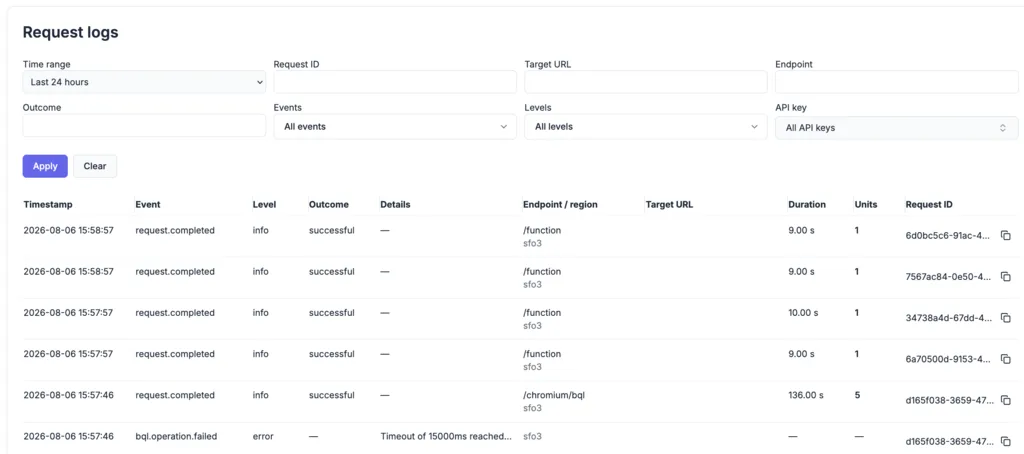
Request logs in the account dashboard, filtered by time range, endpoint, outcome, and API key

Request logs are live. Every request you send now shows up on your account page with the whole story: which endpoint handled it, where it ran, how long it took, and the error that killed it. Narrow the feed by time range, target URL, endpoint, outcome, level, or API key, including keys you have already revoked.

Every run shows its cost too, even the ones that died halfway. Hover the units column for the breakdown across browser time, proxy, captcha, and agent. When an API error comes back with an ID attached, like (requestId: f3a9c2d81b7e4a06), drop it into the Request ID filter to replay everything that request did before it gave up. Logs cover Cloud Unit and Dedicated plans, searchable back 8 hours on Free and up to 7 days on Scale and Dedicated.

Try it in your dashboard →

Live URLs are now available on every plan

You can create a Live URL on any plan now, including Free. Stream a running session to a real person, let them click through a login or a 2FA prompt, and take control back in the script once they are done. Free sessions also went from one minute to two, which is the room a human actually needs.

Read the Hybrid Automation guide →

Control your overage spend

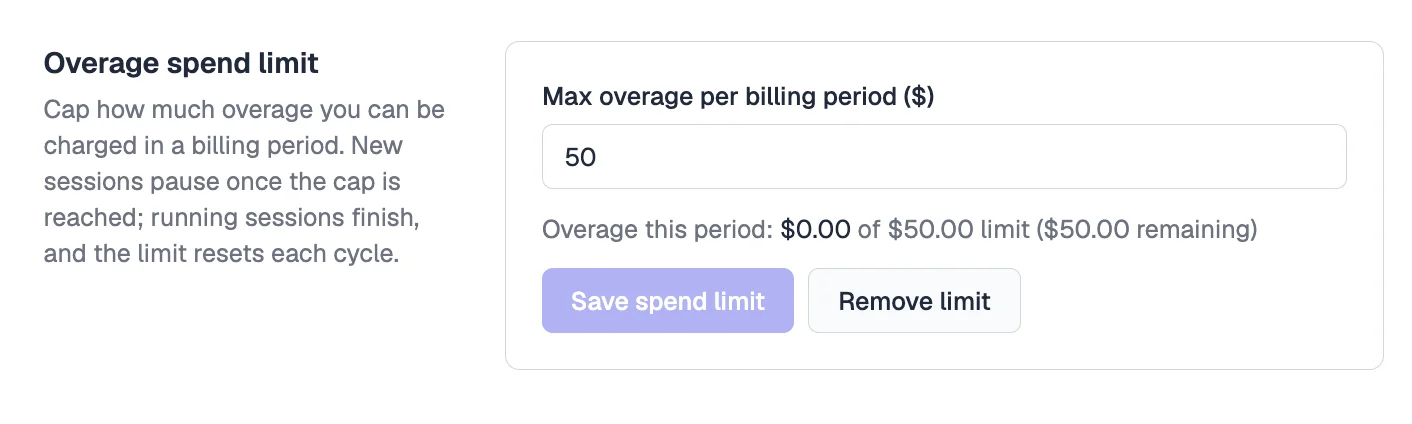
The Overage spend limit setting in account settings, with a $50 cap and current overage shown against it

Set a dollar cap under Overage spend limit in your account settings, and new sessions pause once you reach it. Set it to $0 to stop at your plan allowance instead. Sessions already running are allowed to finish, the limit resets each billing cycle, and anything paused comes back with an error naming your cap.

Owners and admins can set it; viewers see it read-only.

Set your cap →

Run an AI browsing task with one REST call

The new /agent/run endpoint gives you a browser agent you can call from your own code. POST a task in plain English, get a run ID back, and poll GET /agent/run/{id} for a clean JSON result, or register a webhook and skip polling. One call replaces a stack you'd otherwise wire up yourself, so you don't manage a model key, build an agent loop, or run any browsers. The agent plans and drives its own steps, navigating, clicking, typing, and reading, then returns its answer.

Runs happen on the same infrastructure built for hard sites, so saved authentication profiles, CAPTCHA solving, and residential or datacenter proxies are all available to a task. Shape a run with a JSON responseSchema, a startUrl, an allowedDomains allowlist, proxy settings, or a saved profile for pages behind a login. The API is in beta and available on Cloud plans.

curl -X POST \
  'https://production-sfo.browserless.io/agent/run?token=YOUR_API_KEY' \
  -H 'Content-Type: application/json' \
  -d '{ "query": "Go to browserless.io/pricing and find the Pro plan price." }'

Read the Agent Run API guide →

Multiple API keys, one for every app and environment

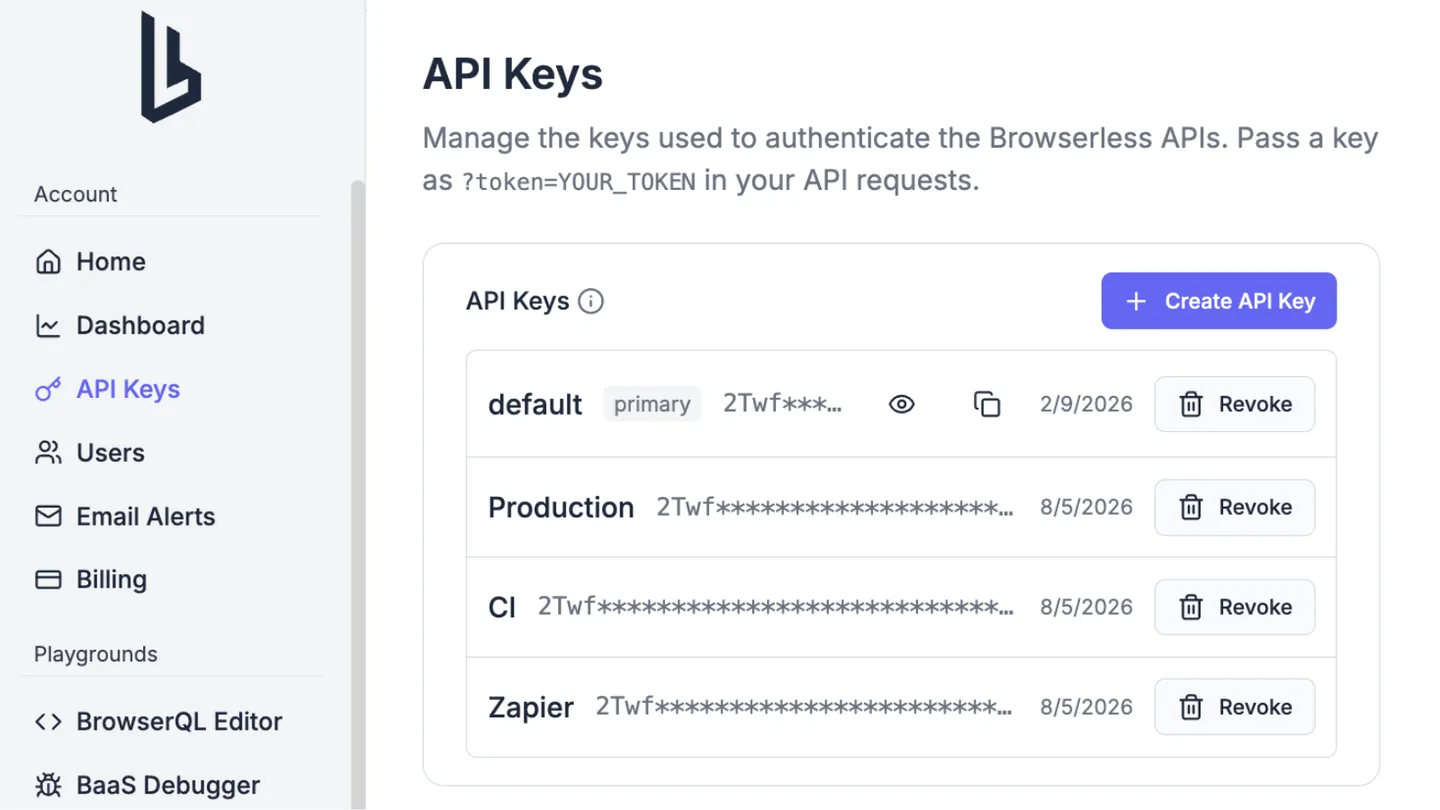
Multiple named API keys in the account dashboard

You can now create multiple named API keys on a single account, so each application, environment, or teammate gets its own key that you can revoke on its own without disturbing the others. Open API Keys in your account, click Create API Key, and add up to 20 keys per account. Only account owners and admins can manage them, and a new key is shown only once at creation time, so copy it somewhere safe right away.

Every key on the account draws from the same shared unit balance and concurrency limit, and billing stays at the account level, so splitting work across keys never changes what you pay. Your account always keeps one primary key, and if you revoke it another active key is promoted automatically. Crawls, authenticated profiles, and 1Password integrations are account-scoped too, so a resource created with one key is visible and usable from any other key on the same account.

Manage your API keys →

Scrape mobile sites with a real Android identity

Add emulationOs=android to a stealth or BQL connection and the session presents as mobile Chrome on Android, with a coherent mobile User-Agent, Client Hints, phone viewport and pixel ratio, touch input, and a mobile GPU identity. This replaces the old approach of hand-matching a mobile viewport to a user-agent, which left navigator.userAgent reporting desktop Chrome and got sessions flagged.

Leave the device out and Browserless picks a real device profile for you and keeps it stable for the whole session, or pin one with emulatedDevice=<slug>, for example pixel-8-pro or galaxy-s25-ultra. Android is the supported mobile persona today; iPhone, iOS, and Safari are not emulated.

wss://production-sfo.browserless.io/stealth?token=YOUR_API_KEY&emulationOs=android&emulatedDevice=pixel-8-pro

Read the mobile emulation guide →

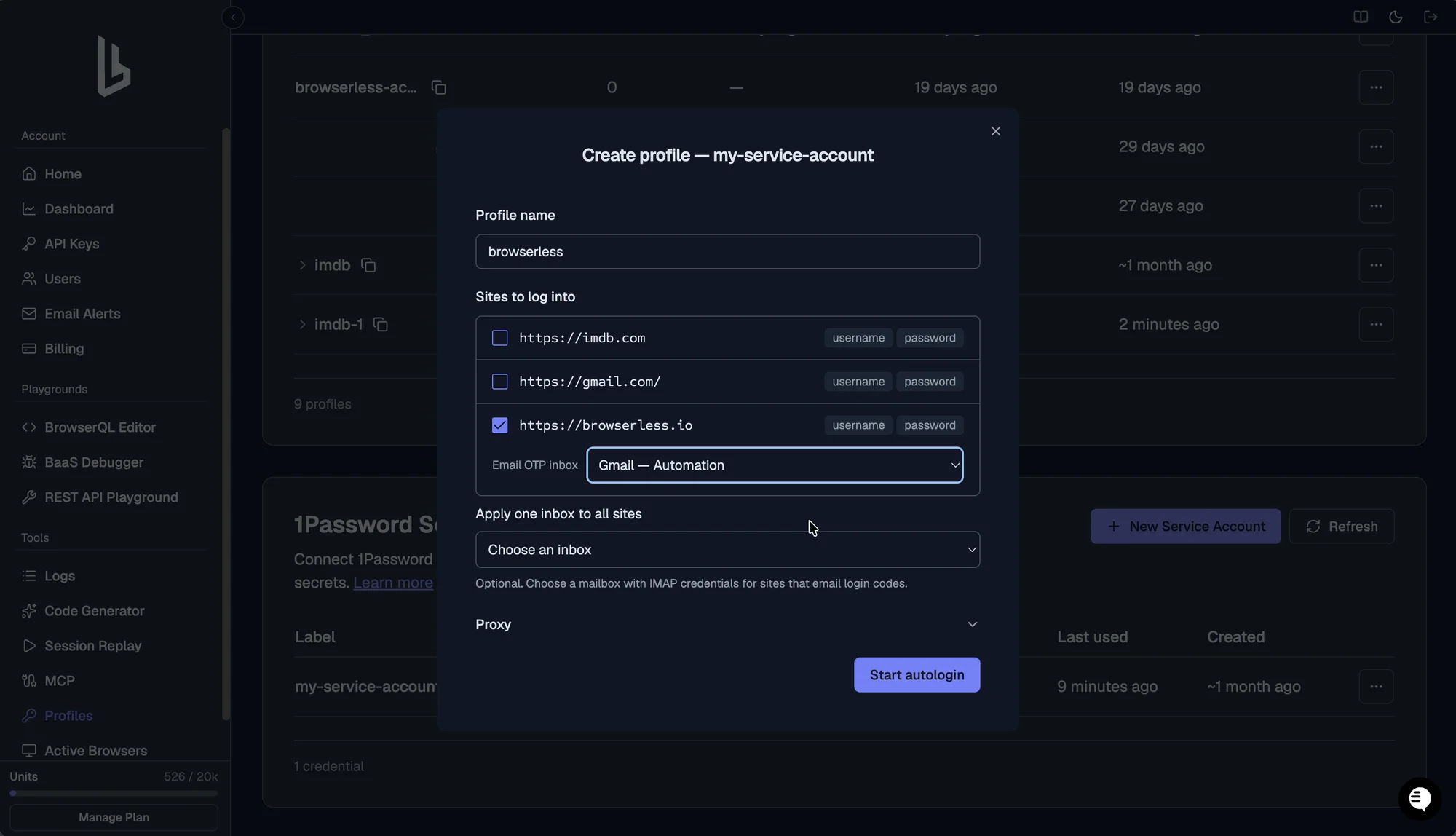
Autologin with 1Password

You can now log in with real credentials without ever putting them in your code. Connect a 1Password service account once, then reference an item by its op://Vault/Item/field path from inside a session. Browserless resolves the secret server-side, types it into the field, and locks the session down so the value can't be screenshotted or read back.

It works from Puppeteer, Playwright, BrowserQL, and the Browser Agent, so an AI agent can sign in on your behalf while your passwords stay in your vault. Every use is written to an audit log, and the plaintext value never reaches your automation or the logs.

Read the 1Password integration guide →

Datacenter proxies: a faster, lower-cost proxy option

Alongside residential proxies, you can now route traffic through datacenter proxies by adding proxy=datacenter to your connection. They cost 2 units per MB versus 6 units per MB for residential, about a third of the price, and they're faster, which makes them a good fit for sites that don't require residential IPs. Datacenter is selectable across browser sessions, the REST APIs, scraping, and BrowserQL, including right inside the BQL editor and exporter.

const browser = await chromium.connectOverCDP(
  "wss://production-sfo.browserless.io?token=YOUR_API_KEY&proxy=datacenter",
);

See proxy options →

Upload and download files from your automations

Moving files in and out of a remote browser used to take fiddly workarounds. Two new commands make it simple: Browserless.uploadFile puts a local file into a page for file inputs and upload forms, and Browserless.fileDownloaded hands you back whatever the browser downloads.

The Browser Agent gets this too, so an AI agent can attach a file to a form or pull down a generated report as part of a task, without you scripting the transfer by hand.

Read the file transfers guide →

The Browserless CLI: sync local browser profiles to the cloud

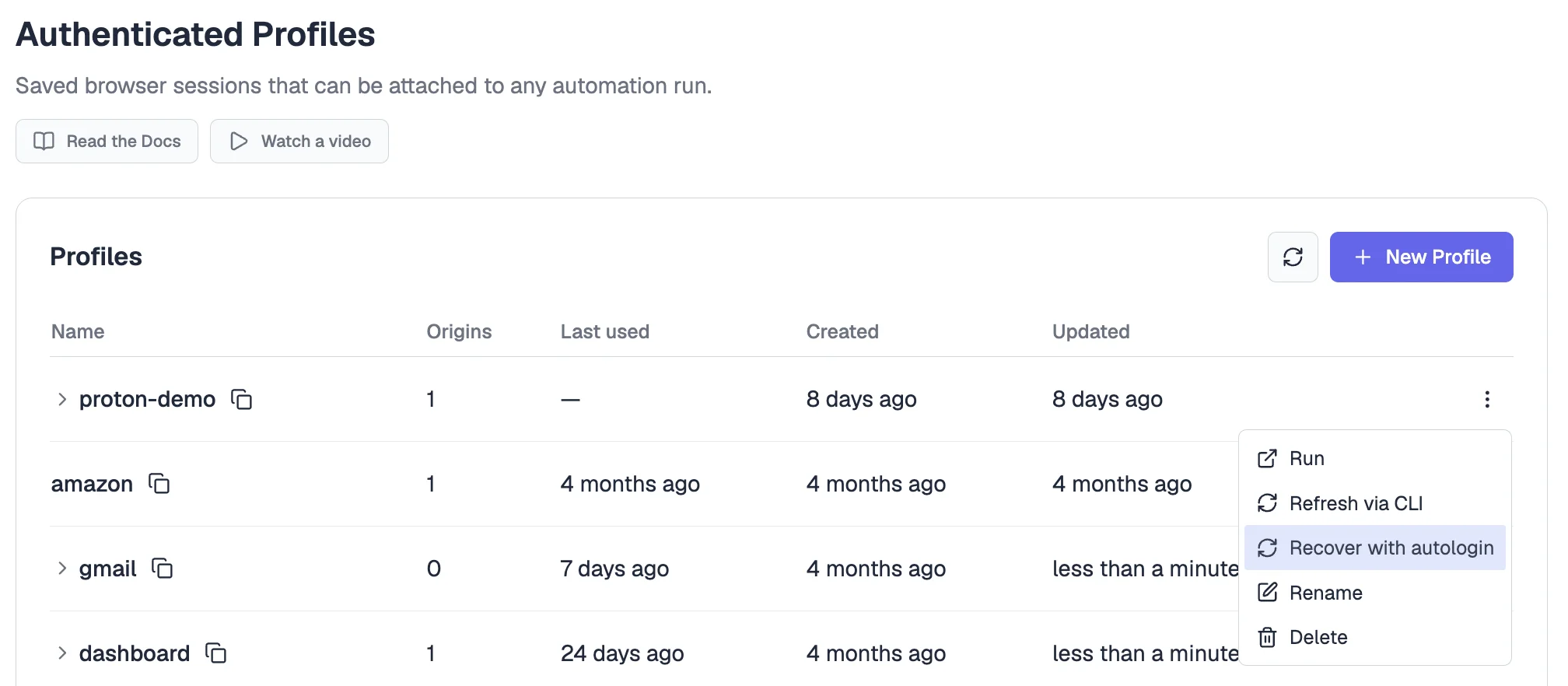
The new Browserless CLI lets you save a logged-in browser session from your own computer straight to the cloud. Log in to a site once, run a single command, and it's stored as an Authenticated Profile that every future session can reuse, so your automations skip the login step entirely instead of signing in on every run. It's available now on npm as @browserless.io/cli.

The CLI bundles up your signed-in state (your cookies and saved site data), strips out anything private it shouldn't keep, and stores it in the cloud under a name you choose. When that login eventually expires, one command refreshes it. To use it, add ?profile=<name> to any session and your automation picks up already logged in.

Get the Browserless CLI on npm →

Read the Authenticated Profiles guide →

Authenticated Profiles now work with AI agents and /crawl

Authenticated Profiles now work in two more places: with AI agents and with /crawl. Your AI assistant can use a profile through the Browserless MCP server to do logged-in work for you without ever seeing your password, and /crawl, our website-crawling tool, can now reach pages that sit behind a login.

We also made it easier to keep logins fresh: open one in your dashboard, sign in again, and click Save to update the stored login when the old one stops working.

See where profiles work →

A smarter Browserless agent for AI-driven browsing

The Browserless agent just got a round of upgrades, after heavy testing against tricky sites like Amazon, Workday, and Ticketmaster. It can now route through residential proxies to reach harder-to-access sites, and work across several browser tabs instead of being stuck on one page.

It also reads CAPTCHAs better. The agent used to be blind to Cloudflare's "I'm not a robot" checkbox and would push ahead anyway; now it notices the challenge and waits for it to be solved before continuing. And when a step does fail, the error messages now tell you what actually went wrong.

Learn more about agentic browsing →

Run Browser Use on Browserless with built-in CAPTCHA solving

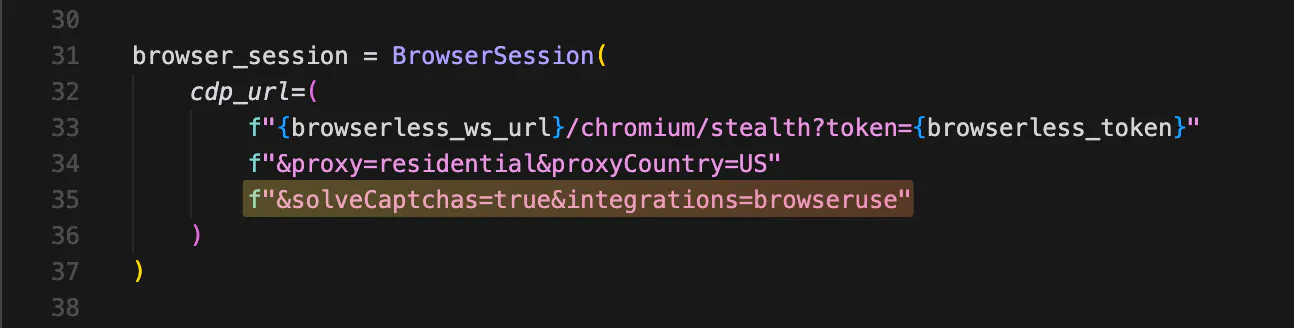
Browser Use is the open-source Python library that lets AI agents drive a browser. You can now run it on our cloud infrastructure with native CAPTCHA solving wired in. When your agent hits a reCAPTCHA, Cloudflare Turnstile, or DataDome challenge, Browserless solves it in the background and the agent picks up where it left off. We're the only browser infrastructure provider with CAPTCHA solving integrated directly into Browser Use.

Browser Use x Browserless

To turn it on, point Browser Use at our WebSocket URL with two query parameters: solveCaptchas=true and integrations=browseruse. Available on all plans. Requires browser-use >= 0.12.0.

Read the Browser Use + Browserless guide →

Agentic browsing in the Browserless MCP

Now your AI assistant can drive a real browser end-to-end. The new browserless_agent MCP tool gives the model a stateful browser session and a snapshot-driven view of the page, so the assistant can navigate, click, type, and react to what it sees over multiple turns instead of returning one-shot scrapes. Plug it into Claude Desktop, Cursor, VS Code, Windsurf, or any MCP-compatible client.

Cookies, localStorage, and navigation history persist across the model's turns, so a single agent run can log in, paginate through results, and finish a multi-step task without losing state.

Learn more about Agentic browsing →

Authenticated Profiles: log in once, attach to any session

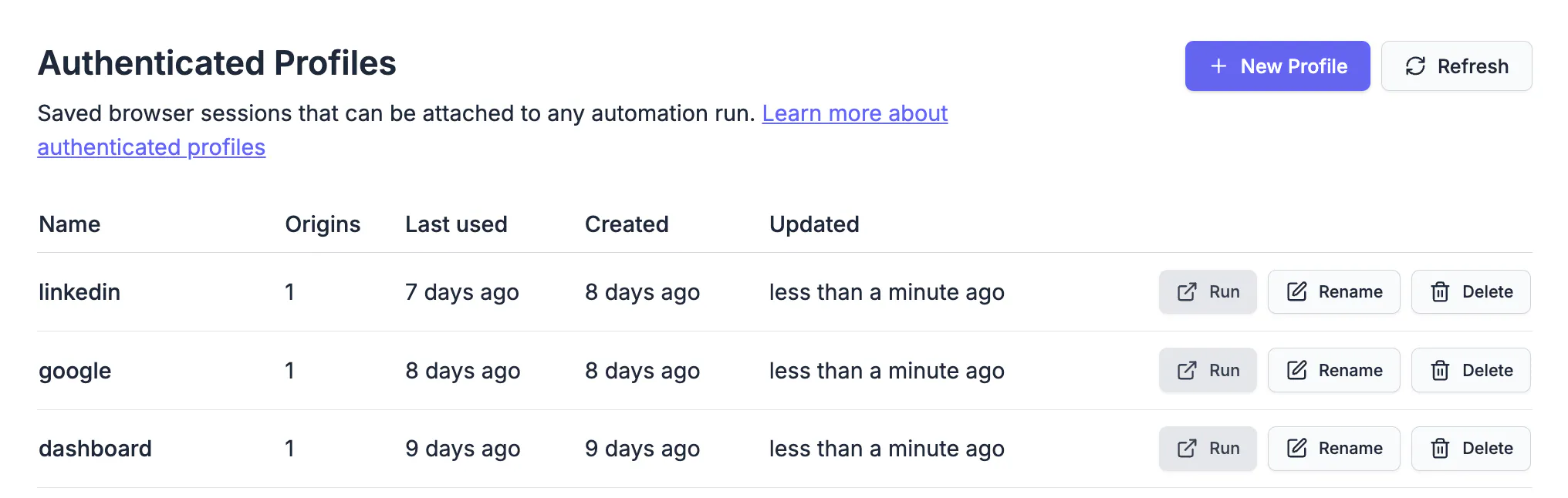
Authenticated Profiles

Now you can create a profile by logging into a site once, then attach it to any future browser session by passing ?profile=<name>. Your automation starts already authenticated, with cookies, localStorage, and IndexedDB all in place.

Two big wins: it's much easier to scale logged-in workflows across many parallel jobs, and you manage the logged-in state in one place instead of scripting login on every run. Works today on all WebSocket routes, BrowserQL, persisted sessions, and most REST endpoints (/function, /content, /pdf, /smart-scrape). Coverage is still expanding.

Coming soon 🔜 a Browserless CLI to sync local browser profiles to the cloud, and a 1Password integration so agents auto-fill credentials from your vault.

Read the Authenticated Profiles guide →

4 New REST APIs: /smart-scrape, /search, /map, /crawl

We've launched four new endpoints built for AI agents and large-scale data extraction:

  • /smart-scrape intelligently extracts content with automatic CAPTCHA solving and proxy rotation.
  • /search combines web search with content extraction in one call.
  • /map discovers all URLs on a site instantly.
  • /crawl handles multi-page extraction at scale.

Learn more about /smart-scrape

Official MCP Server for AI Agents

Our Model Context Protocol server is live at https://mcp.browserless.io/mcp. If you use Claude.ai, Cursor, Windsurf, or VS Code, you can now run browser automations directly from natural language prompts. Sign in with one click instead of copying API tokens. All our REST APIs are available through MCP, plus tools for running custom code, downloading files, and generating PDFs.

Learn more about MCP →

4 New CAPTCHA Types: DataDome, Lemin, MTCaptcha & Slider

BrowserQL now automatically handles DataDome, MTCaptcha, Lemin, and slider CAPTCHAs, on top of the existing support for reCAPTCHA, Cloudflare Turnstile, and others. These challenge types have been showing up more frequently on e-commerce, travel, and financial sites. If your automation is hitting any of them, BQL resolves them without any changes to your scripts.

Using them is the same as any other solve:

mutation SolveDataDome {
  goto(url: "https://example.com") {
    status
  }
  solve(type: datadome) {
    solved
  }
}

See all supported CAPTCHA types →

Script Generator (Beta): Describe It, Get a Script

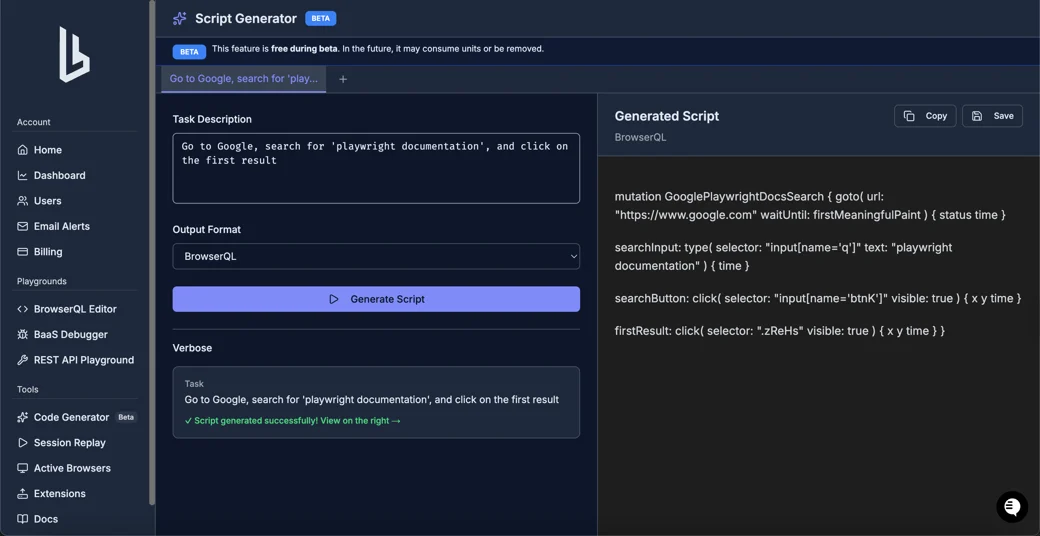
Script Generator in the dashboard

A new tool in the dashboard that turns a plain-English description of what you want to automate into a ready-to-run BQL or Playwright script. Whether you're prototyping something new or just want a starting point without digging through docs, it gets you to working code faster.

Currently rolling out to 50% of users. If it's available on your account, you'll see it in your dashboard.

Unique WebGL Fingerprints, Per Session

Every browser session now presents a unique, realistic GPU fingerprint drawn from a pool of real-world NVIDIA, AMD, and Intel hardware. This replaces the same generic renderer that bot detection systems have long flagged. If your automations run against sites that do canvas or WebGL fingerprinting, this directly improves your pass rate with no code changes required.