
TL;DR
- Cloudflare bypass. A Cloudflare bypass is the set of techniques you use to get a scraper past Cloudflare's bot scoring, JavaScript challenges, TLS fingerprint checks, and the Cloudflare Turnstile captcha so your script can reach the underlying HTML.
- The DIY stack. Rotating proxies, Puppeteer or Playwright with the stealth plugin, and matched JA3/JA4 TLS fingerprints get most of the way to a working Cloudflare bypass, but every layer needs ongoing maintenance as detection updates.
- Open-source limits. Helpers like FlareSolverr and Cloudscraper handle the basic Cloudflare checks, but they struggle with the current Cloudflare Turnstile bypass and newer JavaScript challenge variants, and they rely on community patches that often lag behind Cloudflare's changes.
- The bypass playbook. This guide walks through how to bypass Cloudflare with scraping end-to-end: proxy rotation, headless browsers, TLS fingerprinting workarounds, the Cloudflare captcha bypass, and a hands-off path using BrowserQL.
Introduction
If you want to bypass Cloudflare with scraping, you're going up against one of the most widely deployed firewalls on the web. Cloudflare sits in front of millions of domains and filters traffic for unwanted bots and DDoS attacks before requests reach the origin. That protection is useful for site owners, but it leaves scrapers staring at JavaScript challenges, TLS fingerprint checks, rate limits, and the Cloudflare Turnstile captcha.
In this guide, you'll learn how to bypass Cloudflare with scraping: rotating IPs through proxy providers, simulating real users with headless browsers, handling JavaScript execution, and getting through a Cloudflare captcha bypass. We'll also show where the DIY route falls over, and when it's worth reaching for a maintained tool.
Understanding Cloudflare's bot protection
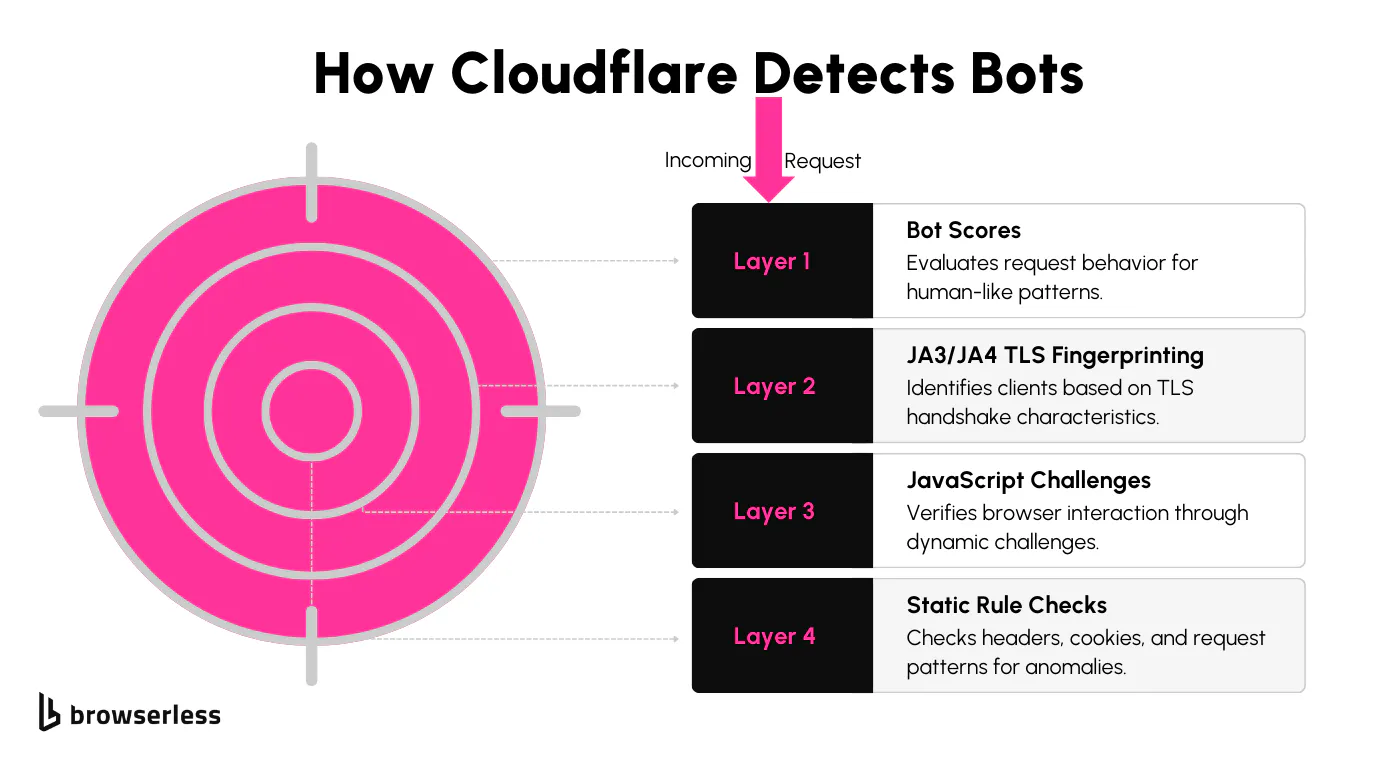
Cloudflare's bot protection is designed to tell legitimate users apart from automated bots. It analyzes each request, flags anything suspicious, and blocks unauthorized access at the edge before your traffic even hits the origin. Here are the key layers of protection:
- Bot scores: Each request is given a score based on how human-like its behavior looks. Lower scores indicate higher suspicion.
- Detection IDs: Static rules identify patterns such as unusual headers, missing browser metadata, or abnormal request frequencies.
- JA3/JA4 fingerprinting: Cloudflare evaluates the unique signature of the TLS handshake to identify the client and detect mismatches with known browser profiles.
- JavaScript challenges and Turnstile: Cloudflare dynamically injects scripts to verify browser interaction, and serves the Turnstile captcha when it isn't sure who's on the other end. Both need real JavaScript execution to pass.
Impact on scraping
Cloudflare's checks make automated scraping much harder. Suspicious requests are blocked quickly, often leaving pages inaccessible to scripts that don't behave like a returning user. You'll often see HTTP 429 "too many requests" responses or full firewall blocks before you ever reach the HTML.
For scrapers, that means holding session state across requests, managing evolving detection mechanisms, and getting through dynamic JavaScript challenges. Together, these hurdles slow down any scraper that isn't built to handle them up front.
How to bypass Cloudflare's protections
Rotating IP addresses with proxy rotation
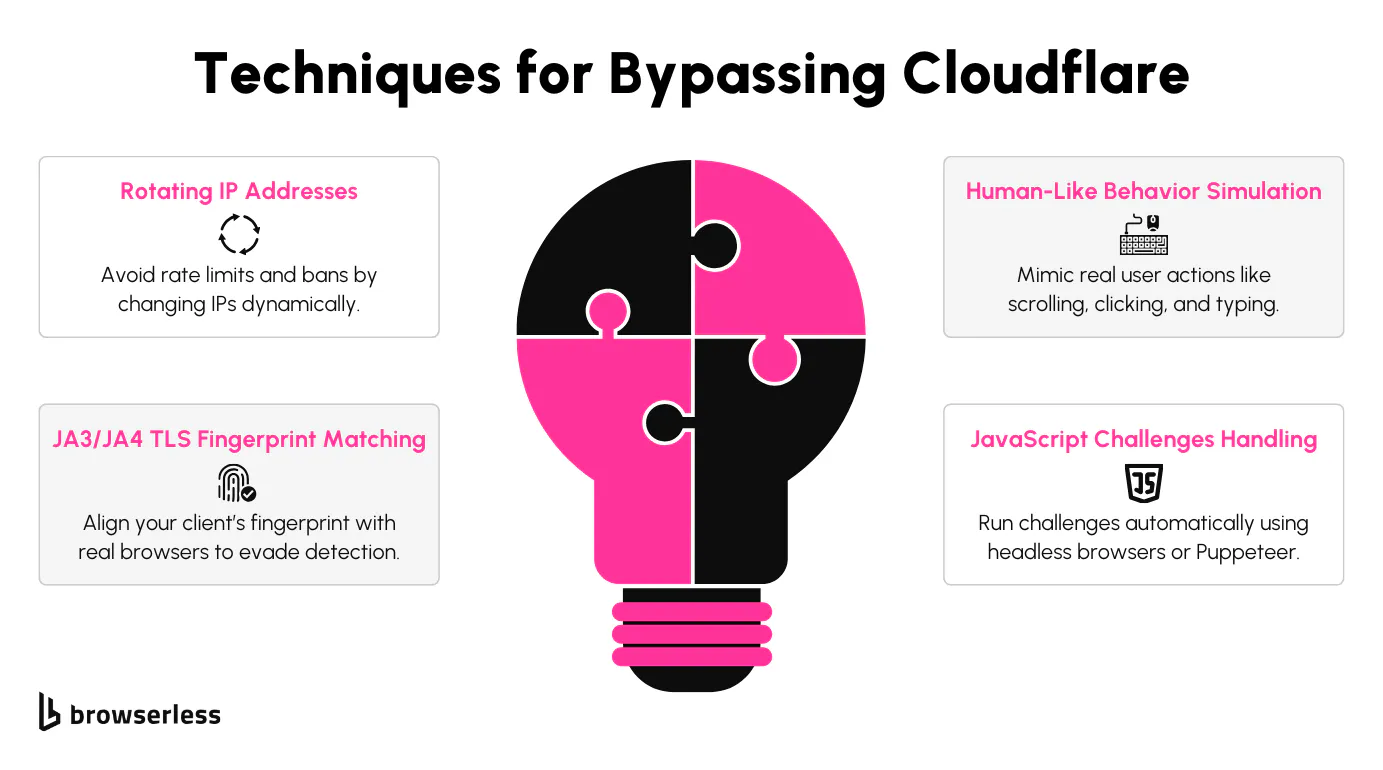
Switching IP addresses frequently is a simple but powerful way to avoid rate limits and bans when scraping a Cloudflare-protected site. Proxy rotation spreads requests across multiple addresses so traffic doesn't pile up on a single IP that gets blocked quickly.
Most teams pull addresses from one of two types of proxy providers. Rotating proxy pools cycle through a list of datacenter IPs automatically, while residential proxies route through real user connections and look much closer to real users on Cloudflare's bot scoring.
Simulating human-like behavior with headless browsers
Headless browsers like Puppeteer and Playwright can make your scraping look much more natural by mimicking how real users interact with a website. Each session runs a real browser, so JavaScript execution, cookies, and page navigation happen the same way they do in normal Chrome.
These tools can execute JavaScript, handle cookies, and replicate actions like scrolling, clicking, and navigation. You can also tweak the user agent, headers, viewport, fonts, and other browser features to make your scraper harder to detect. Running in headless mode is fastest, but switching to a full Chrome instance with a visible UI gives you a more realistic fingerprint against strict Cloudflare checks.
Overcoming TLS fingerprinting (JA3/JA4)
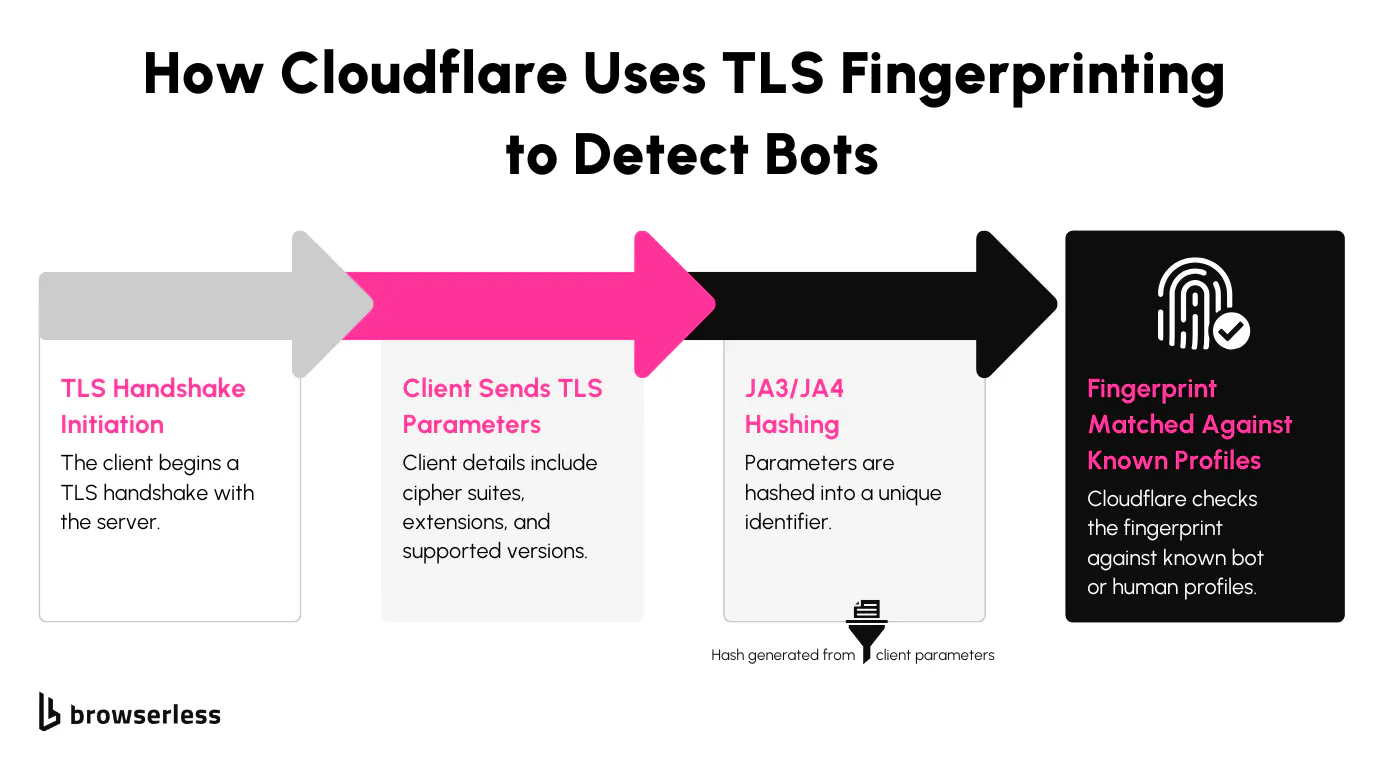
TLS fingerprinting is a tricky layer of detection because it sits below HTTP. Cloudflare looks at how a client opens the TLS handshake (cipher suites, extensions, ALPN order) and assigns it a TLS fingerprint such as JA3 or JA4. Other HTTP clients (requests, axios, default curl builds) have a different fingerprint to Chrome, so a single packet capture is enough for Cloudflare to spot them.
To bypass this, you can adjust your scraper's handshake parameters to match those of common browsers. Tweak things like supported cipher suites and TLS versions so your requests look identical to legitimate browser traffic, which reduces the chances of detection. A real Chrome instance does this on its own, which is one reason browser-based scrapers move past this layer far more easily than raw HTTP clients.
Handling JavaScript challenges
Cloudflare often injects a JavaScript challenge to confirm that a real browser is accessing the site. Puppeteer and Playwright are useful here because they run real JavaScript execution inside an actual Chromium browser instance. They handle the scripts automatically, keep session data intact, and let your scraper progress without interruption, so you can focus on getting the data you need without manual interventions for every Cloudflare challenge.
Here's an example of how you could rotate IPs, simulate human-like behavior, work around TLS fingerprinting (JA3), and handle JavaScript challenges using Puppeteer with a proxy manager. Replace the example proxies with your own and install Puppeteer, the HTTP proxy agent, and the Puppeteer extra stealth plugin first. If your proxies require credentials, call page.authenticate({ username, password }) before page.goto.
import puppeteer from "puppeteer-extra";
import StealthPlugin from "puppeteer-extra-plugin-stealth";

// Use the stealth plugin to bypass detection
puppeteer.use(StealthPlugin());

// List of proxy servers (replace with actual proxy credentials)
const proxies = [
  "http://username:password@proxy1:port",
  "http://username:password@proxy2:port",
  "http://username:password@proxy3:port",
];

// Cloudflare-protected target URL
const targetUrl = "https://www.cloudflarechallenge.com";

async function scrapeWithBypass() {
  for (const proxyUrl of proxies) {
    let browser;
    try {
      console.log(`Trying proxy: ${proxyUrl}`);
      const { hostname, port, username, password } = new URL(proxyUrl);

      browser = await puppeteer.launch({
        headless: true,
        args: [`--proxy-server=http://${hostname}:${port}`],
      });

      const page = await browser.newPage();

      // Authenticate against the proxy if credentials are present
      if (username && password) {
        await page.authenticate({ username, password });
      }

      await page.setUserAgent(
        "Mozilla/5.0 (Windows NT 10.0; Win64; x64) AppleWebKit/537.36 (KHTML, like Gecko) Chrome/124.0.0.0 Safari/537.36",
      );

      await page.goto(targetUrl, { waitUntil: "domcontentloaded" });

      // Wait briefly so Cloudflare's JS challenge can execute
      await new Promise((resolve) => setTimeout(resolve, 5000));

      const pageContent = await page.evaluate(() => document.body.innerText);
      console.log("Page content extracted:", pageContent);

      await browser.close();
      break;
    } catch (error) {
      console.log("Proxy failed, trying next:", error.message);
      if (browser) await browser.close();
    }
  }
}

scrapeWithBypass();
What this does
- Rotates IPs through a proxy list to avoid rate limits.
- Authenticates against authenticated proxies with
page.authenticateinstead of relying on credentials inside--proxy-server. - Uses the Puppeteer Stealth Plugin to patch common bot detection signals.
- Sets a realistic Chrome user agent so the HTTP headers look like a normal browser.
- Waits for the JavaScript challenge to execute before reading the page.
The DIY approach can work, but it comes with limitations. Even with the stealth plugin, a rotating proxy, and a realistic user agent, Cloudflare's bot detection still blocked many of our test requests. That's the gap open-source Cloudflare bypass tools try to fill, so let's see how they hold up.
Exploring open-source tools for bypassing Cloudflare
A handful of open-source libraries try to handle the Cloudflare bypass for you. The most popular options are FlareSolverr and Cloudscraper. FlareSolverr spins up a headless browser, runs the Cloudflare challenge, and returns the cookies your other HTTP clients need to fetch the page. Cloudscraper takes a similar approach for static checks and basic CAPTCHA cases. Both projects depend on community updates, so support for the latest Cloudflare changes can lag by weeks, especially around the Cloudflare Turnstile bypass.
Drawbacks of using free options
We ran Cloudscraper and FlareSolverr against the same set of Cloudflare-protected sites to see how well they handled the protections. The results were hit or miss. Plenty of requests failed with errors like blocked access and unexpected responses, and even with stealth settings turned on, both tools struggled with newer JavaScript challenges and the Turnstile captcha. The end result was scraping logic that worked one day and got blocked the next.
One big downside of these free tools is their reliance on community updates. When Cloudflare tightens its security, something in the plugin or its configuration usually breaks, and fixes aren't always immediate.
If updates are slow or inconsistent, you can end up spending more time digging through error logs and adding retries than actually scraping. It sometimes works, but the constant hands-on maintenance isn't ideal for long-term projects.
Open-source projects can also be abandoned outright, which leaves you without updates or support exactly when you need them. Because Cloudflare's defenses keep changing, a tool that gave you access to a domain yesterday might fail on it tomorrow.
Scraping protected sites also involves legal and ethical considerations, from IP bans to policy violations. If you need something reliable, pairing stealth techniques with a well-maintained tool like BrowserQL can save you time and frustration.
How BrowserQL simplifies bypassing Cloudflare
Automated JavaScript execution
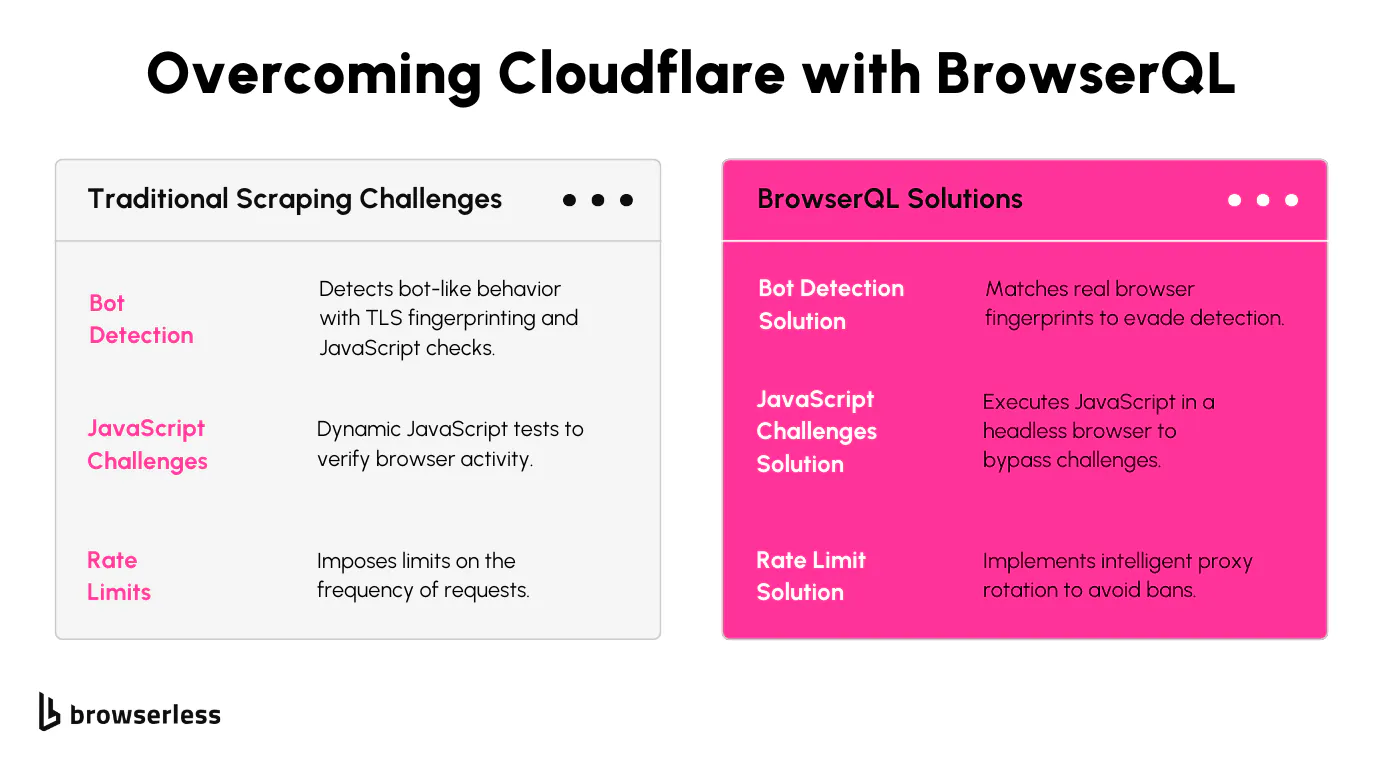
Cloudflare's JavaScript challenges can be a real headache for scrapers, but BrowserQL (BQL) handles them automatically. Instead of writing custom scripts to detect and solve each variant, you let BQL run the challenge inside a managed browser. This built-in feature simplifies the process and lets you focus on getting the data you need without getting bogged down in technical workarounds.
IP and session management
Managing proxies and sessions can get messy quickly, especially when scaling up. BQL ships with built-in support for rotating proxies and maintaining sessions, so you can keep a returning user fingerprint across requests without wiring it up yourself. It handles these tasks in the background, which helps you avoid rate limits and bans while keeping your scraping sessions intact, even on high-volume runs.
Browser emulation
To avoid detection, your scraper needs to act like a real browser, and BQL does this out of the box. It configures the user agent, browser headers, and TLS fingerprint to match popular browsers so your requests blend in with regular traffic. This added layer of realism helps bypass anti-bot measures and keeps your scraping workflow running smoothly.
Customizable queries
BQL uses a GraphQL-style query syntax, so you describe exactly what you want from the page instead of pulling the whole HTML. Instead of loading unnecessary page parts, you can focus on specific elements like product details or pricing. That saves time and bandwidth and reduces the chances of your requests being flagged.
The earlier example showed how much manual work goes into managing proxy rotation and bot detection. The next snippet uses BQL targeting the stealth endpoint (/stealth/bql) so the Cloudflare challenge, the Cloudflare Turnstile bypass, and any leftover CAPTCHA work get handled automatically.
import fetch from "node-fetch";

const API_KEY = "YOUR_BQL_API_KEY";
// Use the stealth route for bot detection bypass
const BQL_ENDPOINT = "https://production-sfo.browserless.io/stealth/bql";

// GraphQL mutation to bypass Cloudflare and extract page data
const query = `
  mutation ScrapeProtectedPage {
    # Step 1: Visit the Cloudflare-protected page
    goto(url: "https://www.cloudflarechallenge.com", waitUntil: networkIdle) {
      status
    }

    # Step 2: Detect and solve any Cloudflare challenge (including Turnstile)
    solveCloudflare: solve(type: cloudflare) {
      found
      solved
      time
    }

    # Step 3: Catch any other CAPTCHA that may still appear (reCAPTCHA, image, etc.)
    solveAny: solve {
      found
      solved
      time
    }

    # Step 4: Extract protected content from the page
    extractedText: text(selector: ".protected-content") {
      text
    }
  }
`;

async function scrapeWithBQL() {
  try {
    const response = await fetch(`${BQL_ENDPOINT}?token=${API_KEY}`, {
      method: "POST",
      headers: {
        "Content-Type": "application/json",
      },
      body: JSON.stringify({ query }),
    });

    const data = await response.json();
    console.log("Extracted Content:", data.data.extractedText.text);
  } catch (error) {
    console.error("BQL Scraping Failed:", error);
  }
}

scrapeWithBQL();
What this does
- Bypasses Cloudflare's anti-bot protections automatically through the
/stealth/bqlendpoint. - Solves Cloudflare's JavaScript challenges and CAPTCHAs, including the Cloudflare Turnstile bypass via
solve(type: cloudflare). - Auto-detects any remaining CAPTCHA with a second
solvecall. - Extracts data from a Cloudflare-protected site without needing to manage a headless browser yourself.
Optimizing your workflow with BQL
Improving scraping speed
BQL's endpoint-based design is built to handle multiple requests efficiently. Once you set up an endpoint, you can reuse it across multiple requests without reconfiguring settings repeatedly. This streamlined approach reduces overhead and speeds up data extraction, especially for workflows with high-frequency requests.
Reducing complexity
Manually managing proxies, headers, and session configuration can quickly become overwhelming. BQL simplifies this process by handling these settings out of the box. It takes care of complex setup like proxy rotation and browser header management, so you can focus on the data instead of constantly tweaking your scraper.
Scaling efficiently
When you scale up to scrape hundreds or thousands of pages, manual adjustments just don't cut it. BQL is designed to scale across that load. Its automation and endpoint management make it easy to handle large-scale scraping projects while maintaining consistent performance, no matter how much data you're processing.
Avoiding IP bans
To minimize detection, BQL includes adaptive IP rotation and request throttling. These features let you manage the pace of requests and switch proxies dynamically, which reduces the chances of being flagged or banned. With those protections in place, your workflow stays reliable and uninterrupted, even on long scraping sessions.
The snippet below sends multiple requests to a Cloudflare-protected site, optimizing for large-scale scraping while minimizing detection and rate limits.
import fetch from "node-fetch";

const API_KEY = "YOUR_BQL_API_KEY";
const BQL_ENDPOINT = "https://production-sfo.browserless.io/stealth/bql";

// Function to fetch multiple pages efficiently
async function scrapeMultiplePages(pages) {
  for (let i = 1; i <= pages; i++) {
    const query = `
      mutation ScrapeMultiplePages {
        # Step 1: Visit each page
        goto(url: "https://www.cloudflarechallenge.com?page=${i}", waitUntil: networkIdle) {
          status
        }

        # Step 2: Solve any Cloudflare challenge that appears
        solve(type: cloudflare) {
          found
          solved
          time
        }

        # Step 3: Extract product titles
        productTitles: text(selector: ".product-title") {
          text
        }
      }
    `;

    try {
      const response = await fetch(`${BQL_ENDPOINT}?token=${API_KEY}`, {
        method: "POST",
        headers: {
          "Content-Type": "application/json",
        },
        body: JSON.stringify({ query }),
      });

      const data = await response.json();
      console.log(`Page ${i} Titles:`, data.data.productTitles.text);
    } catch (error) {
      console.error("Error scraping page:", error);
    }
  }
}

// Scrape 10 pages efficiently
scrapeMultiplePages(10);
What this does
- Loops through multiple pages dynamically.
- Avoids Cloudflare's rate limits by reusing session state on the stealth endpoint.
- Extracts data efficiently from a Cloudflare-protected site.
- Scales scraping with minimal risk of being flagged.
Conclusion
Cloudflare's advanced bot protection (IP blocking, TLS fingerprinting, JavaScript challenges, and the Cloudflare Turnstile bypass) complicates scraping workflows. Tools like Puppeteer help bypass these defenses, but BrowserQL takes another layer off your plate by automating session management, proxy rotation, JavaScript execution, and the Cloudflare captcha bypass. For sites that don't deploy Cloudflare at all, Puppeteer or Playwright on their own are still the lightest option. For the ones that do, BrowserQL keeps your scraper focused on the data instead of the firewall. Ready to try it on your toughest target? Sign up for a free Browserless plan.
How to bypass Cloudflare FAQs
Is bypassing Cloudflare legal?
Accessing public pages on a Cloudflare-protected site for scraping is generally lawful in most jurisdictions, but each site's terms of service and your local data protection laws still apply. Treat Cloudflare bypass work the same way you'd treat any scraping project: respect robots.txt where reasonable, avoid scraping personal data without a clear lawful basis, and never use the techniques in this guide to access pages you don't have permission to load.
Does the Cloudflare Turnstile bypass need a CAPTCHA solver?
Yes. Cloudflare Turnstile is a CAPTCHA-class challenge, so a Cloudflare Turnstile bypass relies on running the challenge inside a real browser and either passing it automatically (via a stealth fingerprint) or solving it (via a solver service). BrowserQL handles both through the solve(type: cloudflare) mutation on the /stealth/bql endpoint.
Can I bypass Cloudflare without a headless browser?
Sometimes, but not reliably. Static checks and the older JavaScript challenge can occasionally be passed by libraries like Cloudscraper that emulate a small subset of browser behavior, but anything that involves the Cloudflare Turnstile bypass, TLS fingerprinting at JA3/JA4 depth, or live DOM interaction needs a real browser instance.
What's the difference between /chromium/bql and /stealth/bql?
/chromium/bql runs your query in a stock Chromium build with a minimal fingerprint surface. /stealth/bql adds Browserless's full set of fingerprint mitigations and entropy injection on top of the same browser. For any Cloudflare bypass work, use /stealth/bql.
How often do these techniques stop working?
Cloudflare ships detection updates regularly, so any single technique (stealth plugin, JA3 spoof, etc.) will eventually start failing on some subset of sites. The most stable approach is to layer multiple techniques (residential proxy, real browser, captcha solver) so a failure in one layer doesn't take the whole scraper down.