
TL;DR
- An Etsy scraper loads Etsy's search, listing and shop pages and pulls structured fields out of them, and it starts with the selectors. Search cards hide the listing ID, title, price, image and URL inside
inputvalues, product details come from the page's JSON-LD, and full reviews sit in their own region. - One browser session covers the rest with Browserless's Browser Automation Protocol (BAP) on the
/stealth/bqlendpoint. Callsolve()when a challenge appears,scroll({ throughPage: true })to trigger lazy-loaded reviews, then wait on the card selector. - Extraction runs either as typed
page.evaluate()code in BAP, or as one nestedmapSelectoroperation in raw BrowserQL that already returns structured JSON.
Introduction
Say you're tracking prices across forty Etsy shops and you'd rather not open forty tabs every Monday, so you write an Etsy scraper with the usual Python web scraping stack, point it at a search page and let it run. It comes back with a 403 and a challenge page instead of forty listings.
Etsy sits behind DataDome bot detection, so a plain HTTP client usually gets blocked before it sees a single listing. When a request does get through, reviews, later inventory pages, and lazy-loaded images still need a browser that runs the page's JavaScript and scrolls. This guide starts with what each Etsy page will and won't hand over, then picks up where a plain request gives out, with Browserless's Browser Automation Protocol (BAP) and BrowserQL.
Where Etsy data lives on each page
Etsy lists handmade and vintage items across several page types, and an Etsy scraper does not target one universal layout. It targets one or more page types, each with its own repeated containers, detail fields, and loading behavior.
Those fields support price monitoring, catalog research, market trends, or competitive analysis. Keep the scope concrete. That means product images and prices from listings, seller information from shops, or full shop reviews from the review region, not an undefined promise to pull all the product data on the Etsy website.
Etsy also groups inventory into category pages under /c/, and those category URL patterns take URL query parameters for filtering and sorting. scrapeSearchResults() below takes a URL, so it can be pointed at a category page once you confirm the card selectors there. Decide which page types you need to collect data from before you write a single selector.
Etsy search results page identifiers
A search URL such as https://www.etsy.com/search?q=candles is the discovery layer. The page repeats one card per result, and each current card exposes a listing ID, title, price, image, and canonical product URL. Rating and review fields are not present in every current search-card variant, so collect those aggregates from the product page instead of mislabeling other card text.
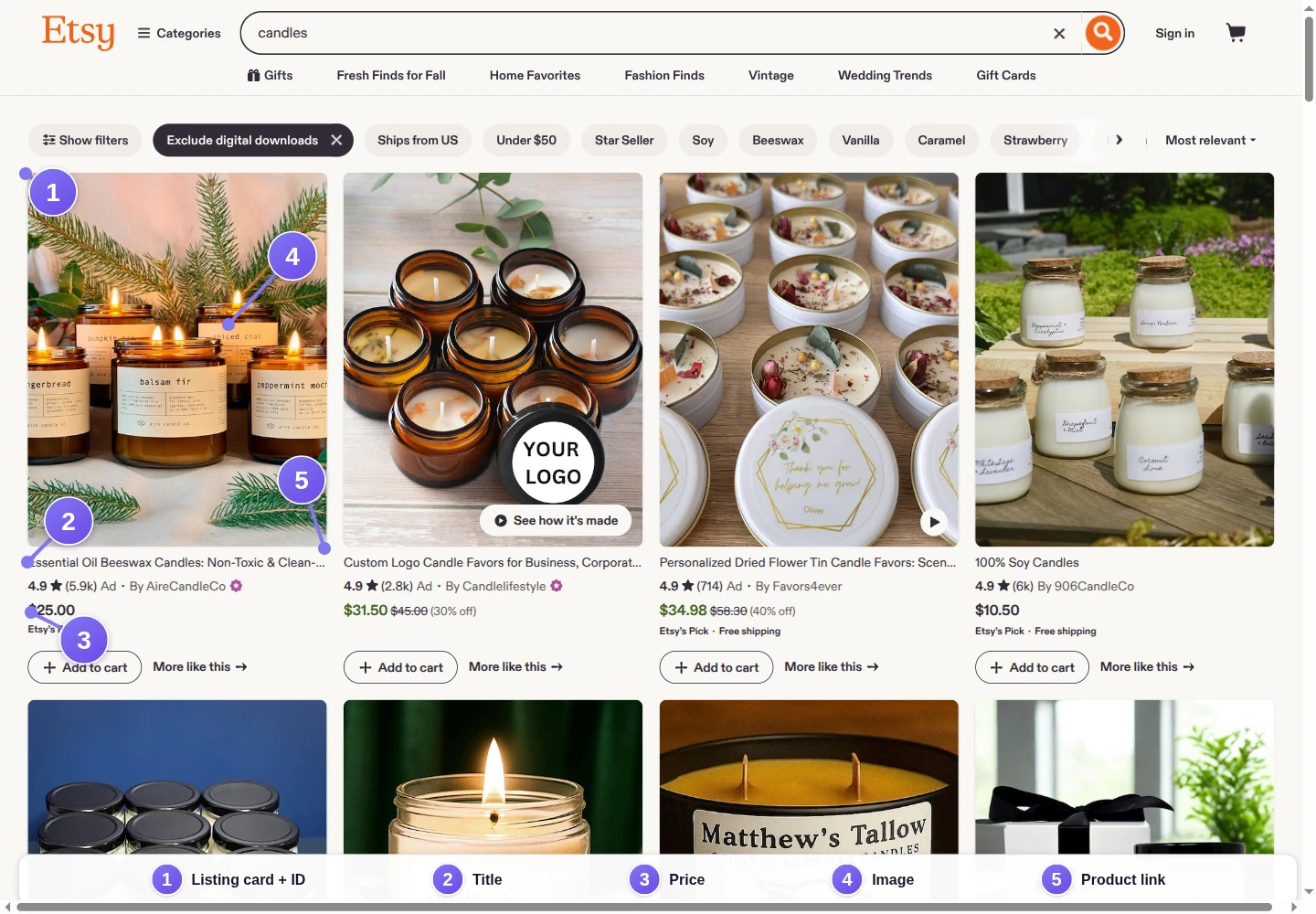
| Data | Element to identify | Starting selector |
|---|---|---|
| Listing card | Repeated result container | .v2-listing-card |
| Listing ID | Hidden value within the card | input[name="listing_id"] |
| Title | Hidden value within the card | input[name="listing_title"] |
| Price | Discounted or original-price value | input[name="formatted_discounted_price"] |
| Image | Full listing-image value | input[name="listing_image_url"] |
| Product URL | Canonical listing URL value | input[name="listing_url"] |
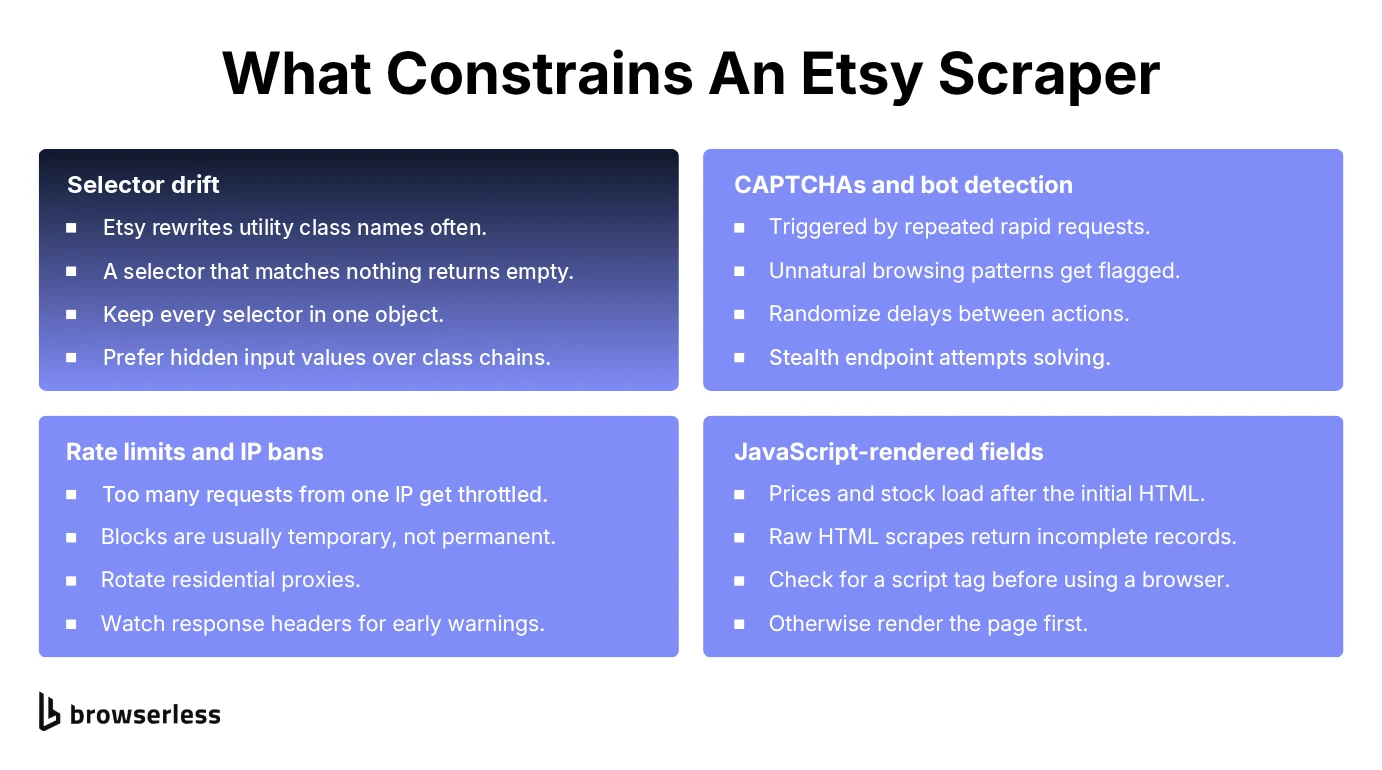
These are starting selectors, not a permanent contract. Confirm each one in DevTools against the live page before you run the scraper. Prefer stable data-* attributes and meaningful link patterns over long chains of CSS classes.
Etsy product page identifiers
An individual listing URL follows https://www.etsy.com/listing/[listing-id]/[slug]. This is where you find the full title, current price, seller link, product images, description, variations, availability, and the review section.
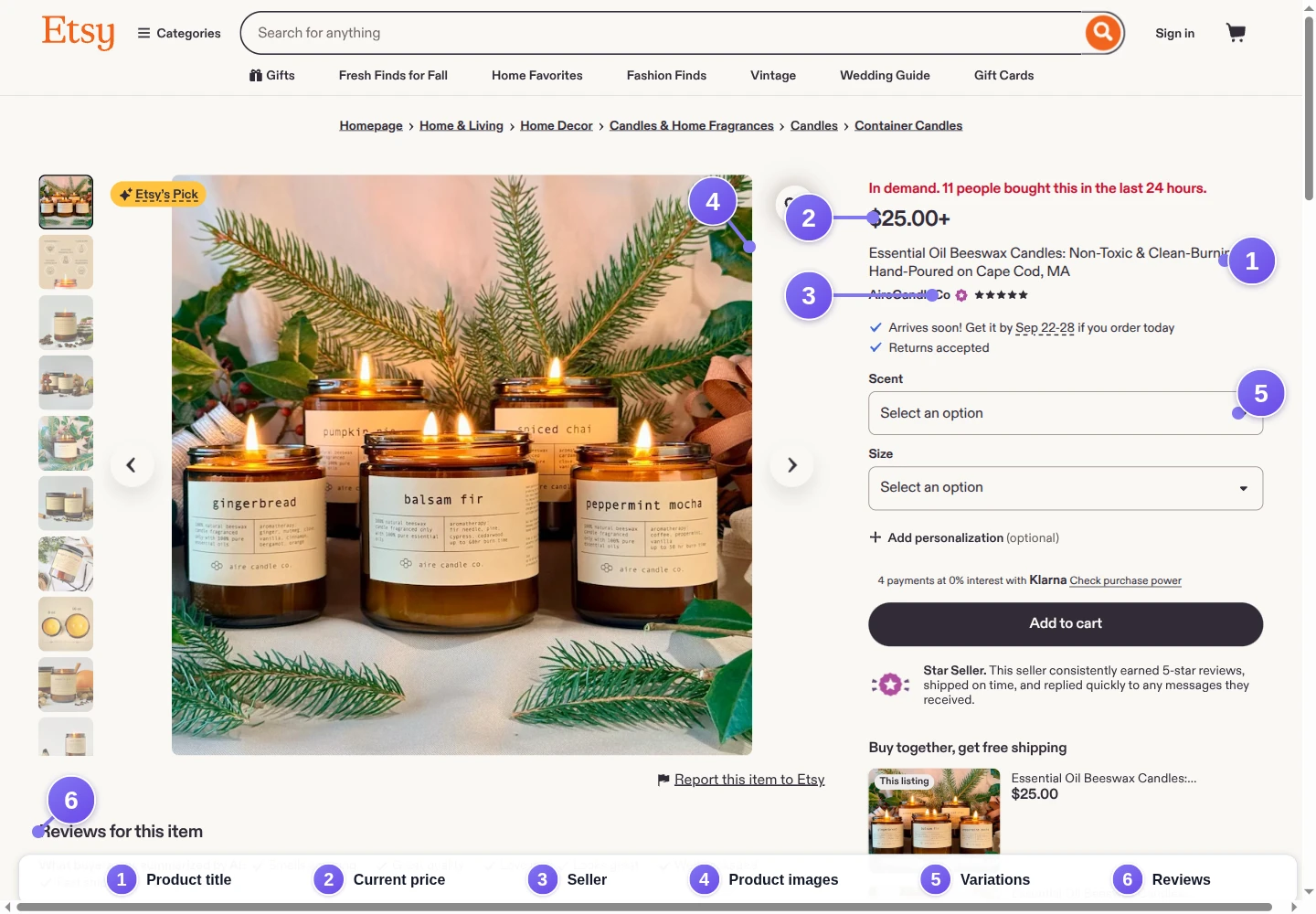
Unlike a result card, a product page may expose the same data multiple times to serve responsive layouts or experiments. Scope selectors to the visible buy box or main listing region instead of taking the first matching price from the entire document.
Etsy shop page identifiers
A shop URL follows https://www.etsy.com/shop/[shop-name]. Its header contains shop-level data such as the name and rating, while the inventory area reuses listing-like cards. Shop inventory may span multiple pages or load additional items after interaction.
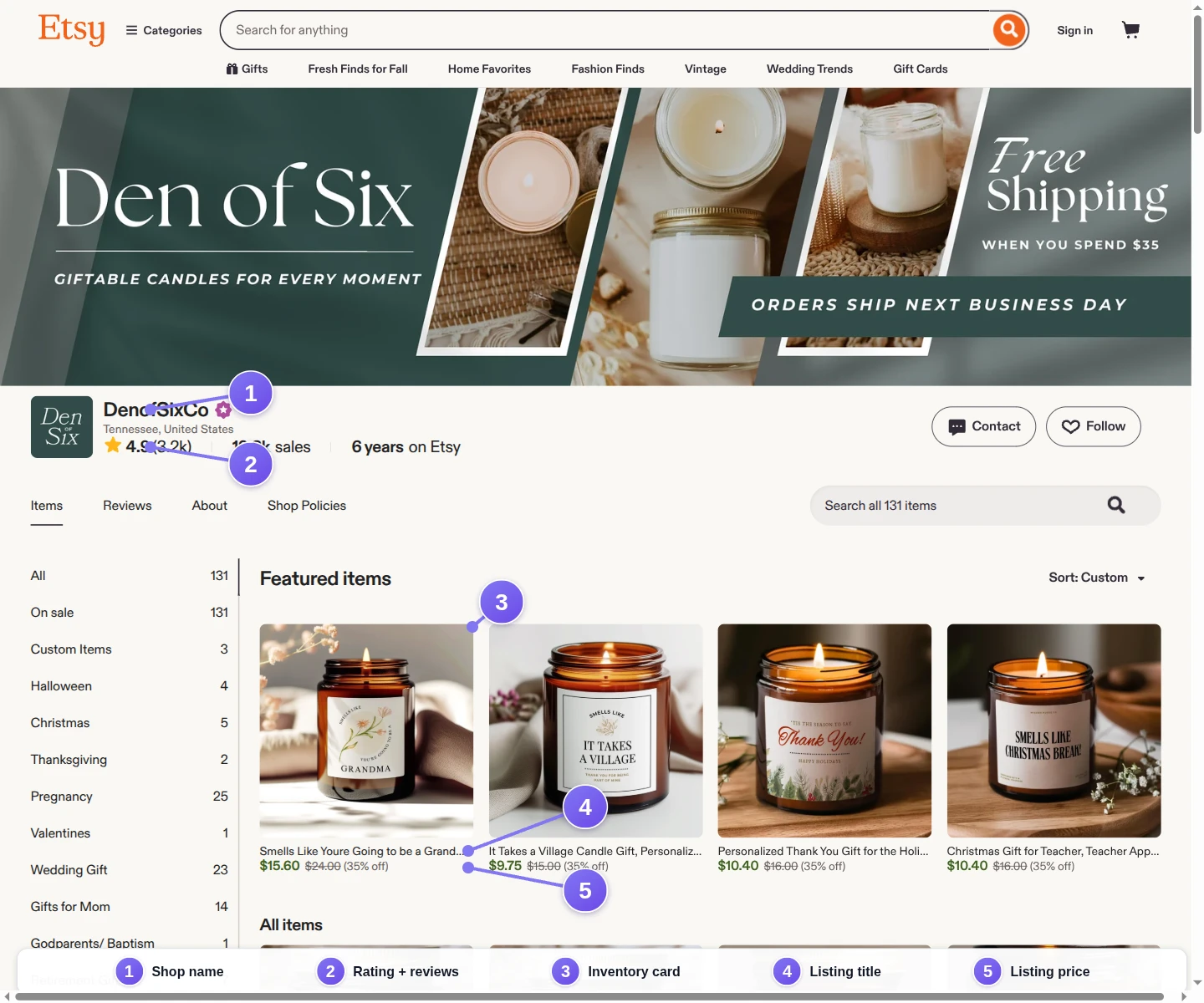
Search cards and shop cards may look similar without having identical markup. Keep their selectors separate until you verify that Etsy uses the same identifiers for both layouts.
Etsy review identifiers
Ratings, review counts, and full reviews are different data. When a search card shows rating data at all, it is only an aggregate rating and count. Full review text belongs to the review region on a product or shop page and may require scrolling, expanding the section, or moving through review pages.
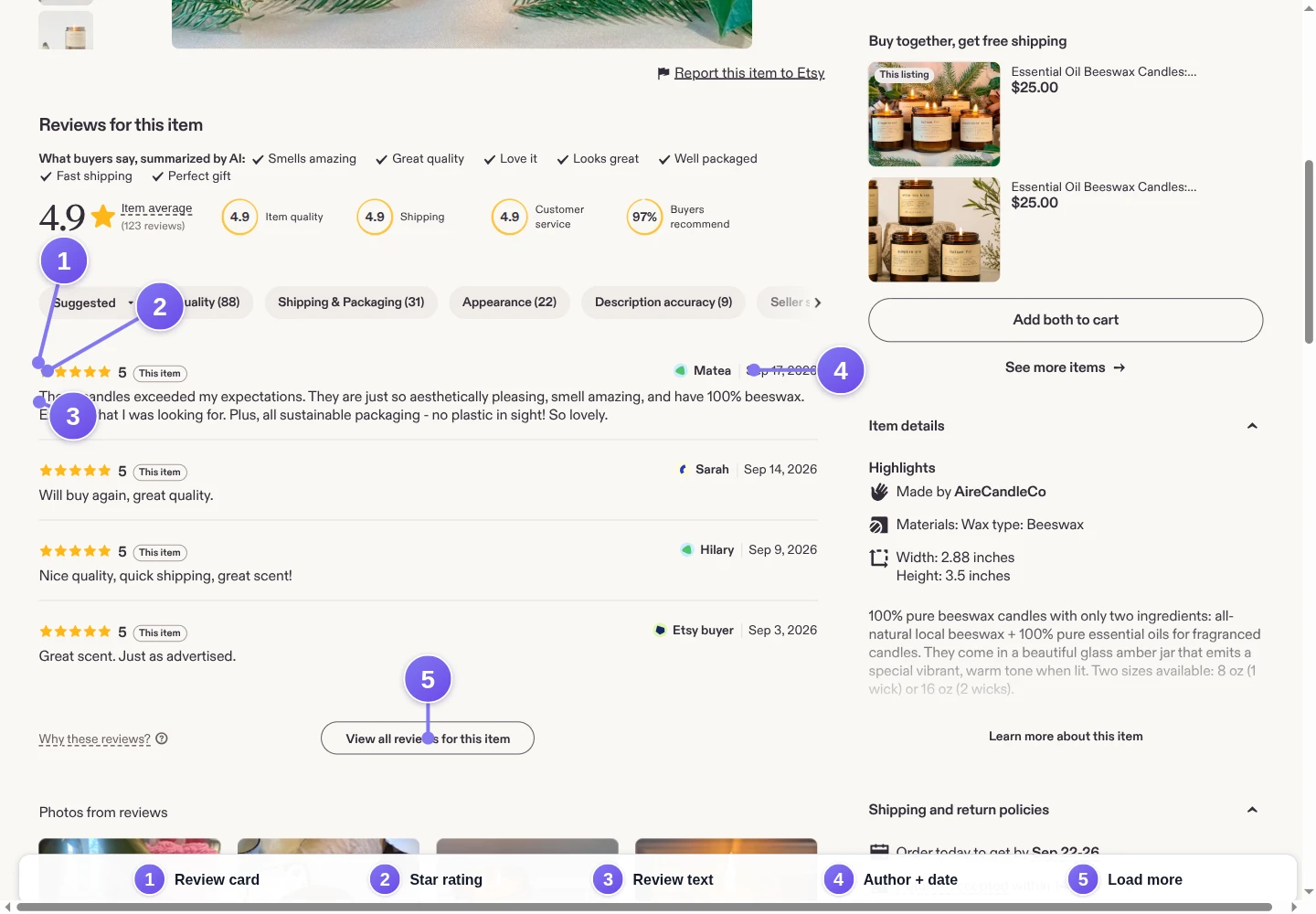
A complete review record normally needs a review-card container, text, rating, author, and date; the code below extracts aggregates and full reviews separately.
Why basic Etsy scrapers become unreliable
Most web scrapers start here. The shortest Python version takes just a few lines and uses the requests and BeautifulSoup Python libraries:
python -m pip install requests beautifulsoup4
import requests
from bs4 import BeautifulSoup

url = "https://www.etsy.com/search?q=candles"
response = requests.get(
    url,
    headers={"User-Agent": "Mozilla/5.0"},
    timeout=20,
)
soup = BeautifulSoup(response.text, "html.parser")
cards = soup.select(".v2-listing-card")
if response.status_code == 200 and cards:
    print(f"Found {len(cards)} listing cards")
else:
    print(
        f"No usable listings: HTTP {response.status_code}; "
        "the response may be incomplete or blocked"
    )
The check is useful as a diagnostic, not as proof that the scrape worked. Today this request usually returns a 403 challenge page, and even a 200 response can still contain incomplete markup, a consent page, or a bot-detection challenge. Even when cards exist, below-the-fold images, expanded reviews, and later inventory pages may be absent.
If a plain request does return the page, check whether the data inside a JSON script tag in the raw HTML already covers the fields you want before adding a browser. Adding a user agent changes one header on your HTTP requests; it does not turn an HTTP client into something that can render a web page.
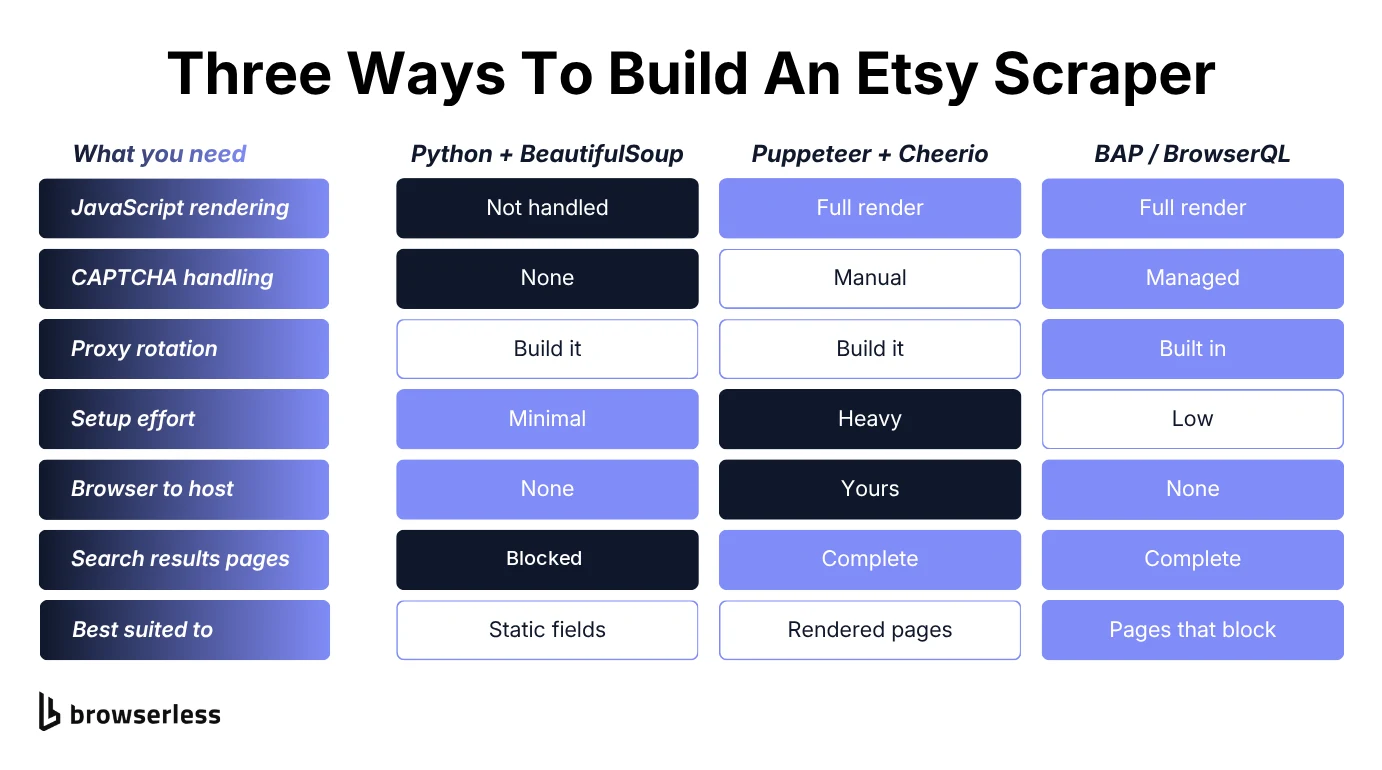
A locally hosted headless browser such as Puppeteer or Playwright can execute JavaScript, scroll the page, and hand back fully rendered HTML, but you still own the browser binaries, concurrency, proxy configuration, challenge handling, retries, and cleanup. Browserless manages that workload remotely, through its stealth browser on the /stealth/bql endpoint.
| Capability | HTTP and BeautifulSoup | Local headless browser | Browserless BAP and BrowserQL |
|---|---|---|---|
| Execute page JavaScript | No | Yes | Yes |
| Trigger lazy-loaded content | No | Build the interaction | scroll({ throughPage: true }) |
| Browser infrastructure | None | Host and maintain it | Managed remotely |
| Stealth browser | No | Add and maintain patches | Select /stealth/bql |
| CAPTCHA workflow | No | Integrate separately | Detect or solve in-session |
| Structured extraction | Parse returned HTML | Write page evaluation code | BAP evaluation or nested BQL mapSelector |
Build an Etsy scraper with Browserless BAP
The code examples below use BAP, a typed SDK over BrowserQL. Its TypeScript API offers familiar methods such as page.goto(), page.scroll(), page.solve(), and page.evaluate(), while Browserless runs the remote browser. Use BAP when you want application code and types, and raw BrowserQL when you want one declarative GraphQL operation or are calling from another language.
Install the TypeScript SDK:
npm install @browserless.io/bap-ts
Store the API key outside the source file:
export BROWSERLESS_API_KEY="your-token"
Centralize the Etsy selectors
Etsy changes its markup, so keep every identifier in one object to save time later. Update this block after checking the annotated screenshots and current DOM instead of hunting through extraction functions.
const SELECTORS = {
  search: {
    card: ".v2-listing-card",
    id: 'input[name="listing_id"]',
    title: 'input[name="listing_title"]',
    discountedPrice: 'input[name="formatted_discounted_price"]',
    originalPrice: 'input[name="formatted_original_price"]',
    image: 'input[name="listing_image_url"]',
    link: 'input[name="listing_url"]',
  },
  product: {
    schema: 'script[type="application/ld+json"]',
  },
  shop: {
    name: "h1",
    card: ".v2-listing-card",
    title: "h3",
    price: ".currency-value",
    link: 'a[href*="/listing/"]',
    reviews: 'a[href="#reviews"]',
  },
  reviews: {
    section: "#reviews",
    card: "[data-review-region]",
    text: "[data-review-text-toggle-wrapper] p",
    rating: 'input[name="rating"]',
    author: "[data-review-username]",
  },
};
The search selectors read values Etsy already places inside each card instead of inferring fields from display text. Product details come from Product JSON-LD, while review selectors target the rendered review region.
Connect through the Browserless stealth endpoint
Create a reusable session helper. /stealth/bql selects Browserless's managed stealth browser; it is an endpoint choice, not a flag added to ordinary Chromium. This connection also enables US residential proxies, and in testing Etsy's DataDome challenge only cleared consistently when traffic came from a residential IP. BrowserQL sessions keep one residential exit IP for the whole session by default, which matters here: DataDome binds its cookies to the egress IP, so a mid-session rotation can re-trigger the challenge. proxyLocaleMatch=1 aligns the browser locale with the US exit node. Residential traffic consumes additional units.
import Browserless, { ConnectionError } from "@browserless.io/bap-ts";

const token = process.env.BROWSERLESS_API_KEY;
if (!token) throw new Error("Set BROWSERLESS_API_KEY before running the scraper");

const browser = Browserless.connect({
  browserWSEndpoint:
    "wss://production-sfo.browserless.io/stealth/bql?proxy=residential&proxyCountry=us&proxyLocaleMatch=1&timeout=120000",
  token,
});

async function clearVisibleChallenge(page) {
  const result = await page.solve({ wait: false });
  if (result.found && !result.solved) {
    throw new Error(
      `A CAPTCHA was found but not solved: ${result.error ?? "unknown error"}`,
    );
  }
}

async function retrySession(operation, attempts = 3) {
  let lastError;
  for (let attempt = 1; attempt <= attempts; attempt += 1) {
    try {
      return await operation();
    } catch (error) {
      // Only a dropped connection is worth retrying. A selector mismatch, an
      // unsolved challenge, or a timeout will not fix itself on a second attempt.
      if (!(error instanceof ConnectionError)) throw error;
      lastError = error;
      console.warn(`Attempt ${attempt} failed: ${error.message}`);
      if (attempt < attempts) {
        await new Promise((resolve) => setTimeout(resolve, 1_000 * 2 ** attempt));
      }
    }
  }
  throw lastError;
}

async function openEtsyPage(url, waitFor, waitOptions = {}) {
  const page = await browser.newPage();
  try {
    await page.goto(url, { waitUntil: "domContentLoaded", timeout: 60_000 });
    await clearVisibleChallenge(page);
    await page.scroll({ throughPage: true });
    await page.waitForSelector(waitFor, { timeout: 30_000, ...waitOptions });
    return page;
  } catch (error) {
    // The caller's finally never runs if setup fails, so release the page here.
    await page.close().catch(() => {});
    throw error;
  }
}
openEtsyPage() keeps navigation, challenge handling, scrolling, and selector waits in one place. retrySession() retries only a ConnectionError, with exponential backoff between attempts, and rethrows everything else so a selector or challenge failure surfaces immediately. Pass { visible: true } when the target must be rendered; omit it for hidden elements such as a JSON-LD script. page.solve({ wait: false }) checks for a challenge that is already present without waiting for one to appear. If Etsy shows the challenge late for your proxy region, switch to wait: true with a timeout, as the BrowserQL example does. CAPTCHA solving consumes plan units, and no anti-bot system guarantees access, so call it only when the page actually presents a supported challenge.
Scrape Etsy product data from search results
The search scraper loads a query URL, checks for a visible challenge, scrolls through the document to trigger lazy-loaded elements, waits for specific elements rather than a fixed delay, and extracts one structured object per card.
async function scrapeSearchResults(searchUrl) {
  const page = await openEtsyPage(searchUrl, SELECTORS.search.card, {
    visible: true,
  });

  try {
    const raw = await page.evaluate(`JSON.stringify((() => {
    const selectors = ${JSON.stringify(SELECTORS.search)};
    return [...document.querySelectorAll(selectors.card)].map((card) => {
      const pick = (selector) => card.querySelector(selector);
      const value = (selector) => pick(selector)?.getAttribute("value") || null;
      return {
        listing_id: value(selectors.id),
        title: value(selectors.title),
        price: value(selectors.discountedPrice) || value(selectors.originalPrice),
        image_url: value(selectors.image),
        url: value(selectors.link),
      };
    });
  })())`);

    const listings = JSON.parse(raw ?? "[]").filter(
      (listing) =>
        listing.listing_id &&
        listing.title &&
        listing.price &&
        listing.image_url &&
        listing.url,
    );
    if (!listings.length) {
      throw new Error(
        "No complete listings found; check for a block or update the selectors",
      );
    }
    return listings;
  } finally {
    await page.close();
  }
}
This validation matters. An empty array can mean “no results,” but it can also mean Etsy changed a selector or returned a different page. Failing loudly stops a blocked scrape from masquerading as valid input to your market analysis.
Scrape an Etsy product page and reviews
To extract product data from an individual listing you need two sources. Product JSON-LD carries the listing-level fields, and the rendered DOM carries the repeated reviews. Scrolling first gives the review region and lazy-loaded images a chance to enter the DOM.
async function scrapeProductPage(listingUrl) {
  const page = await openEtsyPage(listingUrl, SELECTORS.product.schema);
  try {
    await page.evaluate(
      `(() => {
      document.querySelector(${JSON.stringify(SELECTORS.reviews.section)})?.scrollIntoView();
      return "scrolled";
    })()`,
    );
    await page
      .waitForSelector(SELECTORS.reviews.card, {
        visible: true,
        timeout: 15_000,
      })
      .catch(() => null); // A new listing may have no reviews yet.

    const raw = await page.evaluate(`JSON.stringify((() => {
    const selectors = ${JSON.stringify({
      product: SELECTORS.product,
      reviews: SELECTORS.reviews,
    })};
    const schemas = [...document.querySelectorAll(selectors.product.schema)]
      .map((script) => {
        try { return JSON.parse(script.textContent); } catch { return null; }
      })
      .filter(Boolean);
    const schema = schemas.find((item) => item["@type"] === "Product");
    if (!schema) return null;
    const offer = Array.isArray(schema.offers) ? schema.offers[0] : schema.offers;
    const reviews = [...document.querySelectorAll(selectors.reviews.card)]
      .map((review) => {
        const pick = (selector) => review.querySelector(selector);
        const author = pick(selectors.reviews.author)?.textContent?.trim() ?? null;
        const metadata = [...review.querySelectorAll("p")]
          .map((node) => node.textContent?.replace(/\\s+/g, " ").trim())
          .find((text) => author && text?.startsWith(author) && text !== author);
        return {
          review_id: review.getAttribute("data-review-region"),
          text: pick(selectors.reviews.text)?.textContent?.trim() ?? null,
          rating: pick(selectors.reviews.rating)?.getAttribute("value") ?? null,
          author,
          date: metadata?.slice(author.length).trim() || null,
        };
      });
    return {
      title: schema.name ?? null,
      price: offer?.price ?? offer?.priceSpecification?.minPrice ?? null,
      currency: offer?.priceCurrency ?? offer?.priceSpecification?.priceCurrency ?? null,
      seller: schema.brand?.name ?? null,
      description: schema.description ?? null,
      images: (Array.isArray(schema.image) ? schema.image : [schema.image])
        .map((image) => typeof image === "string" ? image : image?.contentURL ?? image?.contentUrl ?? image?.url)
        .filter(Boolean),
      aggregate_rating: schema.aggregateRating?.ratingValue ?? null,
      aggregate_review_count: schema.aggregateRating?.reviewCount ?? null,
      reviews,
    };
  })())`);

    const product = JSON.parse(raw ?? "null");
    if (!product?.title) {
      throw new Error(
        "The product title was missing; verify the page and product selectors",
      );
    }
    return product;
  } finally {
    await page.close();
  }
}
The review wait is optional because a new listing may have no reviews, but it still gives reviewed listings time to render after the targeted scroll.
That extracts only the reviews currently present in the DOM. If the annotated screenshot shows an “expand,” “next,” or “load more” control, add a bounded click loop before evaluation. Stop after a configured number of pages and deduplicate on review_id rather than building an unbounded crawler.
Scrape an Etsy shop page
Shop inventory uses the same extraction pattern as search results, but reads visible text instead of hidden input values, so its selectors live under SELECTORS.shop.
async function scrapeShopPage(shopUrl) {
  const page = await openEtsyPage(shopUrl, SELECTORS.shop.card, { visible: true });

  try {
    const raw = await page.evaluate(`JSON.stringify((() => {
    const selectors = ${JSON.stringify(SELECTORS.shop)};
    const text = (root, selector) =>
      root.querySelector(selector)?.textContent?.replace(/\\s+/g, " ").trim() ?? null;
    const shopName = text(document, selectors.name);
    const bodyText = document.body.innerText.replace(/\\s+/g, " ");
    const summaryStart = shopName ? bodyText.indexOf(shopName) : -1;
    const shopSummary = summaryStart >= 0 ? bodyText.slice(summaryStart, summaryStart + 300) : "";
    return {
      shop_name: shopName,
      shop_rating: shopSummary.match(/\\b([0-5](?:\\.\\d)?)\\s*\\(/)?.[1] ?? null,
      review_count: text(document, selectors.reviews)?.replace(/[()]/g, "") || null,
      items: [...document.querySelectorAll(selectors.card)].map((card) => ({
        title: text(card, selectors.title),
        price: text(card, selectors.price),
        url: card.querySelector(selectors.link)?.href?.split("?")[0] ?? null,
      })),
    };
  })())`);

    const shop = JSON.parse(raw ?? "null");
    if (!shop?.shop_name) {
      throw new Error(
        "The shop name was missing; verify the page and shop selectors",
      );
    }
    const items = shop.items.filter((item) => item.title && item.price && item.url);
    if (!items.length) {
      throw new Error("No complete shop items found; verify the shop selectors");
    }
    return { ...shop, items };
  } finally {
    await page.close();
  }
}
The function returns the inventory currently rendered on the page. If the current shop DOM exposes pagination or a load-more control, use that control to collect later items and cap the number of pages requested. Do not assume a page query parameter without checking the shop's own links.
Run the data extraction and save JSON
Each scraper closes its own page in finally, which releases that page's socket and concurrency slot. The full code calls only the page types you actually need, then closes the browser in finally so a failed navigation does not leave a billable session open.
import { writeFile } from "node:fs/promises";

try {
  const listings = await retrySession(() =>
    scrapeSearchResults("https://www.etsy.com/search?q=candles"),
  );
  await writeFile("etsy-listings.json", JSON.stringify(listings, null, 2));

  // Follow one returned URL to pull the full product record.
  if (listings[0]?.url) {
    const product = await retrySession(() => scrapeProductPage(listings[0].url));
    await writeFile("etsy-product.json", JSON.stringify(product, null, 2));
  }

  const shop = await retrySession(() =>
    scrapeShopPage("https://www.etsy.com/shop/DenofSixCo"),
  );
  await writeFile("etsy-shop.json", JSON.stringify(shop, null, 2));
} finally {
  await browser.close();
}
The extracted data lands in a JSON file, which preserves arrays such as product images and reviews more naturally than a CSV file. The output JSON is also a structured format that most analytics tools and application code can consume. Convert the final records to a CSV file only when the destination requires a flat table.
Extract Etsy listings with raw BrowserQL
BAP methods compile to BrowserQL operations. You can scrape Etsy listings by sending BrowserQL directly when you want a declarative response, when you are working in the hosted BQL IDE, or when you are calling Browserless from a language without a BAP SDK.
mapSelector can nest selectors and preserve the page hierarchy. This mutation reads the card ID from the card itself and the visible title, price, link, and image beneath it, without shipping the whole document back for local HTML parsing:
mutation ScrapeEtsySearch {
  goto(url: "https://www.etsy.com/search?q=candles", waitUntil: domContentLoaded) {
    status
  }
  challenge: solve(wait: true, timeout: 10000) {
    found
    solved
    time
    error
  }
  scroll(throughPage: true) {
    time
  }
  listings: mapSelector(selector: ".v2-listing-card", wait: true, timeout: 30000) {
    listingId: attribute(name: "data-listing-id") {
      value
    }
    title: mapSelector(selector: "h3", wait: false) {
      innerText
    }
    price: mapSelector(selector: ".currency-value", wait: false) {
      innerText
    }
    link: mapSelector(selector: "a[href*='/listing/']", wait: false) {
      href: attribute(name: "href") {
        value
      }
    }
    image: mapSelector(selector: "img", wait: false) {
      src: attribute(name: "src") {
        value
      }
    }
  }
}
Send the mutation as JSON to https://production-sfo.browserless.io/stealth/bql?token=...&proxy=residential&proxyCountry=us. BrowserQL actions execute from top to bottom in the same browser session: navigation, challenge handling, scrolling, and structured data extraction. listingId is a direct attribute result; the nested title, price, link, and image fields are arrays because each child selector can match more than one element, so normalize those fields with a single line such as field?.[0].
A challenged initial navigation can report goto.status as 403 even when challenge.solved is true and extraction then succeeds. A nested selector that matches nothing can also return its own errors entry while the listings around it come back complete, so check data.listings before discarding a response. Treat an unsolved challenge, an error on the listings path, or an empty data.listings value as a failed scrape and surface it as an error. Retry only transport-level failures, with a bounded attempt count and exponential backoff, as in the BAP example.
Collect data from Etsy reliably
A successful first response is not a production scraper. Reliability comes from making failure observable and bounding every loop.
- Wait for the data, not an arbitrary delay. Target a listing card, product title, or review container. A fixed two-second sleep can be too long on a fast page and too short on a slow one.
- Separate “no data” from extraction failure. Good error handling records the final URL, navigation status, page title, challenge result, and matched element count before accepting an empty dataset.
- Keep selectors centralized. Update the selector map and annotated screenshots together when Etsy changes its layout.
- Bound scrolling and pagination. The first page is rarely all the data. Set maximum pages, records, and run time, then deduplicate listings by ID or canonical URL and reviews by review ID.
- Preserve the session. Solving a challenge and then starting a new browser discards the cleared state. BAP continues on the same page after
solve(). - Close every browser. Put
browser.close()infinally, including scripts that write a CSV file or JSON data. - Keep request volume proportionate. Pace the job so it never looks like a burst, on Etsy or on other websites. Bursty traffic is one of the simplest signals a rate limiter can act on, so add jitter between requests.
Conclusion
A reliable Etsy scraper starts with the page, not the code. Find the listing card, the buy box, the shop inventory and the review container, check each against the live DOM, then pull the same labeled fields every run.
Plain HTTP tells you what the server sent, and that's about where it stops. Running JavaScript, scrolling to reviews that load late, keeping a session alive and clearing a challenge all need a real browser. That's what BAP and raw BrowserQL are for, one a typed API for TypeScript and Python, the other a single nested query. You won't need to host Chrome to find out whether any of it works, so sign up for a free Browserless account and point it at a search page.
Etsy scraper FAQs
Can you scrape Etsy with Python?
Yes. Python reads only publicly available data from Etsy's pages, and it can send HTTP requests and parse the raw HTML with requests and BeautifulSoup, but that approach only sees what the server returns. For content that requires JavaScript, scrolling, or browser interaction, use a real browser. Browserless provides a Python BAP SDK as well as BrowserQL over HTTP.
How do I scrape Etsy reviews?
Open an individual listing or shop page, scroll until the review region renders, and extract one record per review container: review text, rating, author, date, and a stable review ID where available. Ratings and review counts on search cards are aggregates, not full reviews. If reviews paginate, use a bounded loop and deduplicate the records.
Should Etsy data go to JSON or a CSV file?
Use JSON when a record contains arrays, which most Etsy product data does, because one listing carries several images and many reviews. The extracted data keeps its shape, and the output JSON drops into another script. Flatten to a CSV file only when the destination expects one row per listing.
How does Browserless handle a CAPTCHA?
Connect BAP or BrowserQL to /stealth/bql, then call solve() when a supported challenge appears. Etsy's current challenge also expects residential IP addresses, which is why the examples above route through residential proxies. The result reports whether a CAPTCHA was found and solved, and the session continues on the same page. CAPTCHA solving consumes units and is not a guarantee that a site will permit access.
Why do my Etsy selectors keep breaking?
Etsy's utility class names change between deploys, and a selector that matches nothing returns an empty result rather than an error, so a broken scraper keeps reporting success. Keep every selector in one object, prefer hidden input values and data-* attributes over long chains of CSS classes, and treat an empty result as a failure worth investigating.