
TL;DR
- List crawling basics. List crawling pulls the same fields from every card on paginated pages like product grids and directories. For JavaScript-rendered lists, Browserless's
/scrapeREST endpoint returns the matched elements as JSON in one request. - Slice past page caps. When a site shows only 100 pages of a 50,000-record list, crawl it one facet at a time, such as state or category, and dedup on the canonical URL.
- Survive blocks and crashes. Soft blocks return
200 OKwith no listings, so escalate to stealth routes and residential proxies. Commit a cursor after every page so a crash costs you one page.
Introduction
If your list crawling job returns fewer rows than the site advertises, or starts getting empty pages halfway through, the cause is usually one of four things. The site caps how many pages it shows, it rate-limits you once you run in parallel, it serves blocked pages that look like successful responses, or your process crashes and has to start over.
By the end, you'll have Python code that splits a capped listing into slices it can finish, runs several workers without tripping rate limits, gets past soft blocks, and picks up where it left off after a crash. Each piece works on its own, so you can add only the ones your target site needs.
What is list crawling?
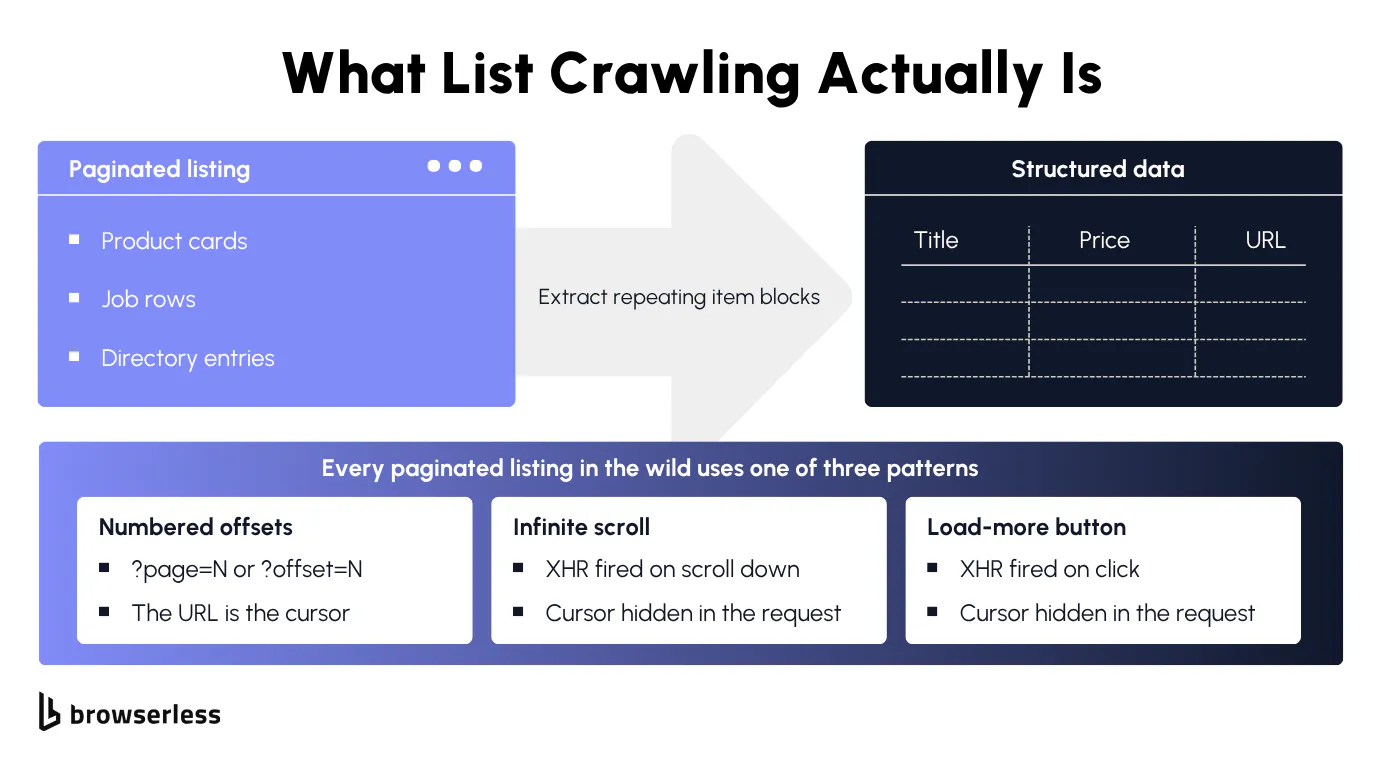
List crawling pulls structured data from list pages that share a repeating layout, such as a category page of product cards, a directory of business listings, or a page of search results. It's a narrow kind of web crawling, aimed at web data that repeats in a known shape. A detail page holds one record per URL, while a list page holds dozens laid out in a structured way.
The URLs follow a pattern (?page=2 or a slugged path like /category/electronics/page-3), each list item exposes the same fields in the same DOM positions, and the canonical URL or listing ID stays stable across runs, so dedup works cleanly.
How list crawling differs from general web scraping
A general crawling job, the kind a web crawler runs across a whole site, follows an arbitrary link graph until the budget runs out. List crawling walks one known page pattern and pulls the same fields from every card.
Knowing the shape of the data before the job starts changes the problems you hit, and those key differences are what this article deals with. Listings come and go mid-crawl, two filters surface the same item twice, the site throttles you before you notice, and item IDs change after a redesign.
List pages in e-commerce product catalogs, business directories, and job boards
The most common types of list crawling targets fall into four groups:
- E-commerce product catalogs. Thousands of SKUs across hundreds of pages, each card carrying product title, price, rating, thumbnail, and stock status.
- Business directories. More records with fewer fields per row, such as every dentist in the United States with name, address, phone, and specialty.
- Job boards. Postings turn over fast, so the value is an incremental crawl. Each card carries title, company, location, and salary, with full descriptions on the detail page.
- Review platforms and news aggregators. The review itself is the record, with author, rating, text, and timestamp repeating under each item.
The 30-line version
A list crawling job usually starts as a short Python script that fetches each page with requests, parses it with Beautiful Soup, walks multiple pages until it runs out, and writes rows to a CSV or Google Sheets. That baseline holds until the page is rendered by JavaScript, and the rest of this guide shows each escalation past it.
Paginated lists, infinite scroll, and HTML structures with Beautiful Soup
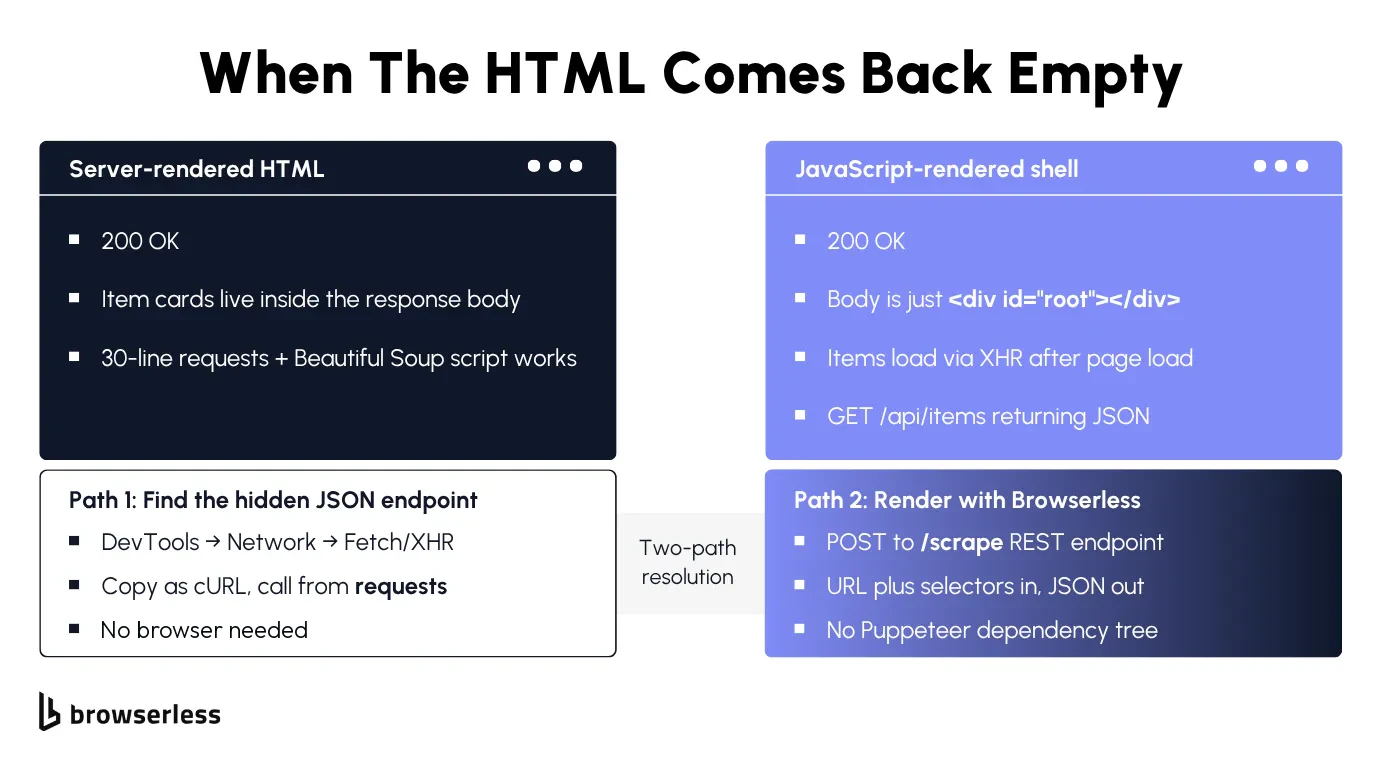
If the listing renders server-side, requests and Beautiful Soup can pull every page. The exact HTML structures barely matter, since a table list, a CSS grid, or a flexbox of cards all parse with the same soup.select() pattern.
The pagination shape matters more than the markup, and traditional pagination with numbered offsets in the URL (?page=2, ?page=3) is the easy case for static lists, because you can walk the pages until one returns no items.
Infinite scroll and load-more buttons follow the same pattern without visible page numbers. Watch DevTools as the user scrolls or clicks and you'll see the page fire a background JSON request for the next batch, which you can call directly.
On quotes.toscrape.com/scroll, for example, every scroll fires a request to /api/quotes?page=N, and the JSON response says when you've reached the end:
import requests

# quotes.toscrape.com/scroll loads each batch from this endpoint as you scroll.
API = "https://quotes.toscrape.com/api/quotes?page={}"

quotes, page = [], 1
while True:
    resp = requests.get(API.format(page), timeout=30)
    resp.raise_for_status()
    data = resp.json()
    quotes += [q["text"] for q in data["quotes"]]
    if not data["has_next"]:  # The API says when you've reached the last batch.
        break
    page += 1

print(f"quotes: {len(quotes)} across {page} pages")
It prints quotes: 100 across 10 pages without rendering a single page, which makes the endpoint worth finding before you reach for a browser.
The baseline only holds while the list data sits in the initial HTML, the page cursor is in the URL, and the site isn't gating you. On modern sites the first of those three assumptions usually breaks first, when the first page comes back as an empty <div id="root"> shell and the dynamic content only appears after JavaScript runs.
Spend two minutes to identify which assumptions hold on your target website:
- Check the raw HTML. View page source or curl the URL, and don't rely solely on the Elements panel, which shows the DOM after JavaScript has already run. If the cards and prices are in the raw HTML, the baseline below works.
- Watch the URL as you paginate. If it never changes when you click to page 2, pagination fires a background request instead of a real navigation.
- Check the Network tab. It's a powerful tool for spotting the request that fires in the background, and that request is the endpoint you want to hit, not the page that wraps it.
These checks avoid common pitfalls, like an hour spent debugging a parser against a site that never served its list server-side.
To prove the parser works, test it against books.toscrape.com, a public web scraping sandbox with a 1,000-book catalog across 50 server-rendered pages. The baseline below walks every page until it hits a 404 and returns one row per book with title and price.
import requests
from bs4 import BeautifulSoup

BASE = "https://books.toscrape.com/catalogue/page-{}.html"

def crawl():
    rows, page = [], 1
    while True:
        resp = requests.get(BASE.format(page), timeout=30)
        if resp.status_code == 404:  # Walked past the last page.
            return rows
        resp.raise_for_status()
        resp.encoding = "utf-8"  # So the £ in prices doesn't render as Latin-1 garbage.
        cards = BeautifulSoup(resp.text, "html.parser").select("article.product_pod")
        if not cards:
            return rows
        rows += [
            {"title": c.h3.a["title"], "price": c.select_one("p.price_color").get_text(strip=True)}
            for c in cards
        ]
        page += 1

if __name__ == "__main__":
    rows = crawl()
    print(f"total books: {len(rows)}")
    print(f"sample: {rows[0]}")
Render dynamic lists and other dynamic content in one round trip
Dynamic lists won't show up in a plain requests.get() call, because the page fires background requests to load content after JavaScript executes. The cheapest escalation is Browserless's /scrape REST endpoint, a scraping API that loads the page in a managed browser, lets it execute JavaScript, and returns CSS-matched elements as JSON in one round trip.
Add blockAds=true to load the page with Browserless's built-in ad blocker. Jobs that need to keep state across pages or solve a CAPTCHA mid-run move up to a full browser session, which the soft-blocks section below covers.
In the request below, three selectors in the elements array pull the title link (h3 a), the price (p.price_color), and the stock label (p.instock.availability) from every product card.
# Browserless renders the page server-side and returns matched elements as JSON.
# blockAds=true loads the page with ads blocked.
ENDPOINT="https://production-sfo.browserless.io/scrape"

curl -sS -X POST "${ENDPOINT}?token=${BROWSERLESS_API_KEY}&blockAds=true" \
  -H "Content-Type: application/json" \
  -d '{
    "url": "https://books.toscrape.com",
    "elements": [
      { "selector": "article.product_pod h3 a" },
      { "selector": "article.product_pod p.price_color" },
      { "selector": "article.product_pod p.instock.availability" }
    ]
  }'
The response holds one entry per selector, each with a results array of 20 matches carrying their text and attributes. Read the book name from the title attribute, since the visible link text is truncated to "A Light in the ...".
When it stops working
One-shot extraction holds up at small scale, but even successful list crawling breaks two ways once you're crawling large lists. The site caps visible pages below the records it advertises, and crawling around that cap runs into rate limits.
Before you scale past what a site serves by default, read its terms of service and robots.txt. Both can restrict automated access, and everything below assumes you're allowed to collect data from the site.
Getting past pagination caps
Some directories cap visible pages well below the dataset they advertise. The search results say 50,000 records, page navigation stops at 100, and 100 pages of 20 items each is 2,000 records, which leaves the other 48,000 as missing data, reachable only through filters.
Try a larger page size first, such as ?per_page=100, since some sites accept one on the query string. When that fails, slice by facet, running each value of a field with good coverage (state, category, price band) as its own paginated crawl.
For example, 50,000 dentists split by US state average about 1,000 records, or 50 pages, per slice. The largest states will still run past the 100-page cap, so split those again by city or zip code.
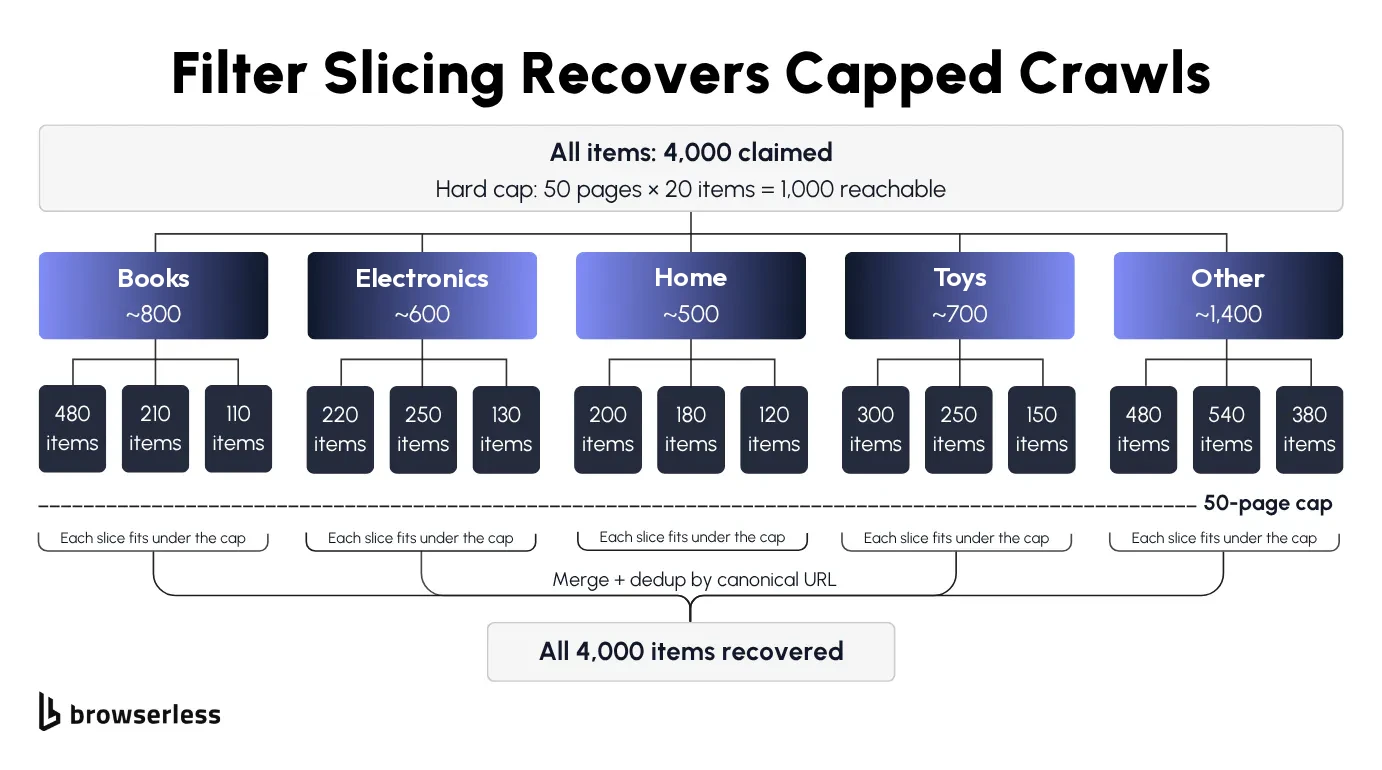
Slices overlap, so dedup on canonical URL with idempotent writes. They also drift as listings appear and drop off mid-crawl, so pick an axis that stays stable for the run and store a cursor per slice.
The script below walks five category slices on books.toscrape.com and dedupes them into listings, a SQLite contents table keyed on canonical URL. walk_slice pages through one slice until a 404, treats an empty 200 page as a soft block, and yields each product with a normalized URL, and INSERT OR IGNORE drops any product that shows up under two slices.
SQLite beats a Python set or a CSV append here, since it persists between runs and lets several copies of the crawler share one store, one writer at a time. A set forgets everything on exit, and a CSV append double-writes overlapping rows.
import sqlite3
from urllib.parse import urljoin

import requests
from bs4 import BeautifulSoup

BASE = "https://books.toscrape.com/catalogue/category/books/"
# One entry per slice. For a real directory these would be states, categories, or price bands.
SLICES = ["travel_2", "mystery_3", "philosophy_7", "classics_6", "romance_8"]

def walk_slice(slice_name):
    """Yield one row per product in a slice, page by page, until a 404 ends it."""
    page_num = 1
    while True:
        name = "index.html" if page_num == 1 else f"page-{page_num}.html"
        url = urljoin(BASE, f"{slice_name}/{name}")
        resp = requests.get(url, timeout=30)
        if resp.status_code == 404:
            return
        resp.raise_for_status()  # A 429 or 403 should stop the run, not end the slice.
        resp.encoding = "utf-8"
        cards = BeautifulSoup(resp.text, "html.parser").select("article.product_pod")
        if not cards:
            # A 200 with no cards is a soft block, not the end of the slice. Only a 404 ends it.
            raise RuntimeError(f"{url} returned 200 with no listings (possible soft block)")
        for card in cards:
            yield {
                # Canonical URL: absolute, without query string or fragment, so duplicates collapse.
                "url": urljoin(url, card.h3.a["href"]).split("?")[0].split("#")[0],
                "title": card.h3.a["title"],
                "price": card.select_one("p.price_color").get_text(strip=True),
            }
        page_num += 1

if __name__ == "__main__":
    conn = sqlite3.connect("/tmp/list-crawling-dedup.sqlite")
    conn.execute(
        "CREATE TABLE IF NOT EXISTS listings "
        "(canonical_url TEXT PRIMARY KEY, title TEXT, price TEXT)"
    )
    inserted = 0
    for slice_name in SLICES:
        # INSERT OR IGNORE turns a product already seen in another slice into a no-op.
        cur = conn.executemany(
            "INSERT OR IGNORE INTO listings VALUES (:url, :title, :price)", walk_slice(slice_name)
        )
        inserted += cur.rowcount
        conn.commit()
    total = conn.execute("SELECT COUNT(*) FROM listings").fetchone()[0]
    print(f"inserted: {inserted}, total in table: {total}")
The five categories hold 108 books, so the first run prints inserted: 108, total in table: 108. A second run prints inserted: 0 against the same 108 rows.
Per-IP rate limits come next, since slices from one IP share that IP's limit, so walking them one after another is slow and running them in parallel gets throttled. Proxy rotation through Browserless's residential pool spreads slices across exit IPs.
Concurrent crawlers that stay under rate limits
Filter slicing fixed the missing pages, but walking 50 slices on a 6-hour deadline takes more browser sessions running at once, spread across separate exit IPs.
How many sessions run at once depends on your Browserless plan. Requests past that limit queue automatically, and once the queue is full, Browserless returns 429 Too Many Requests. Set the worker pool to your plan's concurrency limit, since extra workers only wait in the queue, and close every browser in a finally block so a worker that fails frees its slot instead of holding it until the session times out.
The proxy settings go on the same connection URL, with proxy=residential for the residential pool, proxyCountry=us to pick the exit country, and proxyLocaleMatch=1 to match the browser language to it. Stealth routes like /chromium/stealth are sticky by default and pin one exit IP per session, which suits a slice that has to look like one user, and proxySticky=false switches them to rotating IPs.
In the script below, MAX_WORKERS Playwright workers pull slices off a shared queue and walk each one to the end. A shared next_request_at timestamp acts as a soft rate limiter, so no two requests hit the target less than 1 second apart.
import asyncio
import os
import time
from urllib.parse import urljoin

from playwright.async_api import async_playwright

TOKEN = os.environ["BROWSERLESS_API_KEY"]
# Every proxy option lives on the connection URL: the residential pool, the exit country,
# and proxyLocaleMatch=1 to match the browser language to that country.
WS = (
    "wss://production-sfo.browserless.io/chromium/stealth"
    f"?token={TOKEN}&proxy=residential&proxyCountry=us&proxyLocaleMatch=1"
)
# Set this to your plan's concurrency limit. Extra workers only wait in the queue.
MAX_WORKERS = int(os.environ.get("MAX_WORKERS", "2"))
BASE = "https://books.toscrape.com/catalogue/category/books/"
SLICES = ["travel_2", "mystery_3", "philosophy_7"]

# Shared by every worker, so no two requests reach the target less than 1 second apart.
next_request_at = 0.0

async def wait_for_slot():
    global next_request_at
    # Reserve the next slot before sleeping, so two workers can never claim the same one.
    delay = next_request_at - time.monotonic()
    next_request_at = max(time.monotonic(), next_request_at) + 1.0
    if delay > 0:
        await asyncio.sleep(delay)

async def walk_slice(page, slice_name: str) -> int:
    """Walk one slice page by page and return how many books it held."""
    count, page_num = 0, 1
    while True:
        name = "index.html" if page_num == 1 else f"page-{page_num}.html"
        url = urljoin(BASE, f"{slice_name}/{name}")
        await wait_for_slot()
        resp = await page.goto(url, wait_until="domcontentloaded", timeout=60_000)
        if resp is not None and resp.status == 404:
            return count
        if resp is None or resp.status >= 400:
            # A 429 or 403 is a block, not the end of the slice. Fail loudly, don't undercount.
            raise RuntimeError(f"{url} returned {resp.status if resp else 'no response'}")
        # One call reads every title, instead of one round trip to the remote browser per card.
        titles = await page.locator("article.product_pod h3 a").evaluate_all(
            "links => links.map(a => a.title)"
        )
        if not titles:
            # A 200 with no titles is a soft block. Fail loudly instead of ending the slice early.
            raise RuntimeError(f"{url} returned 200 with no listings (possible soft block)")
        count += len(titles)
        page_num += 1

async def worker(name: str, pw, queue: asyncio.Queue, results: dict):
    """One worker = one Browserless session, pulling slices until the queue is empty."""
    browser = await pw.chromium.connect_over_cdp(WS)
    try:
        context = browser.contexts[0] if browser.contexts else await browser.new_context()
        page = await context.new_page()
        while not queue.empty():
            slice_name = queue.get_nowait()
            results[slice_name] = await walk_slice(page, slice_name)
            print(f"[{name}] {slice_name} -> {results[slice_name]} items")
    finally:
        await browser.close()

async def main():
    queue: asyncio.Queue = asyncio.Queue()
    for s in SLICES:
        queue.put_nowait(s)
    results: dict = {}
    async with async_playwright() as pw:
        await asyncio.gather(*(worker(f"w{i}", pw, queue, results) for i in range(MAX_WORKERS)))
    print(f"workers={MAX_WORKERS} total_items={sum(results.values())}")

if __name__ == "__main__":
    asyncio.run(main())
With two workers, the three category slices come back with 11, 32, and 11 books, and the run ends with workers=2 total_items=54. Whichever worker finishes a slice first takes the next one off the queue.
Keeping the crawl alive
A crawl that runs for days hits problems a one-hour test never shows, from soft blocks that hide inside 200 OK responses to a process that dies halfway through slice 27.
Soft blocks and anti-bot defenses
Empty pages halfway through a crawl usually mean a soft block, where the site stops serving listings to your IP or session but still returns 200 OK with a stripped page, so your script logs no errors and keeps paginating into the void.
A hard 429 is the easy case, with failed requests you can back off and retry, while a soft block or a CAPTCHA mid-pagination needs more sophisticated techniques than a retry.
Browserless layers anti-bot defenses across six escalating tiers, each the right tool for a different detection class:
- Stealth routes. Fingerprint mitigations on a purpose-hardened managed environment (
/stealth), Chromium with anti-detection (/chromium/stealth), or genuine Chrome (/chrome/stealth). - Residential proxies. Pair
proxy=residentialwith stealth so the IP reputation matches the persona. - /unblock API. Launches browsers the way end users would and works through the browser's native remote interfaces, for sites that flag Puppeteer or Playwright.
- In-session CAPTCHA solving. On Browsers as a Service, add
solveCaptchas=trueto the connection URL to handle a CAPTCHA without leaving your existing Puppeteer or Playwright session. - CAPTCHA solving in BAP. The Browser Automation Protocol (BAP) SDK's
page.solve()auto-detects the challenge and solves it inside the running session, covering Cloudflare Turnstile, reCAPTCHA, GeeTest, DataDome, and Akamai. - Human takeover in BAP.
page.liveURL()returns a shareable link to the live browser that a human can take over (last resort for challenges no automated tier clears).
The open-source alternative, puppeteer-extra-plugin-stealth, injects JavaScript fingerprint patches into every page. Patched automation libraries leave traces that detection scripts look for, which is why Browserless's stealth routes do that work in the browser build instead.
Every BAP method compiles down to BrowserQL, the GraphQL protocol underneath it. BAP's Python SDK isn't on PyPI yet, so from Python you call BrowserQL over HTTP, here on /stealth/bql, a privacy-hardened stealth browser with fingerprint randomization, ad blocking, and a distinct user agent. Adding humanlike=true to the URL turns on human-like interaction behavior.
The mutation below opens one listing page with goto, where waitUntil: networkIdle waits for 500 ms with no network connections, so content loaded by background requests has time to arrive, and timeout: 60000 gives the navigation a full minute, since networkIdle through a residential exit can run past the 30-second default. Then the mapSelector mutation walks every article.product_pod card and returns one record per match with its title and price. The connection itself times out after 60 seconds by default, so timeout=120000 on the endpoint leaves room for both steps.
# POST to https://production-sfo.browserless.io/stealth/bql
#        ?token=${BROWSERLESS_API_KEY}
#        &proxy=residential&proxyCountry=us&proxyLocaleMatch=true
#        &humanlike=true   # human-like interaction behavior
#        &timeout=120000   # connection timeout, above the 60-second default

mutation ScrapeListing {
  # Navigate the privacy-hardened stealth browser to the listing page.
  # waitUntil: networkIdle gives the page time to finish background JSON calls.
  goto(
    url: "https://books.toscrape.com/catalogue/page-1.html"
    waitUntil: networkIdle
    timeout: 60000
  ) {
    status
  }

  # mapSelector iterates every product card on the page and pulls title + price from each.
  # One request returns every card on the page, with no click-and-extract loop.
  cards: mapSelector(selector: "article.product_pod") {
    title: mapSelector(selector: "h3 a") {
      value: attribute(name: "title") {
        value
      }
    }
    price: mapSelector(selector: "p.price_color") {
      text: innerText
    }
  }
}
Send the mutation as the query field of a JSON body. The response carries goto.status (200) and a cards array with 20 entries, each holding the book's full title attribute and its price text.
Resuming after a crash
When the crawling process dies at item 47,800 of 50,000, you have to recover the script's place (slice and page) and the browser's state. The browser holds the open pages, cookies, any CAPTCHA it already cleared, and the exit IP, and without a persisted session all of that goes when the browser does.
On the script side, store the slice ID and current page in SQLite after each page commits, keep the INSERT OR IGNORE write from the slicing section, and resume from the next page after a restart.
On the browser side, Browserless's Session API takes ttl, the session's total lifetime, and processKeepAlive, how long the browser keeps running after the last client disconnects, and returns a connect URL plus a stop URL for cleanup.
Reconnect inside processKeepAlive and you land on the same live browser. After it expires, a new browser process starts with cookies and localStorage restored but open pages gone. processKeepAlive defaults to 0, so set it to cover your worst-case restart time. Keeping the live browser needs browser.disconnect(), which Puppeteer has and Playwright doesn't, so a Playwright client always reconnects to a fresh browser process with the session's cookies and localStorage restored.
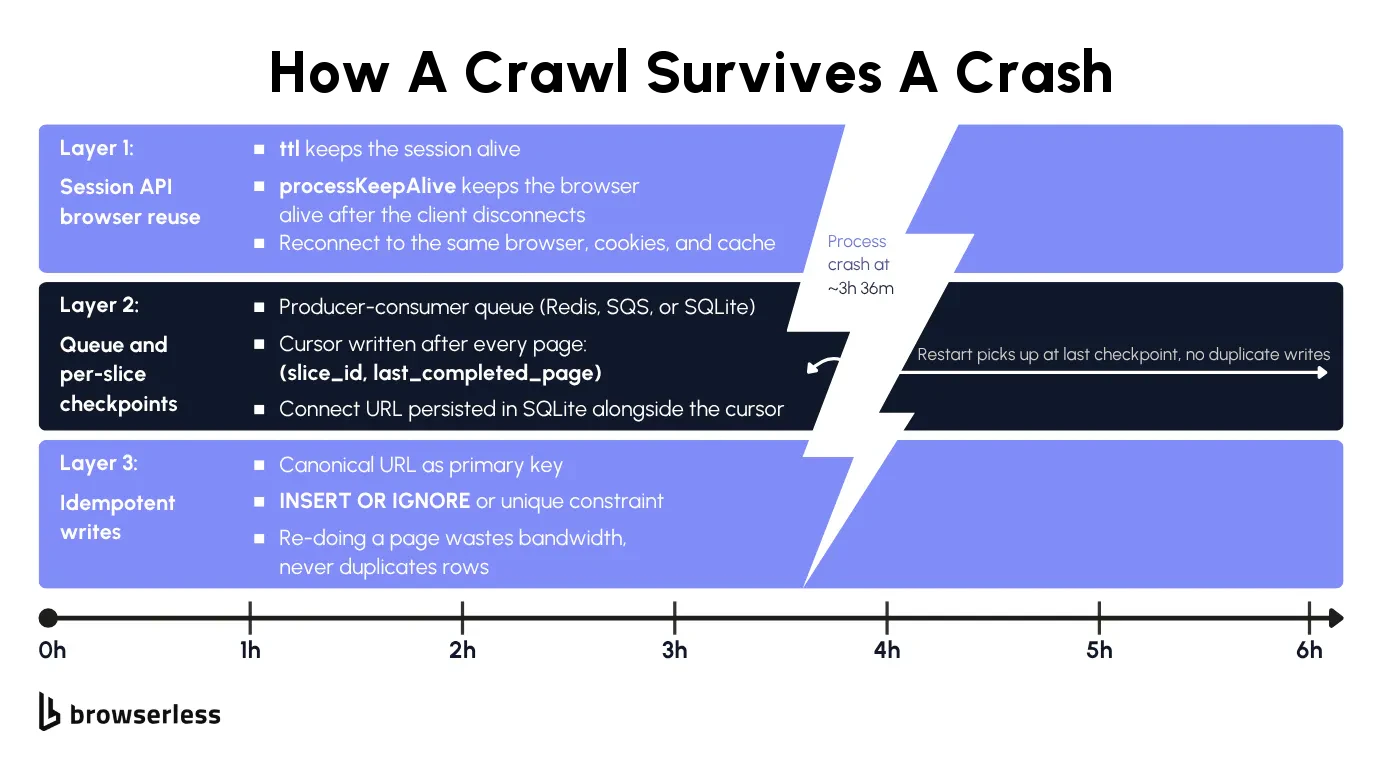
The script below creates the session and three SQLite tables, then runs two phases through one crawl() function. It walks pages with walk_one_page, and commit_page writes each page's rows with INSERT OR IGNORE and advances the cursor in the same transaction, which makes a replay safe.
Phase 1 walks three pages, drops its connection the way a crash would, and exits with an error. By then SQLite holds the connect URL and the cursor. Run the script again and phase 2 reads both back, reconnects to the persisted session with connect_over_cdp, restarts on the last committed page, and walks the rest of the catalog. Because this demo uses Playwright, phase 2 gets a fresh browser process with the session's cookies and localStorage, and the SQLite cursor is what puts it back on the right page. Port the client to Puppeteer, call browser.disconnect(), and set processKeepAlive if you need the same live browser back.
import os
import sqlite3
import sys
from urllib.parse import urljoin

import requests
from playwright.sync_api import sync_playwright

TOKEN = os.environ["BROWSERLESS_API_KEY"]
BASE = "https://books.toscrape.com/catalogue/"
DB_PATH = "/tmp/list-crawling-resume.sqlite"
CRASH_AFTER_PAGE = 3  # The demo crashes the Python process after this page.

SCHEMA = """
CREATE TABLE IF NOT EXISTS session_state (
    id INTEGER PRIMARY KEY CHECK (id = 1), connect_url TEXT NOT NULL, stop_url TEXT NOT NULL);
CREATE TABLE IF NOT EXISTS cursor (slice_id TEXT PRIMARY KEY, last_completed_page INTEGER NOT NULL);
CREATE TABLE IF NOT EXISTS listings (canonical_url TEXT PRIMARY KEY, title TEXT, price TEXT);
"""

def open_db(reset: bool = False):
    if reset and os.path.exists(DB_PATH):
        os.remove(DB_PATH)
    conn = sqlite3.connect(DB_PATH)
    conn.executescript(SCHEMA)
    return conn

def has_saved_state() -> bool:
    """True when an earlier run left a session behind to resume."""
    if not os.path.exists(DB_PATH):
        return False
    conn = open_db()
    found = conn.execute("SELECT 1 FROM session_state").fetchone() is not None
    conn.close()
    return found

def create_session():
    # ttl: total session lifetime (1 hour).
    resp = requests.post(
        f"https://production-sfo.browserless.io/session?token={TOKEN}",
        json={"ttl": 3_600_000},
        timeout=30,
    )
    resp.raise_for_status()
    return resp.json()

def walk_one_page(page, page_num: int):
    """Return one page of (canonical_url, title, price) rows, or None past the last page."""
    url = urljoin(BASE, f"page-{page_num}.html")
    resp = page.goto(url, wait_until="domcontentloaded", timeout=60_000)
    if resp is None or (resp.status >= 400 and resp.status != 404):
        # Stop on a block rather than treating it as the end. The cursor keeps your place.
        raise RuntimeError(f"{url} returned {resp.status if resp else 'no response'}")
    if resp.status == 404:
        return None  # Walked past the last page.
    # One call reads every card; `a.href` is already the absolute URL.
    rows = page.locator("article.product_pod").evaluate_all("""cards => cards.map(c => [
        c.querySelector("h3 a").href,
        c.querySelector("h3 a").title,
        c.querySelector("p.price_color").innerText.trim(),
    ])""")
    if not rows:
        # A 200 with no cards is a soft block, so stop without moving the cursor.
        raise RuntimeError(f"{url} returned 200 with no listings (possible soft block)")
    return rows

def commit_page(conn, page_num: int, rows):
    # Rows and cursor commit in one transaction, so a crash can only ever replay a whole page.
    conn.executemany("INSERT OR IGNORE INTO listings VALUES (?, ?, ?)", rows)
    conn.execute(
        "INSERT INTO cursor VALUES ('all', ?) "
        "ON CONFLICT(slice_id) DO UPDATE SET last_completed_page = excluded.last_completed_page",
        (page_num,),
    )
    conn.commit()

def crawl(conn, connect_url: str, start_page: int, stop_after=None):
    """Connect to the persisted browser and walk from start_page, committing every page."""
    with sync_playwright() as pw:
        browser = pw.chromium.connect_over_cdp(connect_url)
        ctx = browser.contexts[0] if browser.contexts else browser.new_context()
        page = ctx.pages[0] if ctx.pages else ctx.new_page()
        print(f"connected, browser is on: {page.url}")
        page_num = start_page
        while stop_after is None or page_num <= stop_after:
            rows = walk_one_page(page, page_num)
            if rows is None:
                break
            commit_page(conn, page_num, rows)
            page_num += 1
    # Leaving the `with` block drops the connection, the same thing a crash does.
    # Playwright has no disconnect(), so phase 2 reconnects to a fresh browser process
    # with the session's cookies and localStorage, and the SQLite cursor restores its place.

def phase1_until_crash():
    conn = open_db(reset=True)
    session = create_session()
    # Persist the connect and stop URLs so phase 2 can reconnect to the same session.
    conn.execute(
        "INSERT INTO session_state VALUES (1, ?, ?)", (session["connect"], session["stop"])
    )
    conn.commit()
    crawl(conn, session["connect"], start_page=1, stop_after=CRASH_AFTER_PAGE)
    raise RuntimeError("simulated crash mid-job")

def phase2_resume():
    # A fresh process: everything it needs comes back out of SQLite.
    conn = open_db()
    connect_url, stop_url = conn.execute(
        "SELECT connect_url, stop_url FROM session_state"
    ).fetchone()
    row = conn.execute("SELECT last_completed_page FROM cursor").fetchone()
    last_page = row[0] if row else 1  # No page committed yet, so start at page 1.
    # Restart on the last committed page. INSERT OR IGNORE makes replaying it a no-op.
    crawl(conn, connect_url, start_page=last_page)
    rows, cursor_page = conn.execute(
        "SELECT (SELECT COUNT(*) FROM listings), last_completed_page FROM cursor"
    ).fetchone()
    print(f"resumed at page {last_page}, rows: {rows}, cursor: page {cursor_page}")
    # Release the persisted session on Browserless and clear it, so the next run starts fresh.
    requests.delete(f"{stop_url}&force=true", timeout=10).raise_for_status()
    conn.execute("DELETE FROM session_state")
    conn.commit()
    conn.close()

if __name__ == "__main__":
    # The first run crashes partway through. Run the script again to resume.
    if has_saved_state():
        phase2_resume()
    else:
        try:
            phase1_until_crash()
        except RuntimeError as exc:
            sys.exit(f"[CRASH] {exc}")
The first run prints connected, browser is on: about:blank and [CRASH] simulated crash mid-job, then exits. Run it again and phase 2 reconnects to the session, restarts on page 3 from the SQLite cursor, and finishes with resumed at page 3, rows: 1000, cursor: page 50.
Real crashes are rarely this clean, since a process can die mid-page-load or mid-CAPTCHA. The cursor advances in the same transaction as the inserts, so the worst case is replaying the one page that was in flight, and INSERT OR IGNORE turns its rows into no-ops. For a fifteen-minute job, skip the resume machinery and rerun from scratch.
Conclusion
Before you trust a list crawl, compare the rows you stored with the total the site advertises. If the numbers are far apart, the fixes in this article tell you where to look, whether that's a page cap that needs slicing, a rate limit that needs spacing and more exit IPs, or a soft block that needs a stealth route.
Browserless handles the browser side of those fixes, including rendering, stealth routes, residential proxies, and sessions you can reconnect to after a crash. Sign up for Browserless to run the scripts from this article.
List crawling FAQs
How do I know the slicing plan actually recovered every record?
Compare your unique-row count with the directory's advertised total. A gap of more than a few percent usually means a facet still exceeded the page cap or drifted mid-run, so re-slice on a finer axis (zip code instead of state) or run two slicing axes and dedup the union on canonical URL.
Why does my scraper return empty results on page 50 but not on page 1?
Page 50 coming back empty while page 1 works is usually a soft block, which you can confirm by comparing the page-50 response body with a known-good page-1 capture. If the structure is there but the rows are missing, the site is stripping the listing for your session, and the escalation order in the soft blocks section is the fix.
What if the crash outlasts the Browserless session-keepalive window?
Reconnect to the same connect URL anyway, since until the session's ttl runs out, Browserless starts a fresh browser process with the saved cookies and localStorage. Replay the last committed page from the SQLite cursor and walk forward, and once ttl expires, start a new session from the cursor alone.
When should I keep the same proxy IP versus letting it rotate?
Keep the same IP when a slice depends on session state, like a logged-in cart or a target that checks for IP changes mid-session, and let it rotate when each page request stands alone. Stealth routes, BrowserQL, /unblock, and /scrape are sticky by default (proxySticky=false rotates), while other REST endpoints and library connections take a random IP per request unless you pass proxySticky=true.