
TL;DR
- Playwright testing. A cross-browser end-to-end test framework from Microsoft that drives Chromium, Firefox, and WebKit through one API, with auto-waiting, isolated contexts per test, parallel test execution, and tracing built in.
- Fast to start. A working suite runs in minutes, and network mocking, retry strategies, and Trace Viewer debugging layer on as it grows.
- The scaling wall. When CI runners start choking on browser processes, Browsers as a Service (BaaS v2) moves execution to managed cloud browsers so your pipeline doesn't bottleneck on RAM.
Introduction
If you've been running Playwright testing in CI for a while, you probably have a couple of specs sitting behind test.skip with a comment that says flaky, fix later, dated some time last year. They cover something real, so deleting them feels wrong. They only fail about one run in five, which is just rare enough that it never quite becomes anyone's problem on a Tuesday afternoon.
Playwright already ships the fixes, and they're the parts people skip on the way to a first passing test. Auto-waiting works until someone wraps a waitForTimeout around it, and traces only help if they were recording before the run that broke. This guide sets up the runner, writes assertions that don't need manual waits, mocks the APIs that make tests flaky, and ends with the browsers off your CI box entirely.
What Playwright testing is and why it matters for modern web testing
Playwright testing means driving a real browser through the @playwright/test runner, which talks to Chromium, Firefox, and WebKit over a persistent connection rather than one HTTP request per command. One API covers all three engines, and the runner supplies isolation, retries, tracing, and parallel workers without extra plugins.
How Playwright test automation compares to Selenium
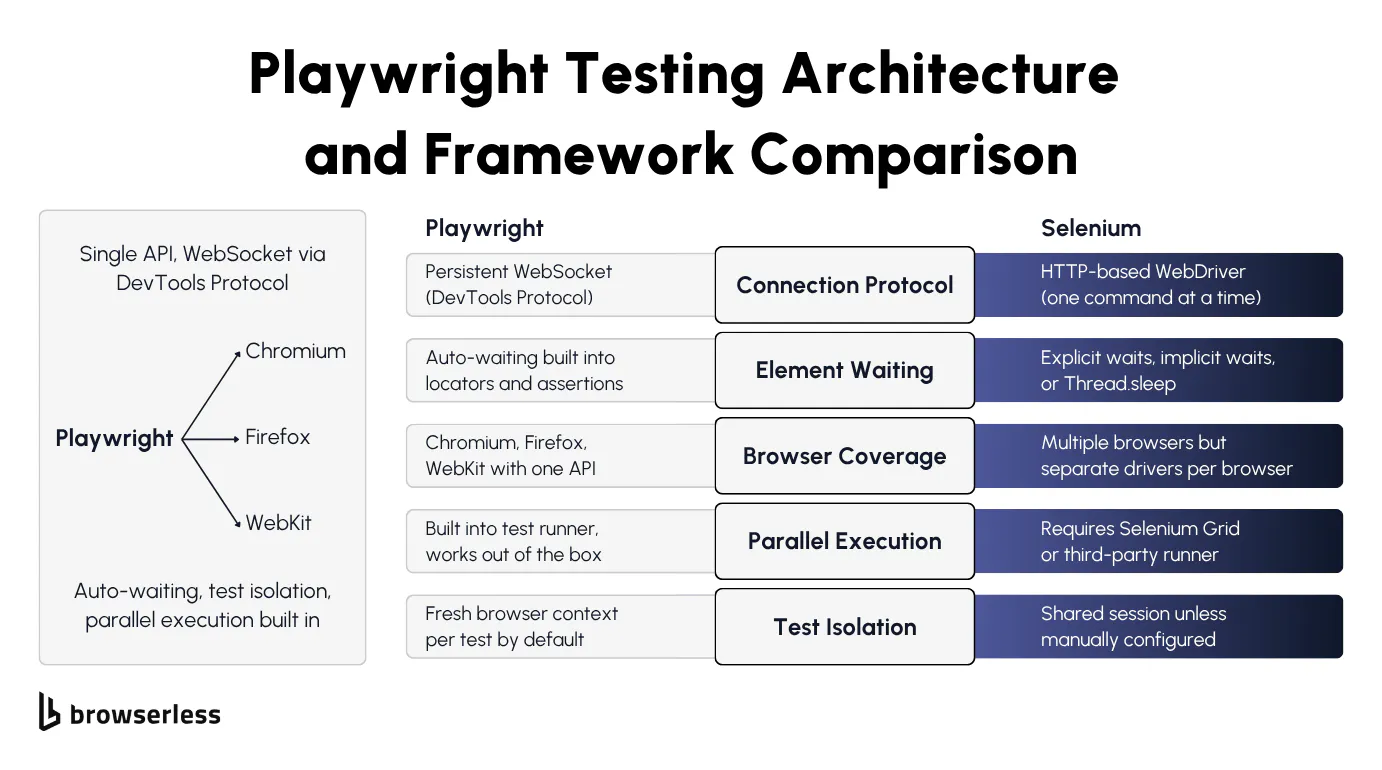
Playwright and Selenium part ways at browser control. Selenium sends each command over HTTP via the WebDriver protocol, then waits for a response before sending the next one.
Playwright connects to each browser over a persistent protocol and keeps the channel open. For Chromium it uses the Chrome DevTools Protocol (CDP), for Firefox it uses Juggler, and for WebKit it uses Playwright's own protocol. The result is the same in each case. Commands fire over an open connection, with no HTTP round-trips.
If you've spent any time debugging Selenium tests, automatic waiting is the most obvious difference. In a Playwright testing workflow, locators and assertions keep retrying until elements are visible, stable, and actionable, so you're not writing manual waits.
With Selenium, your options are explicit waits, implicit waits, Thread.sleep (or its language equivalent), or some brittle combination of all of them. Each one either slows your tests down or makes them flaky. Reliable tests are much easier to write when the framework does the waiting for you.
The other split is coverage, where Playwright's cross browser testing support spans all three major rendering engines behind one API. Selenium reaches more browsers overall, but it wants separate driver binaries and usually some per-browser fiddling in your automated tests.
Playwright's runner also ships with parallel workers built in. Matching that on Selenium means Selenium Grid or a third-party runner.
If you're currently on Selenium and considering a switch, see the migrating from Selenium to Playwright guide for the migration path in detail. Note that BaaS v2 dropped Selenium support, so the migration path for cloud execution is Selenium to Puppeteer or Playwright (then connect to Browserless), rather than Selenium directly to Browserless.
Key features of Playwright as a testing framework
Playwright runs every test in a fresh browser context, which means each test gets the equivalent of a brand-new browser profile with its own cookies, localStorage, and cache. By default this prevents cross-test contamination, one of the most common sources of hard-to-debug failures.
Playwright's full featured test runner (@playwright/test) is already in the box, with automatic retries, an HTML test report, and JUnit and JSON output for CI. Unlike most test automation tool setups, there's no separate framework to bolt on and no reporter plugins to wire up.
The codegen tool (npx playwright codegen) records your user interactions in a real browser to generate tests you can use as a starting point, though you'll almost always need to clean them up before they're production-ready.
CI failure screenshots are notoriously unhelpful, which is exactly what Trace Viewer fixes. It captures an execution trace for every test run, covering DOM snapshots, network requests, console logs, and action timelines. When you need to debug tests that only fail in CI, you can replay the run step by step without re-running anything.
Setting up Playwright and writing your first test
Installing Playwright and configuring the test runner
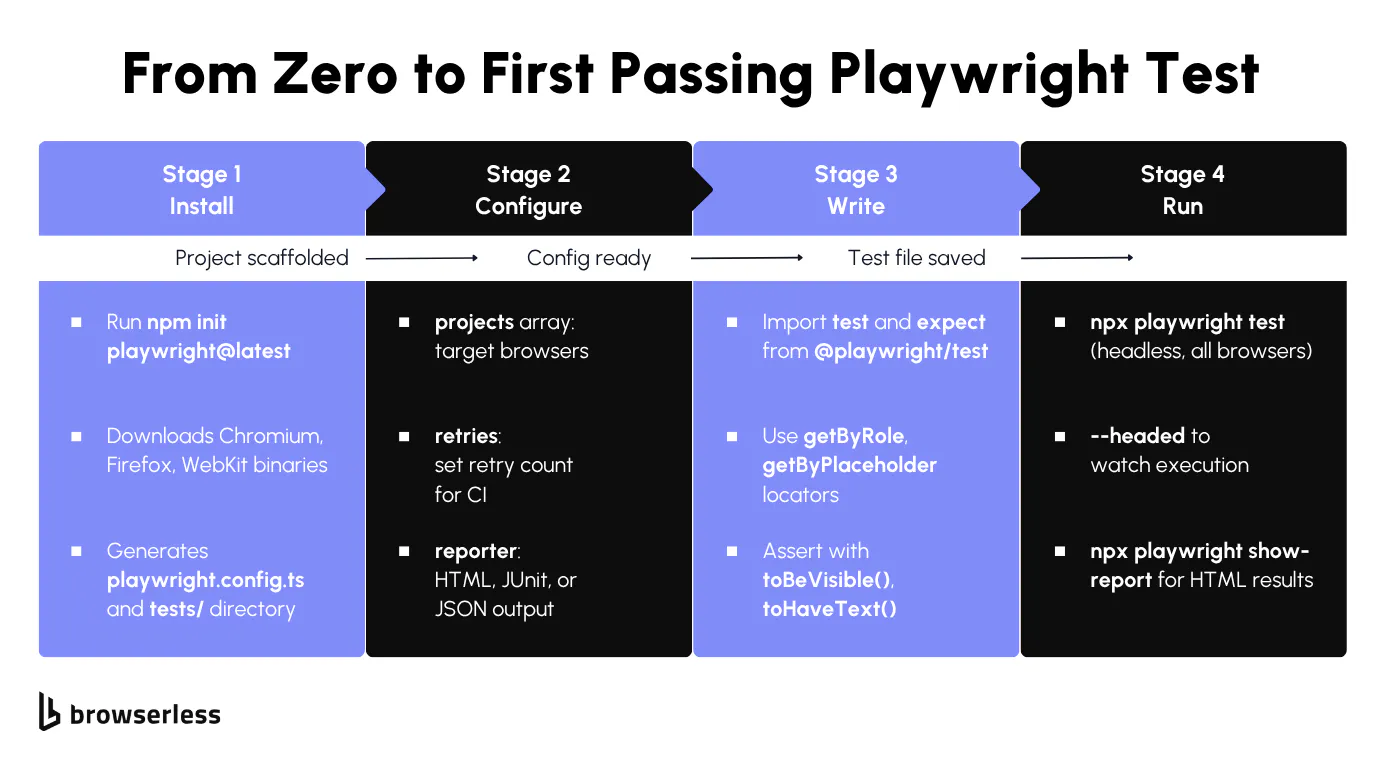
You'll need a current Node.js release, which as of this writing means the latest 22.x, 24.x, or 26.x (run node -v to confirm). From there, one command scaffolds a whole Playwright project:
npm init playwright@latest
The command generates a playwright.config.ts, a tests/ directory holding an example test, and downloads the three browser binaries. The config is the file you'll come back to most, so it's worth reading before you write a test:
// playwright.config.ts
import { defineConfig, devices } from "@playwright/test";

export default defineConfig({
  testDir: "./tests",
  fullyParallel: true,
  // Retry failed tests twice in CI, zero retries locally
  retries: process.env.CI ? 2 : 0,
  workers: process.env.CI ? 1 : undefined,
  reporter: "html",
  projects: [
    { name: "chromium", use: { ...devices["Desktop Chrome"] } },
    { name: "firefox", use: { ...devices["Desktop Firefox"] } },
    { name: "webkit", use: { ...devices["Desktop Safari"] } },
  ],
});
Five keys carry most of the behavior. testDir points at your test folder, projects defines which browsers to run against, retries sets how many attempts a failing test gets, and reporter chooses the output format. fullyParallel lets tests inside the same file run at once rather than in sequence.
Note that retries and workers both branch on process.env.CI, so the suite deliberately behaves differently on a shared runner than it does on your laptop.
With the config in place, run tests with npx playwright test, which uses headless mode by default. Add --headed to watch in a visible browser, --ui for interactive mode, or --project=chromium to target specific tests at a single browser. After a run, npx playwright show-report opens an HTML report of the test results.
Start with a single browser to confirm the install actually works:
npx playwright test --project=chromium
You should see output like this:
Running 1 test using 1 worker
  ✓  1 [chromium] › tests/example.spec.ts:3:5 › has title (498ms)
  1 passed (3.1s)
One test, one worker, green in about three seconds. That's the scaffold working end to end, and the example spec is now yours to replace.
Writing a basic end-to-end test with assertions
With the project scaffolded, you're ready to write your first real Playwright testing spec. Create a new test file at tests/example.spec.ts and import test and expect from @playwright/test. Each test() block receives a page fixture automatically, so there's no manual browser launch step.
Playwright's locator strategy prioritizes accessibility over raw CSS selectors. Methods like page.getByRole('heading', { name: 'todos' }), page.getByPlaceholder('What needs to be done?'), and page.getByTestId('todo-item') make your tests read like user stories. Tests based on a role or a label also survive UI refactors far better than .class-name selectors.
Web-first assertions make the biggest difference for test reliability. When you write await expect(page.getByRole('heading')).toBeVisible(), Playwright automatically retries that assertion for up to 5 seconds (configurable via expect: { timeout: 5000 } in your config).
By contrast, page.waitForSelector() waits for visibility by default but doesn't retry assertions or check actionability the way web-first assertions do.
The following test navigates to the Playwright TodoMVC demo, adds an item, and verifies it appears in the list:
import { test, expect } from "@playwright/test";

test("add a todo item and verify it appears", async ({ page }) => {
  await page.goto("https://demo.playwright.dev/todomvc/#/");

  await expect(page.getByRole("heading", { name: "todos" })).toBeVisible();

  const todoInput = page.getByPlaceholder("What needs to be done?");
  await todoInput.fill("Buy groceries");
  await todoInput.press("Enter");

  const todoItem = page.getByTestId("todo-title");
  await expect(todoItem).toBeVisible();
  await expect(todoItem).toHaveText("Buy groceries");

  await todoInput.fill("Write Playwright tests");
  await todoInput.press("Enter");

  const todoItems = page.getByTestId("todo-title");
  await expect(todoItems).toHaveCount(2);
  await expect(todoItems.nth(0)).toHaveText("Buy groceries");
  await expect(todoItems.nth(1)).toHaveText("Write Playwright tests");
});
Run the test in headed mode with npx playwright test --headed to watch the browser interact with the page in real time. Once it passes, you've got a working foundation to build on.
Fixing flaky tests and mocking network requests
How to fix flaky tests with retries, proper assertions, and test isolation
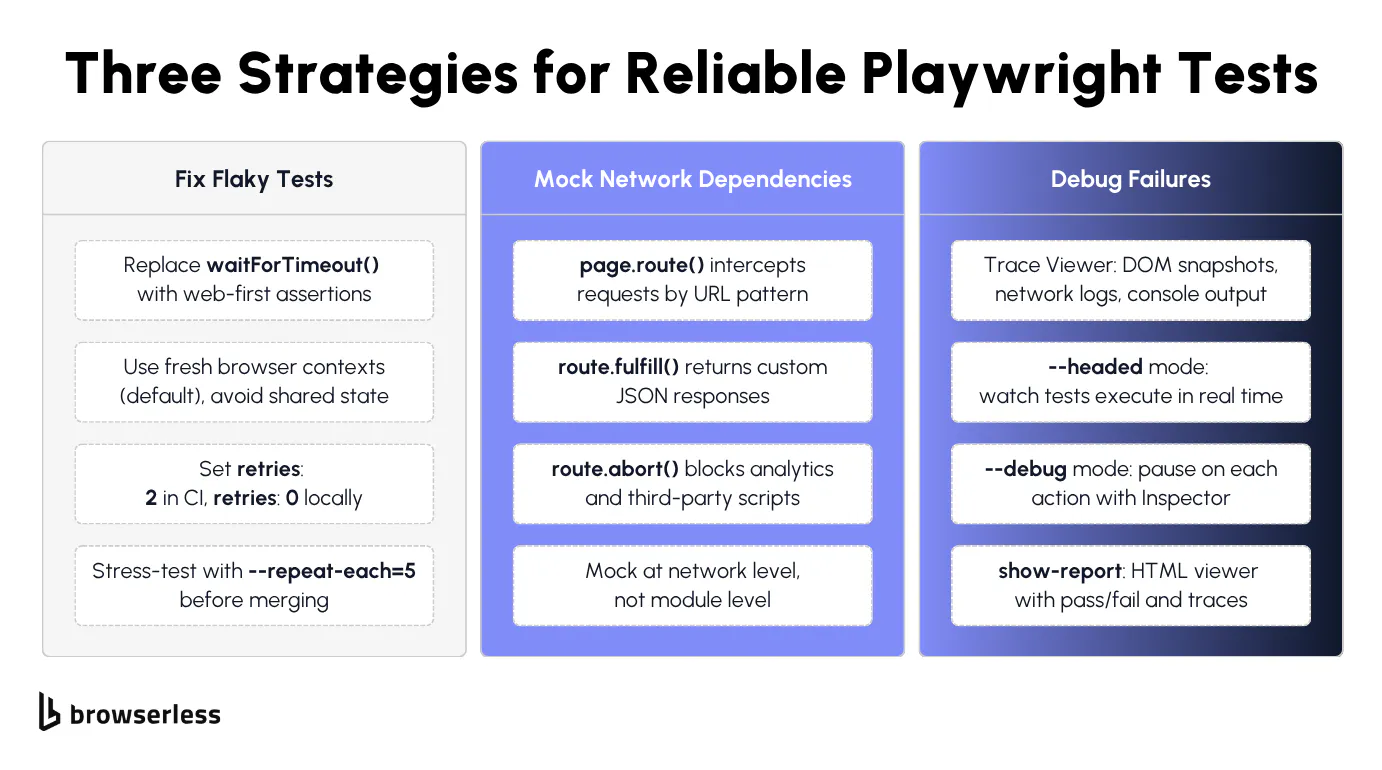
Flaky Playwright tests often come down to timing. The test tries to click a button or read text before the element is ready. Spotting page.waitForTimeout(2000) anywhere in your test code is a red flag.
Swap it for the web-first assertion covered earlier, which retries until the condition is met and fixes the root cause instead of papering over it with a sleep.
The second-biggest source of flakiness is shared state between tests. Playwright's default isolation handles browser state per test, but anything outside the browser (a shared database, a worker-scoped fixture, in-memory module state) can leak between runs. Reset that external state explicitly in beforeEach rather than letting it carry over.
Avoid leaning on cross-test state through test.describe.configure({ mode: 'serial' }) or worker-scoped fixtures. Both patterns create implicit dependencies between tests, so results vary with execution order and a single failure cascades through every dependent test downstream.
The retries branch from the config earlier already does this, with two attempts in CI and none locally. Retries catch genuinely intermittent issues like network hiccups or slow CI runners, but they shouldn't mask broken tests.
If a test requires retries to pass consistently, it has a bug. Fix the underlying timing or state issue instead. The most common offenders are test cases that assume a page loads instantly, or that rely on data from a previous test run.
Use test.beforeEach and test.afterEach hooks for setup and teardown. Avoid putting cleanup logic in afterAll, since a crash in one test skips cleanup for everything that follows.
Before merging new test scripts, run npx playwright test --repeat-each=5 to stress-test for flakiness. A test that fails even once across five local runs is very likely to fail in CI, where runners are slower and noisier.
How to intercept network requests and mock API responses
External API dependencies will eventually break your tests. The API goes down, response times spike, or the data changes, and your test fails for reasons completely outside your control. Playwright's page.route() method solves this by intercepting network requests at the browser level and returning whatever response you need.
page.route('**/api/users', route => route.fulfill({ body: JSON.stringify(mockData) })) intercepts any request matching that URL pattern and returns your mock data. The test never hits the real API, so it runs fast and produces deterministic results every time.
Route handlers also let you build test scenarios that are hard to reproduce against a real backend. Return a 500 status to verify your error UI renders correctly, or malformed JSON to check that your parser doesn't crash. Different test scenarios that would otherwise need a cooperating backend become a two-line mock.
Use route.abort() to block specific requests entirely, whether that's analytics scripts, tracking pixels, ad loaders, or any other third-party request that slows your tests down or clutters the network tab.
Mock at the network level, not the module level. Intercepting fetch or axios directly inside your application code ties your tests to implementation details. If someone swaps the HTTP library, all your mocks break, but network-level interception with page.route() works regardless of how the application makes its requests.
This spec loads a real page, then exercises both a happy-path and an error mock, using page.evaluate() to trigger fetches against the routed URLs. Asserting the responses inside the same test() keeps everything in one runnable file:
import { test, expect } from "@playwright/test";

test("intercept API and render mock data", async ({ page }) => {
  const mockTodos = [
    { id: 1, title: "Mock item one", completed: false },
    { id: 2, title: "Mock item two", completed: true },
  ];

  // Happy-path mock: return our fixture data for /api/todos
  await page.route("**/api/todos", (route) =>
    route.fulfill({
      status: 200,
      contentType: "application/json",
      body: JSON.stringify(mockTodos),
    }),
  );

  // Error-path mock: return a 500 to verify error-handling code paths
  await page.route("**/api/error-test", (route) =>
    route.fulfill({
      status: 500,
      contentType: "application/json",
      body: JSON.stringify({ error: "Internal Server Error" }),
    }),
  );

  // Block analytics and tracking requests to keep tests fast and deterministic
  await page.route("**/{analytics,tracking,gtag}**", (route) => route.abort());

  await page.goto("https://demo.playwright.dev/todomvc/#/");

  // Trigger the happy-path mock and verify the response
  const okRes = await page.evaluate(async () => {
    const res = await fetch("/api/todos");
    return { status: res.status, data: await res.json() };
  });
  expect(okRes.status).toBe(200);
  expect(okRes.data).toEqual(mockTodos);

  // Trigger the error-path mock and verify the 500 surfaces correctly
  const errRes = await page.evaluate(async () => {
    const res = await fetch("/api/error-test");
    return { status: res.status, data: await res.json() };
  });
  expect(errRes.status).toBe(500);
  expect(errRes.data.error).toBe("Internal Server Error");
});
Run it and both assertions pass with no real backend anywhere in the picture. The mocked 200 and the mocked 500 resolve straight from the route handlers, and the aborted analytics requests never leave the browser.
One caveat applies when you port these patterns to Browserless. page.route() is fully supported on Playwright's native protocol, the /chromium/playwright endpoint that connectOptions.wsEndpoint uses in the config below.
On the standalone chromium.connectOverCDP() connection shown in the scaling section later on, routing runs through the CDP Fetch domain instead, and Browserless's docs point you there rather than at page.route(). The behavior can differ from a local run, so for any suite that depends on network mocking, connect with connectOptions and /chromium/playwright. The CDP path earns its keep elsewhere, since it's the one that unlocks Browserless's CAPTCHA solving, Chrome extensions, and BrowserQL interop.
That covers making a UI suite deterministic, but the same test runner also handles work that isn't a UI test at all.
Extending Playwright testing beyond the UI
Playwright testing isn't limited to clicking through a UI. Modern web applications break in ways a click-through never catches, and the same runner stretches your test coverage over most of them.
It handles API calls and visual regressions, and it checks how a web page behaves on a mobile viewport just as readily, all without leaving the expect assertions you already know.
API testing with Playwright's request fixture
Alongside page, every test gets a request fixture backed by Playwright's APIRequestContext. It fires real HTTP requests without opening a browser tab, which makes it quick for seeding state before a UI test, checking a postcondition after one, or hitting a REST endpoint on its own.
Here the fixture calls a public test API directly and asserts on the response, with no page involved:
import { test, expect } from "@playwright/test";

test("creates a resource through the request fixture", async ({ request }) => {
  const response = await request.post("https://jsonplaceholder.typicode.com/posts", {
    data: {
      title: "Playwright testing",
      body: "Testing the API directly",
      userId: 1,
    },
  });

  expect(response.ok()).toBeTruthy();
  const created = await response.json();
  expect(created.title).toBe("Playwright testing");
});
request honors the same baseURL and extraHTTPHeaders you set in playwright.config.ts, so you configure an authenticated API session once and every test inherits it.
Because it's just another fixture, you can mix it with page in the same test. Create a record via request in beforeAll, then use page to confirm it renders correctly in the UI, all in one spec instead of two separate test suites.
Catching UI regressions with visual comparisons
Functional assertions confirm an element exists and has the right text, but they won't catch a broken layout, a missing style, or an icon that silently stopped rendering. expect(page).toHaveScreenshot() compares a full-page or element screenshot against a saved baseline image:
import { test, expect } from "@playwright/test";

test("todo list layout matches the baseline", async ({ page }) => {
  await page.goto("https://demo.playwright.dev/todomvc/#/");
  await expect(page).toHaveScreenshot("todomvc-empty-state.png");
});
The first run has no baseline yet, so Playwright writes the screenshot it just took and fails the test to report that the snapshot didn't exist, which is expected rather than a sign of a broken test.
Review the saved image, commit it alongside your test file, and every later run compares against it pixel by pixel using the pixelmatch library, failing if the difference exceeds the maxDiffPixels threshold you configure. Run npx playwright test --update-snapshots deliberately whenever a layout change is intentional.
Visual comparisons are sensitive to the OS, browser version, and rendering settings used to generate the baseline. Run them in the same environment that produced the reference images, typically CI and not your laptop. Otherwise you'll spend your time chasing font and anti-aliasing differences that were never real regressions.
Baselines don't have to be made of pixels, and expect(locator).toMatchAriaSnapshot() compares the accessibility tree instead, so it catches a heading that lost its level or an input that lost its label without failing every time a font renders half a pixel differently. Because these structured accessibility snapshots are plain text, they diff cleanly in code review and survive the cosmetic changes that break image baselines.
Emulating mobile viewports (not native mobile apps)
Playwright ships a registry of device profiles that bundle a viewport size, user agent, and touch support for common phones and tablets. Spread one into a project's use block to run your existing tests against a simulated device:
// playwright.config.ts
import { defineConfig, devices } from "@playwright/test";

export default defineConfig({
  testDir: "./tests",
  projects: [
    { name: "chromium", use: { ...devices["Desktop Chrome"] } },
    { name: "Mobile Safari", use: { ...devices["iPhone 13"] } },
  ],
});
Running npx playwright test --project="Mobile Safari" now points your same test file at a WebKit engine sized and configured like an iPhone 13, respecting the page's mobile meta viewport and enabling touch events.
This is mobile-web emulation, not native mobile app testing. It's the right tool if your product is a responsive web app or a mobile web view, but it doesn't drive an actual iOS or Android app binary. If you need to test a native app, that's a job for Appium or a platform-specific framework, not Playwright.
Once the suite covers UI, API, visual and mobile checks, the remaining bottleneck is infrastructure. How many browsers can your CI runner handle before it runs out of memory?
Scaling Playwright tests on cloud browsers with Browserless
Connecting Playwright automation to Browserless BaaS
Local browser automation hits a wall when your CI runner runs out of memory. A Chromium browser instance running a content-heavy app can hold a few hundred MB of RAM, so ten parallel workers on a 4GB CI runner is already tight. Measure your own suite before sizing workers, because a few heavy tests with complex DOM trees are enough to tip it into out-of-memory crashes.
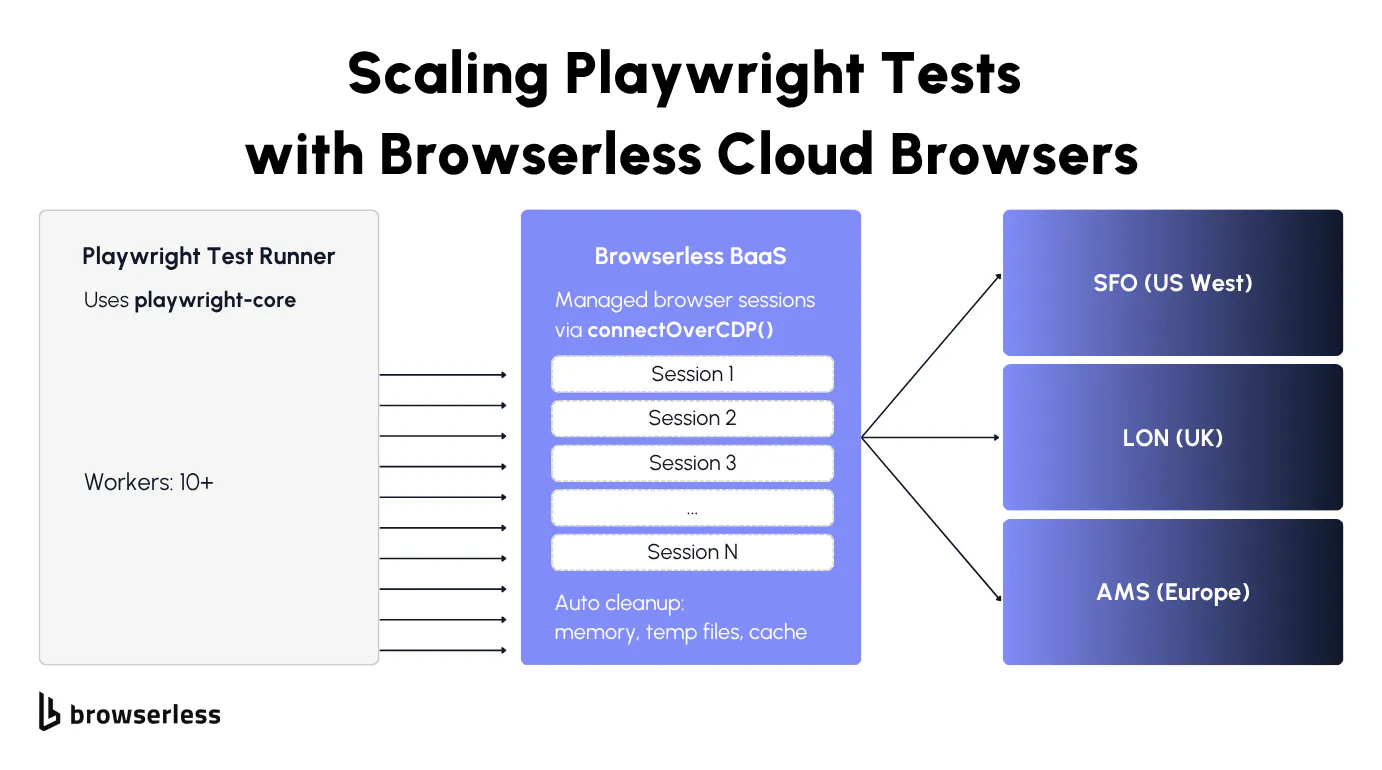
Browsers as a Service (BaaS), specifically BaaS v2, runs your Playwright tests on cloud-hosted browsers over WebSocket. Your specs stay the same, and the connection is what changes.
Browserless accepts two kinds of Playwright connection. For a @playwright/test suite, use Playwright's native protocol: set use.connectOptions.wsEndpoint to /chromium/playwright (or /firefox/playwright and /webkit/playwright), as the config in the next section shows. That path fully supports page.route() and APIRequestContext, so the mocking and API tests from earlier behave as they do locally.
The other option is chromium.connectOverCDP() against /chromium, which Browserless's docs recommend for most standalone automation scripts. It's also the path that unlocks stealth routes, CAPTCHA solving, Chrome extensions and BrowserQL interop. For a test suite the trade-off is that routing goes through the CDP Fetch domain and can behave differently than a local run. The standalone script below uses CDP because it's the quickest way to see a cloud browser respond. To try it, install playwright-core, the lightweight package without bundled browser binaries.
Keep an eye on versions while you're there. Playwright's native connect() is tightly version-coupled, so a local playwright-core newer than the browser Browserless runs will fail at connect time, and the supported versions are listed in the BaaS version compatibility docs. connectOverCDP() is more forgiving, since CDP stays broadly compatible across versions.
Firefox and WebKit connect through Playwright's native connect() on /firefox/playwright and /webkit/playwright, so cross-browser runs aren't limited to Chromium.
Each connection gets its own isolated browser process, with the same context-per-test guarantees you're used to locally.
Browserless absorbs the grunt work of running browser sessions at volume, from startup and memory management through to cleanup and teardown. No zombie Chrome processes, no out-of-memory crashes, no stale /tmp directories, and nothing orphaned filling up your CI runner's disk.
If your staging server is in Europe but your tests are running from US West, you're adding round-trip latency to every single page.goto() call. Browserless has regional endpoints to fix that, with production-sfo.browserless.io for US West, production-lon.browserless.io for the UK, and production-ams.browserless.io for Amsterdam. Pick the one closest to your staging server.
Install playwright-core to get started:
npm install playwright-core
Then connect to Browserless and run a test against a cloud-hosted browser. The try/finally earns its place here in a way it doesn't locally. If anything inside the block throws, the finally still releases the remote session instead of holding a slot against your concurrency limit until it times out. Adding &timeout=120000 to the connection URL caps how long any one session can hold that slot, which is worth setting explicitly for a suite that runs unattended.
// test.mjs (top-level await, so run it as ESM)
import { chromium } from "playwright-core";

const TOKEN = process.env.BROWSERLESS_TOKEN;

const browser = await chromium.connectOverCDP(
  `wss://production-sfo.browserless.io/chromium?token=${TOKEN}`,
);

try {
  const context = await browser.newContext();
  const page = await context.newPage();

  await page.goto("https://demo.playwright.dev/todomvc/#/", {
    waitUntil: "domcontentloaded",
  });

  const heading = page.getByRole("heading", { name: "todos" });
  console.log(`Heading visible: ${await heading.isVisible()}`);

  const todoInput = page.getByPlaceholder("What needs to be done?");
  await todoInput.fill("Test from Browserless");
  await todoInput.press("Enter");

  const todoCount = await page.getByTestId("todo-title").count();
  console.log(`Todo items: ${todoCount}`);

  await page.screenshot({ path: "browserless-screenshot.png" });
} finally {
  await browser.close();
}
Running this produces:
Heading visible: true
Todo items: 1
That's the same TodoMVC interaction from earlier in the guide, now running on a cloud browser with identical test code. The only difference is where the browser runs, which is the whole point of not having to rewrite tests in order to scale them.
Debugging a run you can't watch is the one thing that genuinely changes when the browser moves off your machine. Trace Viewer still works exactly as it does locally, and Browserless can record the session itself on top of that. Add replay=true to the connection URL and the run uploads to your dashboard as an interactive replay covering DOM changes, console output, and network activity, which is usually faster than trying to reproduce a cloud-only failure on your laptop.
How to run tests in parallel at scale
Test performance at this point comes down to how many browsers you can run at once. The workers setting controls how many tests run simultaneously, and on an 8GB machine four workers is about the ceiling before multiple tests start fighting over the same memory.
With Browserless, you can push that number up to your account's concurrency limit, since each session gets its own isolated browser process on Browserless infrastructure rather than competing for your local machine's memory.
Stay at or under that limit. On Browserless cloud plans, a connection over your concurrency limit is rejected with 429 Too Many Requests, and the usual cause is sessions that were never closed and are still holding slots. Set workers to your plan's limit or lower, and make sure every test closes its browser in a finally block or fixture teardown.
If your suite needs more parallel browsers than a cloud plan allows, Browserless Enterprise runs on dedicated or self-hosted infrastructure. Those deployments queue connections over the concurrency limit, so a burst of workers waits for a free slot instead of failing.
To scale, set up a custom fixture or global setup that opens a fresh connectOverCDP connection per worker. Browserless load-balances those connections across its fleet, and on dedicated clusters that's least-connections routing across your workers, so ten parallel sessions land on remote browsers instead of fighting over your local CPU. When a test finishes, the whole session goes with it, temp files, cache, and anything else that leaked.
For teams testing against bot-protected staging environments, the escalation path is:
- Start with basic BaaS for remote execution.
- If your staging environment uses bot detection, switch the connection URL from
/chromiumto/chromium/stealth. - For multi-step flows that need cookies and localStorage across reconnections, use the Session API to persist state. To start every parallel session already logged in, save the login once as an authenticated profile and add
&profile=<name>to the connection URL. - For workflows that need GraphQL-style composition or built-in CAPTCHA solving, move to BrowserQL on
/stealth/bql.
Update your playwright.config.ts to point all workers at Browserless:
// playwright.config.ts
import { defineConfig } from "@playwright/test";

export default defineConfig({
  testDir: "./tests",
  fullyParallel: true,
  // Match workers to your account's concurrency limit
  workers: 10,
  retries: 2,
  reporter: [["list"], ["html"]],
  use: {
    connectOptions: {
      wsEndpoint: `wss://production-sfo.browserless.io/chromium/playwright?token=${process.env.BROWSERLESS_TOKEN}`,
    },
    trace: "on-first-retry",
    screenshot: "only-on-failure",
  },
});
With this config, parallel test execution spreads across 10 workers, each with its own isolated cloud browser. The trace and screenshot settings are worth keeping as they are. Setting on-first-retry records the failing attempt without storing a trace for every green run, and only-on-failure does the same for screenshots. For a comparison of the self-managed CI runner approach and offloading to Browserless, see the selecting and maintaining CI runners for Playwright guide.
Conclusion
Playwright covers the hard parts of end-to-end testing well, from auto-waiting and isolation through to tracing and cross-browser runs. Getting those right removes most of the flakiness teams complain about.
Scale is a separate problem, and it isn't one you can write your way out of. Browsers are memory-hungry, CI runners are not generous, and the usual compromise is fewer workers and a slower pipeline. Browserless hosts the browsers so that compromise isn't necessary. Point connectOptions at a Browserless cloud browser and your current suite runs unchanged at a higher worker count.
Playwright testing FAQs
What is Playwright testing used for?
Playwright handles end-to-end web application testing across Chromium, Firefox, and WebKit, with every test running in its own isolated browser context. That covers form fills, click sequences, screenshot comparisons, API validation, and accessibility checks. The job it's really doing is catching the regressions that would otherwise need a manual testing pass before every release.
Unlike Selenium, Playwright bundles the test runner and browser automation into a single package. Playwright supports programming languages that most teams already use, including TypeScript, JavaScript, Python, Java, and .NET. A team split across multiple programming languages can therefore share one framework.
How does Playwright handle cross-browser testing?
Define multiple browsers in the projects array of playwright.config.ts, and Playwright downloads the binaries for you. The same scripts then run against all configured browsers, so covering different browsers costs a config entry rather than a separate suite.
Chromium stands in for Google Chrome and Edge, Firefox for Gecko, and WebKit for Safari, which between them cover the modern browsers your users are realistically on. For remote execution, connectOverCDP() works with Chromium, while Firefox and WebKit connect through Playwright's native connect() method with /firefox/playwright and /webkit/playwright paths.
Can you run Playwright tests in CI/CD pipelines?
Yes, and there are documented setups for GitHub Actions, GitLab CI, Jenkins, and Azure Pipelines. Playwright publishes a Docker image with the browser dependencies already installed, which saves most of the fighting with system libraries. Reports come out as JUnit XML, JSON, or HTML, and the JUnit XML is what a test management system will want to import. If you'd rather not manage browser binaries in CI at all, Browserless BaaS connects your runner to cloud browsers over WebSocket instead.
How do you debug a failed Playwright test?
Reach for the trace first, since --trace on records the run so you can replay a test failure step by step instead of guessing from a screenshot. Locally, --headed lets you watch it happen and --debug steps through it. For cloud sessions, Browserless offers a live debugger with network inspection and DOM highlighting.
What is the difference between Playwright and Cypress for testing?
Playwright drives the browser from outside over a persistent connection, while Cypress runs inside the browser alongside your application. Almost every practical difference traces back to that one architectural choice. Cypress supports Chrome and Firefox with WebKit still behind an experimental flag, and multi-tab, multi-origin, and iframe work that Playwright handles natively is where it tends to struggle. Parallel execution is built into Playwright's runner, where Cypress needs Cypress Cloud or a third-party orchestrator.
Is Playwright difficult to learn?
Not if you're already writing code, because the API mirrors how you'd describe a user's actions in plain language – page.getByRole(...) reads like "find the heading," page.getByPlaceholder(...) reads like "find the input" – and npm init playwright@latest gets a runnable suite going in minutes. No manual browser-launch step, and no separate WebDriver setup to configure. The learning curve shows up later, in getting parallelization, mocking, and CI integration right, not in writing your first test.
Is Playwright a BDD framework?
The Playwright framework isn't a BDD framework. Behavior-driven development (BDD) tools structure tests as Gherkin, Given-When-Then feature files, where Playwright ships a plain assertion-based test runner (@playwright/test) instead. You can layer BDD-style syntax on top with a community integration like playwright-bdd, but Playwright's own docs and defaults are JavaScript/TypeScript tests, not feature files.