
TL;DR
- What is a REST API. A REST API (Representational State Transfer) lets a client and server communicate over HTTP using stateless requests, predictable URIs, and standard HTTP methods like GET, POST, PUT, PATCH, and DELETE.
- Strong vs weak answers. Each REST API interview question pairs the textbook answer with two callouts — "Additional context to help you stand out from the crowd" and "What to avoid: the bad answer" — so candidates know what senior signal sounds like and interviewers know what to listen for.
- A rubric for hiring managers. The strong vs weak framing doubles as a scoring rubric, helping panels compare candidates on REST API knowledge consistently instead of leaning on gut feel.
- What's covered. REST API fundamentals (HTTP methods, URIs, HTTP status codes), design and best practices (API versioning, idempotency, PUT vs POST, rate limits), security and testing (authentication, CORS, OWASP, test strategy), and real-world scenarios (payloads, error handling, scaling RESTful APIs in production).
Introduction
If you're preparing for software engineering or QA interviews in 2026, REST API questions will almost certainly be part of the discussion. REST remains the foundation of modern RESTful web services, powering everything from backend communication in microservices to integrations with third-party platforms. Interviewers want to see not only that you understand the core principles like statelessness, HTTP methods, and status codes, but also that you can apply them in practical scenarios. In this article, we'll walk through the most common REST API interview questions and answers, giving you clear explanations, examples, and insights to help you stand out in your next interview. For each question, you'll also see what a strong answer sounds like, the extra context that makes you look senior, and the common mistakes that quietly drop candidates, so the guide works as much for hiring managers as it does for candidates.
Why it helps to understand REST APIs before a job interview
REST API questions show up in almost every backend, full-stack, and QA interview because RESTful APIs sit underneath nearly every modern web service. Interviewers reach for the topic for one practical reason: a few questions on HTTP methods, status codes, and API endpoints will tell them whether you have actually shipped RESTful web services or just read about them. For candidates, that means preparing for REST API interview questions is one of the highest-leverage things you can do before the interview. The fundamentals are predictable, the questions repeat from company to company, and being fluent in them frees up your mental energy for the harder follow-ups on API versioning, authentication and authorization mechanisms, and real-world error handling.
For hiring managers, knowing what a strong REST API answer looks like makes interviews more consistent. The candidate who recites a definition of REST architecture is not the same as the candidate who can talk about idempotency in the context of a payment retry, or explain why returning the appropriate HTTP status codes matters for existing clients. The strong vs weak framing throughout this guide gives both sides a shared rubric: candidates know what to aim for, and interviewers know what to listen for in the answer.
REST API Fundamentals
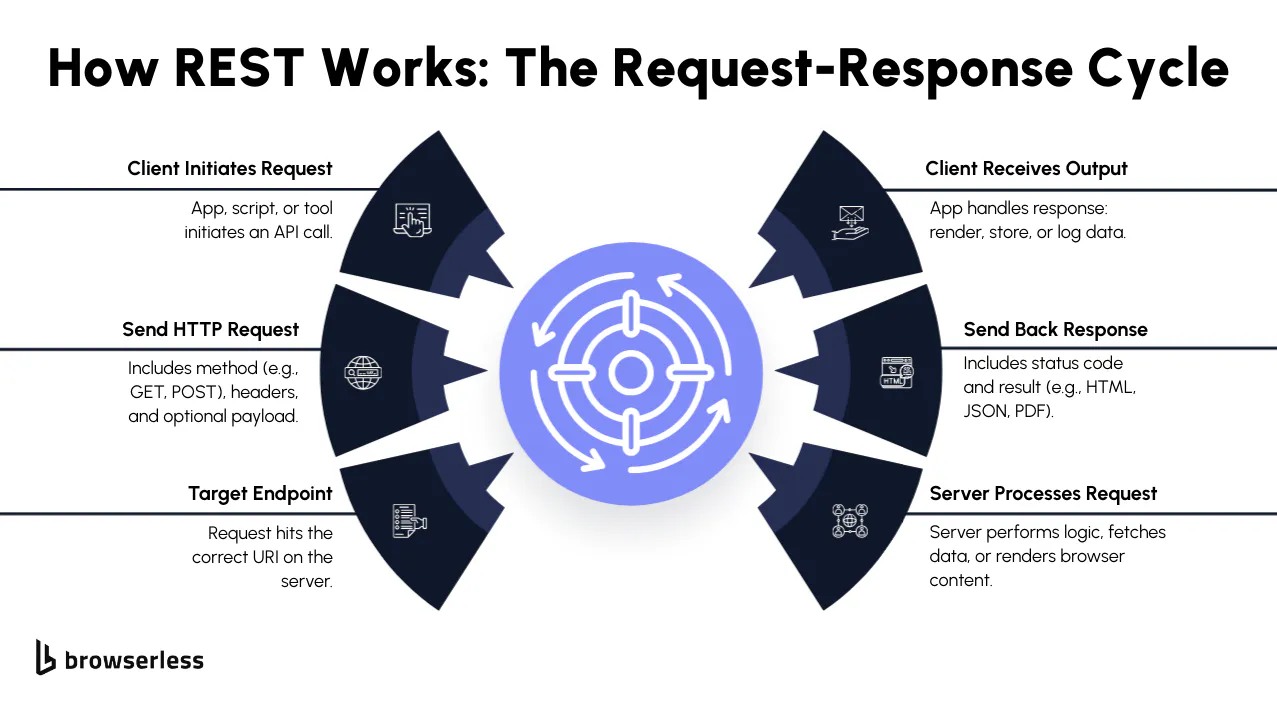
If you're walking into an API interview in 2026, expect a handful of REST API interview questions right at the start. Why? Because REST APIs are still the most common way developers build and consume web services. They're simple, stateless, and designed for predictable communication between clients and servers. Whether you're working on microservices, mobile apps, or internal dashboards, understanding how REST works and how to explain it clearly is going to help you stand out.
Most interview questions and answers around RESTful web services focus on the basics: HTTP methods, URIs, resources, and standard HTTP status codes. You should also be prepared to discuss error handling, API endpoints, and how concepts such as API versioning, authentication and authorization mechanisms, and cross-origin resource sharing (CORS) are applied. Let's go through the fundamentals you'll need to answer confidently.
What is a REST API and how does it work?
A REST API (short for Representational State Transfer) is an application programming interface that adheres to a set of principles governing how clients and servers communicate with each other. The key idea is statelessness: each HTTP request contains everything the server needs to process it, with no reliance on subsequent requests or session memory.
You hit an api endpoint (like /users/123) with a request, and the api server responds with a structured payload, usually in JavaScript Object Notation (JSON). This design makes restful APIs scalable and predictable, especially when managing web resources, which is exactly why you'll see them powering everything from microservices to public APIs.
Additional context to help you stand out from the crowd
Tie the definition to something you've shipped. Saying "the last service I worked on exposed an /orders endpoint, and each request had to carry the auth token because the api server kept no session" signals real production experience around RESTful APIs. It's also worth pointing out that REST is an architectural style, not a strict protocol (unlike Simple Object Access Protocol, SOAP), and that "RESTful" in the wild is often closer to "HTTP API" since few systems implement every constraint Roy Fielding originally laid out.
What to avoid: the bad answer
Reciting acronyms without explaining them. Saying "REST is stateless" with no follow-up on what statelessness changes in practice (caching, horizontal scaling, retries) is a red flag. Don't call REST a protocol, since it isn't one, and don't conflate REST with JSON. JSON is a common payload format for RESTful web services, but the API itself can return XML, plain text, or any other format.
What are HTTP methods in REST APIs?
Every REST API interaction begins with an HTTP method (sometimes referred to as an HTTP verb) that defines what action you're taking against a resource:
- GET → retrieve data without changing it
- POST → create something new
- PUT → fully update an existing resource
- PATCH → apply a partial update
- DELETE → remove a resource
Interviewers often ask about idempotency, which means that multiple identical requests should have the same outcome (e.g., PUT and DELETE are idempotent, whereas POST is not). Be ready to explain how these HTTP request methods tie directly to REST architecture and why using the right one keeps your api documentation and testing process clear.
Additional context to help you stand out from the crowd
Bring up safety and idempotency without being asked. GET is safe (it doesn't modify state) and idempotent. PUT and DELETE are idempotent but not safe. POST is neither. Connecting that to retry logic, network failures, or payment processing shows you've handled flaky systems in production. It's also worth mentioning HEAD and OPTIONS, since OPTIONS shows up in CORS preflight checks and HEAD is common in health probes.
What to avoid: the bad answer
Reciting the verbs with no commentary on when to use each. "PUT and POST are basically the same" is a common weak answer, and they aren't. Using POST for every write operation because "it just works" tells the interviewer you haven't had to maintain an API that other developers consume.
What is a REST resource?
In RESTful APIs, a resource is just the thing you're working with. It could be a user, a product, or even a webpage. Each one is identified by a Uniform Resource Identifier (URI). For example, /users/123 is a resource that represents a single user.
You interact with resources through HTTP requests, often passing query parameters or a request body to filter or change what you're retrieving. Since responses are typically structured as key-value pairs in JSON, they're easy to parse and reuse across web applications or server processes.
Additional context to help you stand out from the crowd
Talk about nouns vs verbs in URI design. Resources are nouns, and the action comes from the HTTP method, not the URL, which is why DELETE /users/123 beats POST /deleteUser?id=123. Mentioning collection vs item endpoints (/users vs /users/123) and how nesting works for related resources (/users/123/orders) signals that you've thought about API design beyond a single endpoint.
What to avoid: the bad answer
Calling a resource "an API endpoint." An endpoint is the address you hit; the resource is the thing on the other side. Modeling every resource as a single flat object is another tell that you've only worked on toy projects, since real RESTful web services almost always have nested relationships.
What are URI and URL in REST context?
This one frequently appears in REST API interview questions. A Uniform Resource Identifier (URI) is a string that uniquely identifies a resource. A URL (Uniform Resource Locator) is a specific type of URI that not only identifies the resource but also tells you how to reach it.
- URI: /users/123 → uniquely identifies a resource
- URL:
https://api.example.com/users/123→ specifies the protocol, domain, and path to get the same resource
When discussing API endpoints, you'll often see both terms, but in interviews, it's useful to explain that all URLs are URIs, but not all URIs are URLs.
Additional context to help you stand out from the crowd
Mention URN (Uniform Resource Name) as the third sibling in the URI family. URNs identify a resource by name without specifying location, like urn:isbn:0451450523. You'll rarely use them in everyday REST API work, but knowing the full hierarchy shows depth. It's also worth noting that the line between URI and URL has blurred in practice, and most engineers use the terms interchangeably in conversation.
What to avoid: the bad answer
Saying URI and URL are the same thing. They're related but not identical, and getting it backwards (claiming a URL is a kind of URN, for example) suggests you only memorized the acronyms. Don't go on a long tangent here either; in most REST API interview questions, this is a quick checkpoint, not a deep dive.
What are HTTP status codes and why are they important?
HTTP status codes tell the client how an http request turned out. They're essential for error handling and for providing meaningful error messages in RESTful APIs. Some of the common status codes to know for interviews are:
- 200 OK → request was successful
- 201 Created → a new resource was created
- 400 Bad Request → client sent an invalid request
- 401 Unauthorized → missing or invalid credentials
- 404 Not Found → the requested resource doesn't exist
- 500 Internal Server Error → something went wrong on the api server
Expect to receive follow-ups on distinguishing between client errors and server errors, when to use appropriate HTTP status codes, and how to enhance backward compatibility by returning error responses with detailed error messages in the response body. A good answer goes beyond listing codes, explaining why they matter for debugging, monitoring, and making your api requests reliable for authorized users and existing clients.
Additional context to help you stand out from the crowd
Pair each status code with a real product decision. For example: "we return 401 for missing tokens and 403 for valid tokens that lack permission, since they trigger different flows in the frontend." Mentioning 422 Unprocessable Entity for validation errors, 409 Conflict for concurrency issues, and 429 Too Many Requests for rate limiting separates you from candidates who only know 200 and 500.
What to avoid: the bad answer
Returning 200 OK with an error message in the response body, and then defending it. It's a common anti-pattern in RESTful APIs and a guaranteed way to lose points, because every monitoring tool and dashboard treats 200 as healthy. Don't use 500 Internal Server Error as a catch-all either; if the request itself was bad, that's a 4xx, and confusing the two makes debugging harder for everyone downstream.
Design & Best Practices
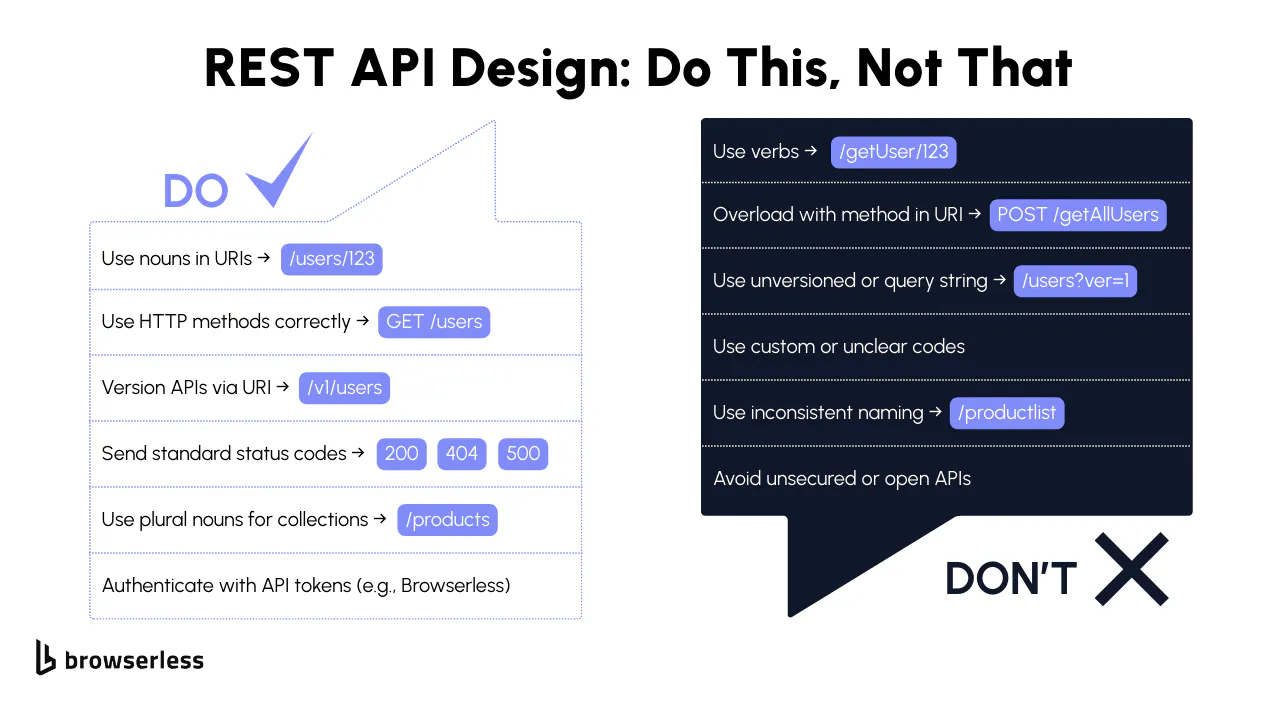
When preparing for REST API interview questions, it's not enough to know the fundamentals of REST APIs; interviewers will also want to see if you understand how to design resource-oriented architecture for RESTful web services that scale, follow best practices, and make life easier for developers and existing clients. Expect API interview questions about HTTP methods, status codes, api versioning, and how you'd handle error handling in production. This section covers the design concepts you should know to answer those interview questions and answers with confidence.
What are the best practices for designing RESTful APIs?
When designing RESTful APIs, keep your REST architecture predictable and easy to use. Some best practices to highlight in an API interview:
- Use nouns (not verbs) in your api endpoints: /users/123 instead of /getUser.
- Stick to standard HTTP methods like GET, POST, PUT, PATCH, and DELETE for actions.
- Always return appropriate HTTP status codes with clear response bodies and meaningful error messages.
- Support API versioning (e.g., /v1/users) to prevent changes from breaking existing clients and maintain backward compatibility.
- Document your API with clear examples of api requests, query parameters, and http request methods.
A clean design helps developers retrieve data, send payloads in a request body, and interpret HTTP responses without confusion, which is exactly what good RESTful APIs should do.
Additional context to help you stand out from the crowd
Bring up a trade-off you've actually made. For example: "we moved from offset to cursor-based pagination because the dataset was being written to constantly and offset pagination kept skipping or duplicating rows." Mentioning HATEOAS (the discoverability constraint in Fielding's original REST paper) signals reading depth, even if you also note that most RESTful APIs in production don't implement it. Talking about deprecation strategy (sunset headers, advance notice, deprecation warnings in response headers) is another strong signal of senior thinking.
What to avoid: the bad answer
Generic answers that could come from any tutorial. "Use HTTPS and good URLs" isn't a design discussion. Saying you'd skip api versioning because "we can always add it later" is another red flag, because retrofitting versioning onto a REST API with live existing clients is painful, and any interviewer who has done it will notice.
How do you handle versioning in REST APIs?
API versioning is a common rest api interview question because it's critical for long-term maintainability. There are a few ways to version APIs:
- URI versioning: Include the version in the path → /v1/users.
- Query parameter versioning: Add a version parameter → /users?version=2.
- Header-based versioning: Use a custom request header like API-Version: 2.
Most developers prefer URI or header-based versioning since they're explicit and easy to maintain. This ensures backward compatibility, allowing existing clients to continue using older versions while new features are shipped on a separate track. In interviews, be prepared to explain which approach you'd recommend and why.
Additional context to help you stand out from the crowd
Talk about when you wouldn't version at all. Internal RESTful APIs with one consumer can often skip versioning and use feature flags instead, while public REST APIs with paying customers can't. Mention how you'd communicate a breaking change: deprecation headers, advance notice in release notes, and a documented end-of-life policy for older versions. That ties api versioning back to existing clients, which is what interviewers want to hear.
What to avoid: the bad answer
Saying you'd break backward compatibility because "the client team can just update." Even when it's technically true, it tells an interviewer you haven't had to fix a production outage caused by a silent schema change in a REST API.
What does idempotency mean in REST APIs?
Idempotency means that making multiple identical requests will always result in the same outcome. In RESTful APIs, this concept ensures reliability and predictability in automation and retry logic.
For example:
- Sending the same request body multiple times to PUT/users/123 will not change the result after the first update.
- DELETE /users/123 will always remove the resource, no matter how many times it's called.
In contrast, POST is not idempotent because every call typically creates a new resource. Interviewers may connect this to error handling e.g., if a network issue forces a retry, idempotency prevents duplicate records or inconsistent server processes.
Additional context to help you stand out from the crowd
Tie idempotency directly to retries in production. Networks fail and mobile clients drop connections, so if your write operation isn't idempotent, a retry can create duplicate orders or double-charge a customer. The standard mitigation is the Idempotency-Key header, popularized by Stripe: the client sends a unique key with each write, and the api server returns the original HTTP response if the same key is replayed. Describing that pattern signals you've shipped payment or financial code.
What to avoid: the bad answer
Confusing "idempotent" with "safe." They're related but different: GET is both, PUT is idempotent but not safe (it changes state), and POST is neither. Saying "POST can be idempotent if we just make it so" without explaining how (idempotency keys, request hashing) is hand-waving, and interviewers will catch it.
What's the difference between PUT and POST?
This comes up in almost every rest api interview. Both HTTP methods update the server, but they serve different purposes:
- POST → Create a new resource. Example: POST /users with a request body adds a new user.
- PUT → Update or replace an existing resource. Example: PUT /users/123 replaces the user data with new values.
Some API interview questions will push further: PATCH methods allow partial updates, whereas PUT replaces the entire requested resource. Always be ready to explain why using the correct HTTP verbs improves clarity and prevents confusion for other developers consuming your API.
Additional context to help you stand out from the crowd
Point out that PUT requires the client to know the full state of the requested resource. If you only have the email and you PUT, you might wipe the other fields by accident, which is why PATCH is the safer default for most update flows in RESTful APIs. Mentioning JSON Patch (RFC 6902) or JSON Merge Patch (RFC 7396) shows you know PATCH is the method, not the body format, and that the body format is its own design decision.
What to avoid: the bad answer
"We just use POST for everything because it's simpler." That works until two developers update the same requested resource at the same time and the REST API has no way to express partial updates. Claiming PUT is always the right choice for updates is the opposite mistake; it's fine when the client has the full object, but when it doesn't, PATCH is the better fit.
What are REST API rate limits?
Rate limits are a way to enforce fair usage of an API server by controlling how many API requests a client can make within a given timeframe. This prevents abuse, protects against denial-of-service attacks, and ensures server processes can handle load fairly across all authorized users.
For example, a service might limit api endpoints to 1000 HTTP requests per hour per client. If that limit is exceeded, the server should return a 429 Too Many Requests response.
In interviews, expect follow-ups on how rate limits relate to error codes, providing meaningful error messages, and designing RESTful APIs that strike a balance between scalability, data protection, and developer experience.
Additional context to help you stand out from the crowd
Mention the algorithm behind the rate limit. Fixed window, sliding window, token bucket, and leaky bucket all have different trade-offs for burst traffic and fairness. Token bucket is the most common in production RESTful APIs because it allows short bursts without breaking long-term limits. It's also worth noting that you can rate limit per API key, per IP, per authorized user, or per endpoint, and a well-designed REST API uses more than one of these together.
What to avoid: the bad answer
Returning 500 Internal Server Error when a client hits the rate limit. That's a server error, and 429 Too Many Requests exists for exactly this case. Don't suggest you'd block clients permanently the first time they exceed a limit either; real RESTful APIs back off, surface a clear error response with a Retry-After header, and give the client a path to recover.
Security & Testing
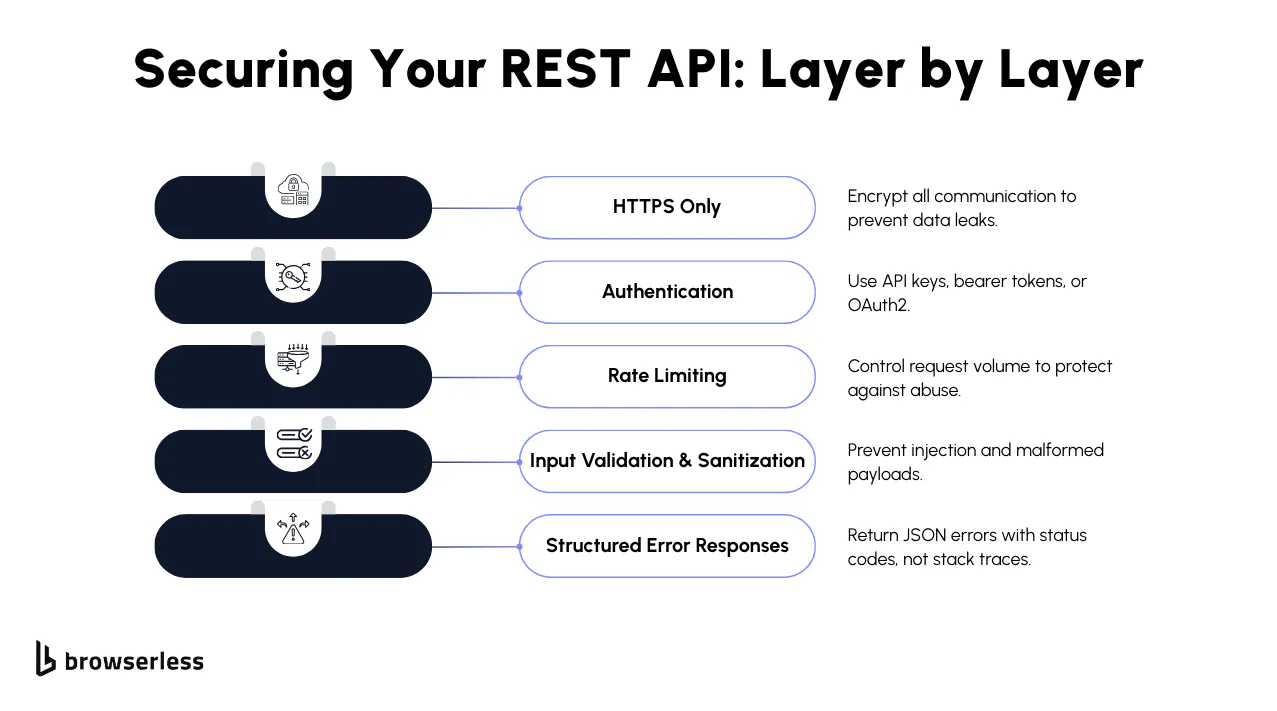
No set of REST API interview questions would be complete without a focus on security and testing, including topics like basic authentication . Companies want to know you understand not just how REST APIs work, but also how to protect them from abuse, handle client errors and server errors, and validate responses. Expect API interview questions related to authentication and authorization mechanisms, CORS, and common testing tools such as Postman or cURL. Let's break it down into the core areas interviewers care about.
How do you secure a REST API?
Securing RESTful APIs comes down to protecting data in transit and controlling who can access api endpoints. A good answer in an api interview includes:
- HTTPS → Encrypts all HTTP requests and HTTP responses so that sensitive data isn't leaked.
- API keys or tokens → Used to authenticate authorized users making api requests.
- Input validation → Prevents injection attacks by sanitizing query parameters and request bodies.
- Rate limits → Helps enforce fair usage and prevents abuse.
You may also mention modern approaches, such as JSON Web Tokens (JWTs), or implementing token-based authentication with an authorization server and a resource server. If you can tie this back to providing meaningful error messages when credentials are missing or invalid, you'll show a strong grasp of error handling in secure APIs.
Additional context to help you stand out from the crowd
Reference the OWASP API Security Top 10. The 2023 list calls out broken object-level authorization (BOLA), broken authentication, and unrestricted resource consumption as the most common problems in production RESTful APIs. Giving a concrete example — such as checking that user 123 is the owner of order 456 before returning it — signals you've thought about REST API security in code, not just at the architecture level.
What to avoid: the bad answer
Claiming HTTPS alone is enough. HTTPS protects data in transit but does nothing about a leaked API key or a poorly scoped token. Don't store API keys in URLs either, since they end up in server logs, browser history, and analytics tools, which is a common way credentials leak from otherwise well-designed RESTful APIs.
What is the difference between authentication vs authorization in REST?
This is one of the most common rest api interview questions. Authentication answers who you are, while authorization answers what you can do.
For example:
- Authentication: You send an API token in the request header → the api server verifies it.
- Authorization: Based on that token, the server decides whether you can retrieve data, create, or delete a requested resource.
In a RESTful API, you typically authenticate once per request (since REST is stateless). Then the server applies authorization rules before executing the HTTP methods. Be ready to explain how these mechanisms protect web services and maintain secure data transmission.
Additional context to help you stand out from the crowd
Use a concrete example: a user can authenticate successfully and still get a 403 Forbidden when they try to delete an order that belongs to someone else. Mentioning role-based access control (RBAC) or attribute-based access control (ABAC) is helpful if you can describe when you'd pick one over the other. RBAC is easier to reason about, while ABAC scales better when permissions depend on data, not just roles, which often shows up in larger RESTful APIs.
What to avoid: the bad answer
Returning 401 Unauthorized when you actually mean 403 Forbidden. A 401 says, "I don't know who you are." A 403 says, "I know who you are, and you can't do this." Mixing them up is one of the most common mistakes in real RESTful APIs and an easy way to lose a point in a REST API interview.
How do you test a REST API?
For testing, you want to demonstrate familiarity with real developer tools. The most common ones to mention in an api interview are:
- Postman → Easy GUI for sending HTTP requests, testing status codes, and checking the response body.
- curl → Command-line tool to hit api endpoints directly (great for debugging).
- Automated test frameworks → Using Java, Python, or JavaScript libraries to script api requests and validate responses.
Testing should cover error handling (checking for appropriate HTTP status codes like 400, 401, 404, 500), response headers, and detailed error messages in the response body. Strong candidates also mention how automated tests can simulate subsequent requests, measure test execution speed, and validate backward compatibility for existing clients.
Additional context to help you stand out from the crowd
Talk about what you test for, not just which tool you use: status codes, response shape, headers, error structure, idempotent retries, rate limit behavior, and authorization edge cases. Mention contract testing as a way to catch breaking changes in RESTful APIs before they reach a client, and name a tool (Pact, schemathesis, or Dredd) if you've used one. For end-to-end testing on real browser workflows, a managed platform like Browserless can host your Puppeteer or Playwright sessions over WebSocket so your test suite doesn't bottleneck on CI machines.
What to avoid: the bad answer
"I just use Postman." Postman is fine for poking around, but an interviewer is looking for a testing strategy, not a tool name. Don't claim you skip 4xx and 5xx responses either; the error paths are where RESTful APIs actually break, and ignoring them is a junior move.
What is CORS, and how does it affect REST APIs?
Cross-Origin Resource Sharing (CORS) is a browser security feature that restricts how web applications running in one domain can make HTTP requests to an api endpoint hosted on another domain.
Without proper CORS headers (Access-Control-Allow-Origin), browsers will block requests for security reasons, which relates to the fair usage policy. This comes up frequently in API interview questions because, if you're exposing a web service API that frontend apps consume, you need to configure CORS policies correctly.
For example, allowing requests only from authorized users on trusted domains prevents abuse while still letting legitimate apps exchange data with your RESTful APIs.
Additional context to help you stand out from the crowd
Mention the CORS preflight. For requests that aren't "simple" (anything with a JSON body, custom headers, or non-standard HTTP methods), the browser sends an OPTIONS request first to check permissions. If that preflight fails, the real request never goes out. Knowing this stops you from chasing imaginary backend bugs when the fix is actually a missing CORS header on the api server.
What to avoid: the bad answer
Setting Access-Control-Allow-Origin: * on a production REST API that uses cookies or authenticated requests. It's convenient for demos and dangerous in real RESTful APIs. Treating CORS as a server-side firewall is another red flag; it's a browser feature, and a backend client (curl, Python requests, a mobile app) ignores it entirely, so CORS is never a substitute for authentication and authorization mechanisms.
Real-World Scenarios & Advanced Concepts
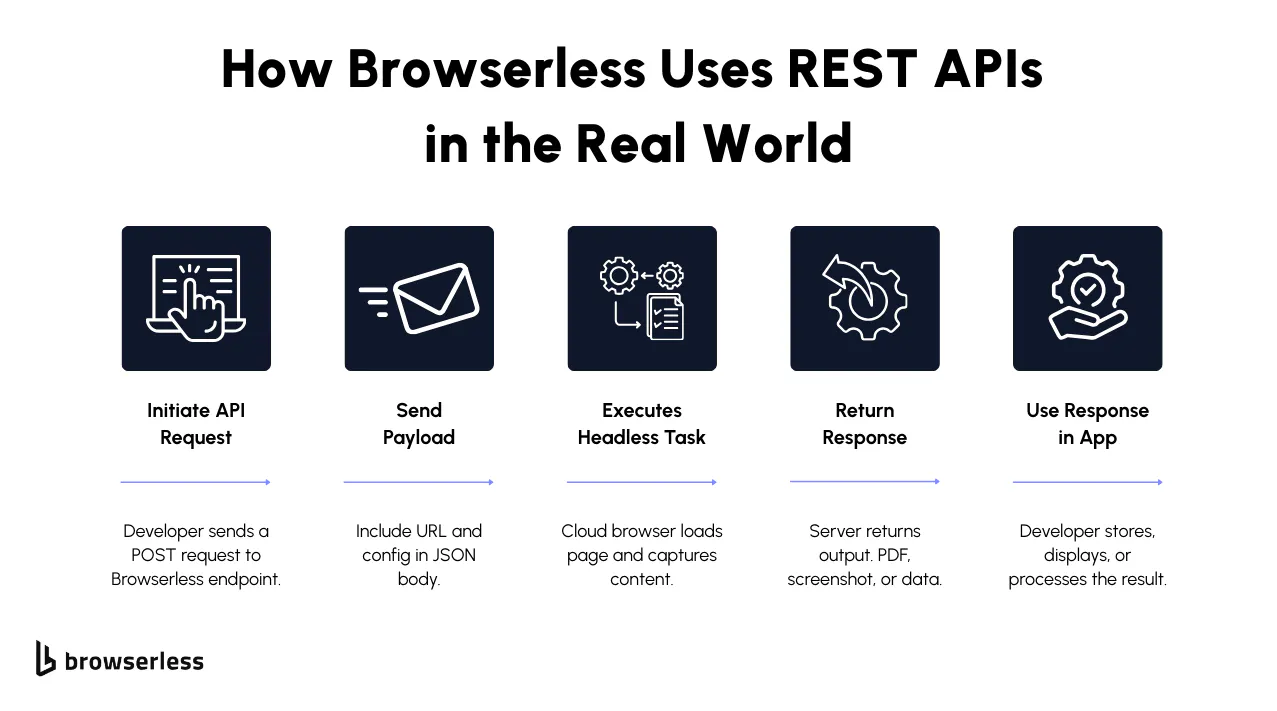
Once you've mastered the fundamentals, many REST API interview questions dive into applied use cases and advanced concepts. Employers want to see that you not only understand how RESTful APIs are designed, but also how they behave in production environments with real-world web services. Expect api interview questions about payloads, HTTP request methods, distributed server processes, and best practices for error handling. Let's go through the key areas that often come up in advanced rest api interview discussions.
What is a REST API payload?
A REST API payload is the data sent by the client to the api server in a request body. Most often, the payload is structured as JavaScript Object Notation (JSON), a lightweight data interchange format made up of key-value pairs.
For example, if you're creating a user, you might send:
{
  "username": "dev123",
  "email": "dev@example.com"
}
In interviews, emphasize that payloads are not just about data transmission — they allow clients to send configurations, filters, or state changes to an api endpoint, making them central to how RESTful web services exchange data.
Additional context to help you stand out from the crowd
Bring up payload size and shape as design concerns. Large payloads are slow to parse and expensive over mobile networks, so well-designed RESTful APIs expose pagination, projection (fields=name,email), or compression. JSON is the default but not the only option; Protobuf and MessagePack show up in performance-sensitive RESTful web services, and CSV or NDJSON are common in data export endpoints.
What to avoid: the bad answer
Confusing the payload with the entire request. A request includes the method, URL, headers, and body; the payload is usually just the body. Don't suggest you'd shove every field into one giant POST body either, since large, unstructured payloads are slow to validate and a magnet for bugs in real RESTful APIs.
Can you send a payload with GET or DELETE?
This is a common api interview trick question. By design, standard HTTP methods like GET and DELETE should not include a request body. GET is meant to retrieve data, and DELETE is meant to remove a requested resource. Payloads in these methods are technically possible on some servers, but they're not standard and are often overlooked.
The correct approach is to stick to POST (for creation) or PUT/PATCH methods (for updates) when sending payloads. This aligns with the rest of the architecture and avoids compatibility issues across different api servers and web service APIs. You can also mention using query parameters in GET requests for filtering instead of payloads.
Additional context to help you stand out from the crowd
Bring up the real-world exception: search endpoints sometimes use POST instead of GET when the query is too complex to fit in a URL, because URLs have practical length limits and query strings can't represent nested objects cleanly. Elasticsearch is the classic example. Knowing why that compromise exists shows you understand the trade-off between RESTful purity and what actually works in production.
What to avoid: the bad answer
"Yes, you can, so we do." It may work in your test environment and silently break behind a CDN, a proxy, or a strict HTTP client. Being dogmatic in the other direction ("never, ever") is also weak; the better answer is "you can, but it's fragile, and here's the one case where I'd do it anyway."
How does Browserless use REST APIs to scale headless browser tasks?
Browserless, a managed headless browser platform with Puppeteer and Playwright support, relies on REST APIs to distribute browser automation workloads. Because REST APIs are stateless and built on a solid REST architecture, each HTTP request to an API endpoint, such as /screenshot or /scrape, contains all the necessary configuration in the request body.
That means tasks like rendering a webpage, generating PDFs, or scraping structured content can be distributed across multiple machines in the cloud without depending on subsequent requests or shared session state. This architecture allows Browserless to handle parallel test execution, scalable test automation, and high-throughput web scraping workloads reliably. For interviews, mentioning this type of distributed RESTful API design demonstrates your understanding of how APIs support real-world scaling.
Additional context to help you stand out from the crowd
Explain why statelessness matters for this kind of workload. Browser sessions are heavy and slow to start, so naive systems try to keep the browser alive between requests. Browserless instead designs around the assumption that any worker can handle any request, which is what lets the platform autoscale across a fleet of cloud workers. Mentioning that REST endpoints like /screenshot, /pdf, /scrape, /content, and /function each wrap an entire browser task in a single stateless call is the kind of concrete detail interviewers remember.
What to avoid: the bad answer
Treating Browserless as a generic web scraping API. It's a headless browser platform with REST APIs in front of it, which is a different kind of service from a basic scraping endpoint. Claiming statelessness is automatic in distributed RESTful APIs is another miss; statelessness is a design choice that the platform has to enforce, and it has real costs (every request pays the cost of context, not just the work).
How do you handle errors in REST APIs?
Good error handling is a sign of a well-designed REST API. Instead of returning generic failures, APIs should return appropriate HTTP status codes with clear response bodies that contain error codes and meaningful error messages.
For example:
{
  "error": "InvalidToken",
  "message": "API token is missing or expired",
  "status": 401
}
Here's what to highlight in an api interview:
- Use client errors (4xx) when the issue is with the request.
- Use server errors (5xx) when something fails inside the server processes.
- Always return structured JSON so clients can parse and act on errors programmatically.
- Document common status codes and error patterns in your api documentation.
Browserless, for example, surfaces failures through standard HTTP status codes (400, 401, 403, 408, 429) and response headers like x-response-code, with structured JSON details available on endpoints such as /smart-scrape, making debugging and retries straightforward. This is exactly the type of real-world REST API design interviewers want to hear about.
Additional context to help you stand out from the crowd
Mention RFC 7807 (Problem Details for HTTP APIs), the standard error format that gives RESTful APIs fields like type, title, status, detail, and instance. Adopting it (or a close variant) means clients only have to learn one error shape across your whole REST API. Trace IDs in error response bodies are another senior signal; they turn "something broke" into a five-minute log lookup, which matters at scale.
What to avoid: the bad answer
Returning 200 OK with {"success": false} in the response body. It looks fine in a tutorial and breaks monitoring everywhere else, since every dashboard treats 200 as healthy. Don't put stack traces in production responses either; they leak internals (file paths, library versions, sometimes credentials) and tell attackers where to look. Stack traces belong in logs, not in HTTP responses from RESTful APIs.
Conclusion
Mastering REST APIs is a must-have skill for modern developers, whether you're preparing for interviews or building production-ready systems. From HTTP methods and status codes to error handling and API versioning, these fundamentals demonstrate how to design and work with scalable RESTful web services. The strong vs weak framing above gives candidates a clear target and gives interviewers a shared rubric, so REST API interview questions and answers stay consistent across panels. Beyond the theory, platforms like Browserless show how REST APIs drive real-world automation, enabling you to run scraping jobs, generate PDFs, and scale headless browser tasks with simple, stateless calls. Ready to put your knowledge into practice? Sign up for a free Browserless trial and see how REST powers production-grade automation at scale.
FAQs
How should I prepare for REST API interview questions in 2026?
When preparing for REST API interview questions, start with the fundamentals of RESTful web services and understand how HTTP requests, HTTP responses, and HTTP methods (GET, POST, PUT, DELETE) work with an api endpoint. Review status codes, especially client errors (4xx) and server errors (5xx) like 500 Internal Server Error, and practice explaining them with real-world examples. Employers often ask API interview questions around error handling, api versioning, and backward compatibility, so make sure you can confidently explain these concepts with examples.
What are the most common API interview questions I should expect?
In a REST API interview, expect questions around:
- Explaining REST architecture and Representational State Transfer principles
- How Uniform Resource Identifiers (URIs) define a requested resource
- The difference between standard HTTP methods like PUT and PATCH methods
- Returning appropriate HTTP status codes with clear response bodies
- Implementing authentication and authorization mechanisms (e.g., API keys, tokens, or JSON Web Tokens)
Some interviews also ask you to compare REST with Simple Object Access Protocol (SOAP) to test your knowledge of legacy web service APIs.
How important is it to know HTTP status codes for an API interview?
Understanding HTTP status codes is critical for success in an API interview. You should be able to map HTTP request methods to the right status codes: 200 OK for successful data retrieval, 201 Created for resource creation, 400 Bad Request for malformed input, and 500 Internal Server Error for unexpected failures in server processes. Being able to explain why using appropriate HTTP status codes improves api documentation, debugging, and reliability will set you apart.
Do I need to study advanced topics like API versioning and CORS for API interviews?
Yes. Many api interview questions go beyond basics. Be prepared to explain api versioning (e.g., URI versioning like /v1/users or query parameter versioning like /users?version=2) and why it matters for backward compatibility with existing clients. You should also understand Cross-Origin Resource Sharing (CORS) since it affects how browsers consume web services. Being able to connect these concepts to real-world RESTful APIs shows you're interview-ready.
How can I effectively practice answering REST API interview questions?
The best way to prepare is to practice answering interview questions out loud. Use tools like Postman or curl to send api requests with different request bodies, query parameters, and request headers, then analyze the HTTP responses and response headers. Document what happens when you send multiple identical requests (e.g., idempotency with PUT), or when you hit api endpoints that return error codes. Reviewing api documentation for real-world RESTful APIs will also help you understand how developers communicate data formats, key-value pairs, and meaningful error messages.