
TL;DR
- Headless browsers run everything a normal browser does, minus the window, which is how they execute JavaScript, hold a session, and render a page that a plain HTTP request never sees.
- Scaling is the hard part. One session is trivial, but a few hundred turns concurrency, memory, crash recovery, and detection into infrastructure problems.
- Managed browsers are the escape hatch. Once the fleet outgrows a container or a cluster, a hosted service takes over concurrency, crash recovery, and detection, and your code keeps only the automation logic.
Introduction
A headless browser is a web browser that runs without a graphical user interface (GUI), meaning no window and no visible UI, just a real browser engine you drive from code. You want one whenever you need the page as it looks after its JavaScript has run, and not the raw HTML the server first sent back.
Getting one running takes about ten lines, but keeping fifty of them running without eating your machine alive or getting fingerprinted is the part nobody warns you about, and it's where most teams get stuck. Below, you'll see what a headless browser is, how it works under the hood, the walls you'll run into, and what scaling looks like at each stage.
What is a headless browser?
Take the window off Chrome and surprisingly little changes. It still parses HTML, applies CSS, handles JavaScript execution, and builds a DOM your script can poke at, the same as it does for any web pages you open by hand. The only thing it drops is the graphical interface, rendering visual elements to a screen, and that's where all the performance and memory savings come from.
Modern headless browsers are the popular web browsers you already use, Google Chrome and Mozilla Firefox included, with a flag that turns the window off and nothing bolted on. A regular browser and a headless one are the same binary wearing different clothes.
You start one from the command line interface with that flag, and from then on it talks to your code through network communication over a debugging protocol, where it would normally be talking to a person through a window.
Day to day you write goto and click against browser automation tools like Playwright and Puppeteer. Those JavaScript libraries turn your calls into protocol messages you never have to look at, and browser automation frameworks like Selenium do the same across other languages. PhantomJS handled the same automation tasks before Chrome and Firefox shipped native headless modes, which is why it still turns up in tutorials nobody has touched in years.
You'll mostly find them behind web scraping jobs, headless browser testing, automation testing of web applications, and continuous integration and delivery (CI/CD) pipelines, anywhere you need a real engine against complex websites and there's nobody watching the screen.
Whatever the job, the script underneath always hits the same five beats. Start a browser, open a page, go somewhere, read something back, shut down cleanly. Here it is in Node with Playwright, doing nothing more than loading a live page and printing its title:
import { chromium } from "playwright";

// Headless is the default in Playwright; shown explicitly here
const browser = await chromium.launch({ headless: true });

try {
  const page = await browser.newPage();
  await page.goto("https://news.ycombinator.com", { waitUntil: "networkidle" });
  console.log("Page title:", await page.title());
} finally {
  await browser.close();
}
Python gets at the same library through a context manager, and leaving the with block tears the browser down even if something throws before you reach close(). Past that one structural difference, the sequence of calls is identical:
from playwright.sync_api import sync_playwright

with sync_playwright() as p:
    # Headless is the default in Playwright; shown explicitly here
    browser = p.chromium.launch(headless=True)
    page = browser.new_page()
    page.goto("https://news.ycombinator.com", wait_until="networkidle")

    title = page.title()
    print("Page title:", title)

    browser.close()
Both print Page title: Hacker News, off the same Chromium build. That's why porting a script between the two is mostly a renaming job, and why Python stays a comfortable second choice next to JavaScript for automating Chrome.
Popular headless browsers and browser engines
You'll run into three engines in practice, plus a couple of legacy names, and the most popular headless browsers are not interchangeable, since different browsers ship different engines.
Headless Chrome (Chromium)
Chromium is the open source headless browser most tooling targets, with native headless support since Chrome 59 and the deepest coverage in Puppeteer and Playwright.
Headless Firefox (Mozilla Firefox)
Firefox has its own headless mode, scriptable via Playwright, Selenium, and Puppeteer, which has shipped stable Firefox support over WebDriver BiDi since v23. Reach for it when you want Gecko's behavior and not Blink's. On a hosted service like Browserless, Firefox and WebKit are reached through Playwright only, because neither speaks the Chrome DevTools Protocol (CDP).
Headless WebKit
WebKit runs headless through Playwright, giving you coverage closer to Safari's rendering behavior without keeping macOS infrastructure around.
Legacy and niche options (PhantomJS, HtmlUnit)
PhantomJS was the standard headless WebKit scriptable browser before Chrome and Firefox added native support, and its repository was archived in 2023. HtmlUnit is a different story, still actively released and genuinely handy in Java for server-rendered pages, testing e-commerce websites, and HTTP authentication flows. It runs its own engine in place of a real browser build, though, so JavaScript-heavy front ends often break it.
Chromium sits at the top of that list because of Chrome's dominance outside headless mode. Chrome alone holds 69.39% of worldwide browser market share as of August 2026 according to StatCounter, and frameworks build their headless support around that engine first, then fill in the rest.
Headless vs. traditional browsers: JavaScript execution and real browser behavior
Headless browsers let you automate everything you'd do by hand in traditional browsers, minus the window, the UI, and the visual output.
Under the hood you're still running a full instance of Chromium, Firefox, or WebKit, driven over a debugging protocol with no window in the loop. Which protocol depends on what you're driving it with. Chromium speaks CDP, Playwright patches its own into the Firefox and WebKit builds it ships, and Selenium uses W3C WebDriver throughout.
Whichever one you land on, page rendering, JavaScript execution, DOM access, and network control all work the way they do in a real browser, with no pixels on screen.
It's not perfectly identical, though, not across different browser versions and not even within one, and assuming it is will bite you. An unpatched headless Chrome reports navigator.webdriver as true and sends a user agent with HeadlessChrome in it, which is all a detection script needs before it even gets to rendering quirks and timing patterns. Headless mode leaves you more exposed unless you cover those giveaways.
Which library you write against decides how much of that protocol you ever have to touch. Playwright covers the most ground, wrapping Chromium, Firefox, and WebKit in one API, giving you persistent contexts, and exposing nearly every lifecycle event (request, response, console, and so on). It also hands you CDP directly, which matters when you need lower-level control or want to connect to a remote browser service.
None of them ships anti-detection, though, so stealth has to come from somewhere else, either a plugin you bolt on or the browser infrastructure you connect to. Know which one owns it in your setup, or you'll lose an afternoon wondering why your stealth plugin seems to do nothing against a remote browser.
Switching between headless and headful is a single config toggle, and flipping it helps when you're debugging or tuning for detection resistance. Headful tends to hold up better against sites that inspect canvas output or rendering anomalies. For a proper side-by-side of when to reach for each, see headless browser vs. real browser.
Mechanics of headless browsers and browser automation frameworks
Every session starts with a fresh browser instance, but the real control comes from the hierarchy underneath it. You launch the browser, open a browser context as your isolated sandbox, create a page inside that context, and then drive that page by navigating, waiting, scraping, and manipulating.
Each layer can be configured, observed, or mocked on its own, and knowing the hierarchy is what lets you do that on purpose. The awkward part is what every layer costs you. Browsers are heavy, and each instance drags along JavaScript execution, rendering, garbage collection, and a whole network stack of its own.
Run a few of those at once and CPU and memory climb fast, especially on JavaScript-heavy sites. Miss a page.close() inside a loop and the zombies pile up until you hit a memory ceiling or run out of file descriptors. When a scraper falls over at scale, that's usually what happened, and it's rarely a bug in the automation logic itself.
What headless browsers lack, and where a normal browser still wins
Headless browsers lack a visible window, which is the whole point, but that browser UI was doing more for you than it looked like. Commit your browser tests or a scraping pipeline to headless testing only and you give up the following:
- No visual feedback. You can't just look at the screen when a test fails, since there's no visual interface to look at. Debugging leans on logs, screenshots, and trace recordings, with no page rendering in a browser window to watch.
- Imperfect emulation of real user interactions. Headless mode simulates clicks, scrolls, and typing, but subtle timing, hover states, and rendering quirks tied to GPU compositing don't always match a full browser.
- Detectability if misconfigured. The headless giveaways from earlier become a liability the moment a target starts checking for them. Stealth setup narrows the gap but it's never automatic, and the fingerprinting section below gets into what it actually patches.
- Reduced coverage for visual bugs. Layout shifts, font rendering issues, and CSS regressions are easiest to catch with a real screen. A headless-only suite can miss what a human tester spots immediately.
That last one is why headless-only is rarely the whole testing process. The usual split is a fast headless suite running automated tests in CI/CD, backed by a smaller set of full-browser checks and manual testing for the visual and exploratory stuff where a person is still the better detector.
Common headless browser constraints and how to work around them
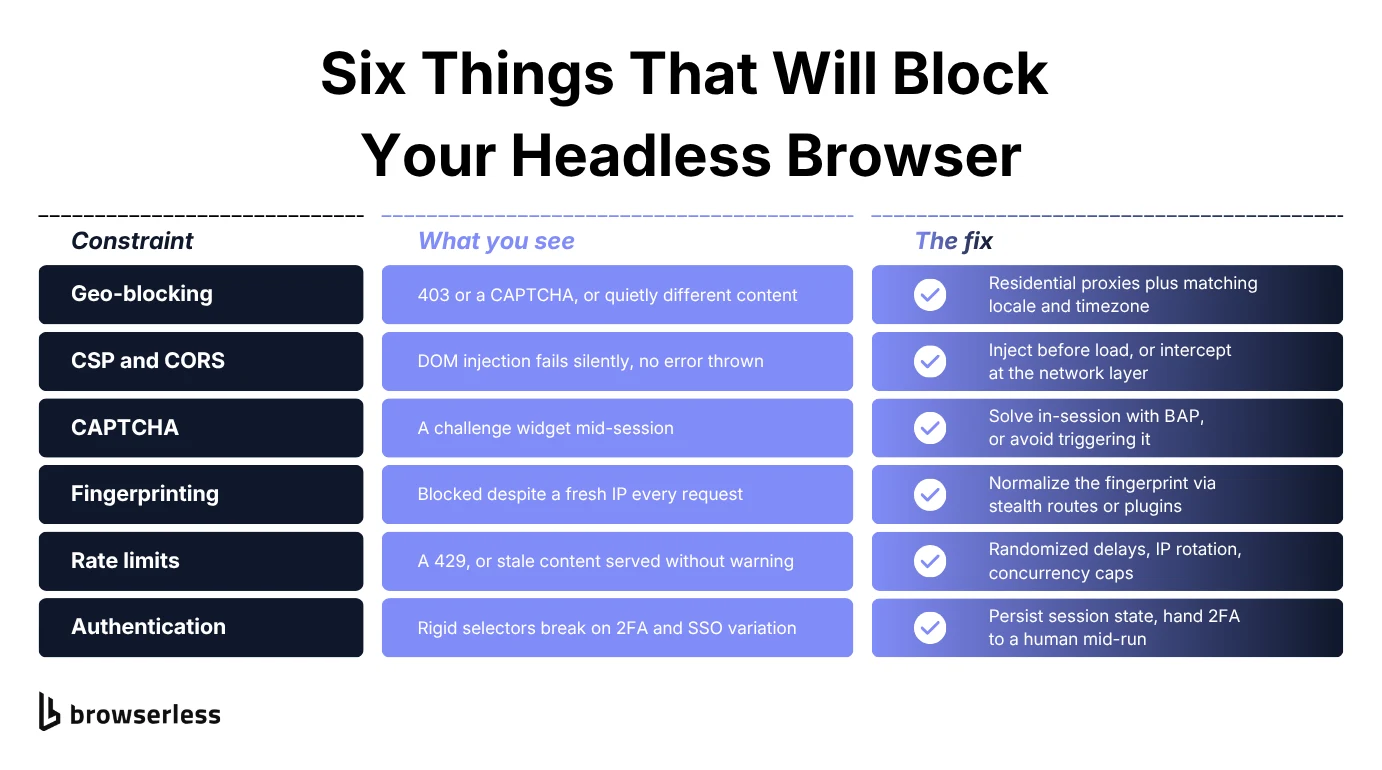
Automation work goes well beyond static scraping, and each kind hits its own wall. Dynamic scraping runs into bot detection, authenticated journeys into session handling, PDF and screenshot generation into render timing, prerendering into throughput, and anything at volume into rate limits.
The sections below work through those blockers one at a time, starting with the boundaries. Some of what follows is detection avoidance, and ethics bolted on afterward doesn't count for much.
robots.txt and terms-of-service boundaries
Boundaries matter most in the places they're most tempting to skip, meaning commercial apps, customer data, and authenticated user flows. Ignore them and the bill shows up as legal exposure, or more slowly as your IPs and accounts landing on a blacklist.
Run a robots.txt parser before you crawl to flag disallowed paths, and put the opt-out logic in the automation framework itself, not in a comment somebody will delete. Treat terms-of-service rules the way you already treat rate limits, as something you check before you point anything at a production target.
Log every automated interaction while you're there, covering request URLs, status codes, response headers, user agents, IPs, and timestamps. It costs almost nothing up front, and it's the difference between answering a policy complaint in ten minutes and spending a week reconstructing what happened.
If partners or third-party data are involved, check the access policies and rotate tokens on a schedule. None of this is expensive when it's part of the automation logic. It only gets expensive when you're building it after someone has already asked.
Geo-blocking
Geo-blocking happens at the edge, usually at the content delivery network (CDN) or web application firewall (WAF) layer, keyed on IP, autonomous system number (ASN), or region. Show up from a known data center range or a country the site doesn't serve and you'll get a 403 or a CAPTCHA. The sneakier version is a clean 200 carrying different content than a local visitor would see, and no log is going to flag that for you.
The fix is a residential proxy pool that lets you pick countries, cities, or ISPs. Playwright and Browserless both take proxy settings per session, which keeps geography a per-request decision. On Browserless, proxyLocaleMatch sets the browser language to match the proxy's country for you.
While you're at it, make the browser agree with the proxy. Set Accept-Language to match and override timezoneId, locale, and geolocation in your framework. An IP in Frankfurt paired with a US locale and a New York clock is a much easier tell than the IP on its own.
Session isolation matters as much as the proxy does, and it's the step people skip. Reuse cookies or user agents across geographies and the inconsistency becomes the tell, not the IP. Give each session its own user agent, language, and fingerprint, and pin the proxy to the context lifecycle, not the process.
CSP and CORS restrictions
Content Security Policy (CSP) restricts which scripts, styles, and connections a page is allowed to load or run. Against a site with tight CSP rules, DOM injection fails silently or trips a content-blocking event. Expect to lose hours to this one, as there's no exception and no error, only code that does nothing.
CORS shows up when you automate cross-origin POSTs, fetch APIs from another origin, or scrape an embedded third-party iframe. The browser blocks the call unless the server allows it via Access-Control-Allow-Origin, the same way it would for a person sitting at that page.
Skip DOM-level injection and go through the DevTools Protocol instead, injecting with addScriptToEvaluateOnNewDocument so your script runs before the page loads and sits inline with the first-party code. From there you can read and poke at state without tripping CSP at all.
You've got the network layer too, through Playwright's page.route() and route.continue() or Puppeteer's request interception, for rewriting outbound requests or catching CORS responses. On automation-heavy work, emulating the client beats spoofing it. Let the site's JavaScript run, watch which XHRs it fires, then reproduce those flows through browser automation and skip the hand-rolled HTTP.
CAPTCHA and human checks
CAPTCHAs turn up when a session stops looking like a person, and volume is only one trigger, usually not even the first. Rendering anomalies, a cursor that never moves, and failed JavaScript challenges all set them off too.
Scoring systems like reCAPTCHA v3 also grade each request against the traffic they've already seen on that site, never on its own. That's why swapping in a fresh proxy while keeping the same fingerprint often changes nothing.
Browserless solves CAPTCHAs in-session whichever way you connect to it. Over Puppeteer, or Playwright via connectOverCDP, add solveCaptchas=true to the connection URL and the challenge is handled as it appears. You can also call the Browserless.solveCaptcha CDP command yourself once you've found one. Raise the session timeout too, as solving can take longer than the default.
With the Browser Automation Protocol (BAP) SDK, solving is built into the client. Every BAP call compiles down to BrowserQL, the GraphQL protocol underneath, where the solve mutation does the same inside a query. Either way you pick up where you left off without tearing the session down, and there's no CAPTCHA farm or manual review anywhere in the loop.
Solve rates vary by challenge type and site, and each successful solve is metered separately, so treat it as a layer, not a guarantee.
Over longer sessions the cheaper move is to not trigger challenges in the first place. Input realism gets you most of the way there, meaning mouse movement, randomized waits, realistic typing speeds, and scrolling that tracks DOM load. Against passive bot detection that scores behavior and doesn't block outright, those details measurably cut down on challenges later on.
Bot detection and fingerprinting
Fingerprinting pulls dozens of low-level attributes out of the browser, things like canvas rendering, WebGL properties, device memory, audio API responses, screen dimensions, installed fonts, and navigator properties. Hash them together and you've got an identifier that survives an incognito window and a fresh proxy without blinking.
Getting less unique means making every session look the same, and on a browser you launch yourself that comes down to consistent flags like --window-size, --font-render-hinting, and --lang, plus navigator overrides through context-level script injection. playwright-extra and puppeteer-extra-plugin-stealth cover the common values so you're not maintaining that patch list yourself.
On a hosted browser you don't launch yourself, the connection route is the equivalent knob. Browserless applies these mitigations through its stealth routes (/stealth, /chromium/stealth, /chrome/stealth), which layer fingerprint mitigations and entropy injection onto the session. Connect through /stealth and the two giveaways from earlier go quiet.
The routes differ in both the binary underneath and how far they patch it. /chromium/stealth goes further than /chrome/stealth, since the Chrome route keeps more of Chrome's native behavior intact, and /stealth is the recommended starting point when a site is detecting you.
There's no single patch that ever finishes this job. The goal is to blend into the statistical baseline of real users, and that means tuning the static launch-time signals and the dynamic interaction-level ones together, across every context you open. Even when you do it well, you're not invisible, just less obvious.
Rate limits
Rate limiting gets enforced per IP, per route, per user-agent, and sometimes per rendered element, and it usually bites on login, search, and listings endpoints when you hit them with repeated GETs and POSTs in quick succession. A 429 is the polite version, and the awkward one is a server that keeps returning 200s while serving stale content, leaving your scraper looking healthy while the data ages underneath you.
Start with randomized delays between actions, which read as far more human than fixed intervals. Then rotate IPs after a set number of requests and randomize fingerprints alongside them, so session identity stops moving in lockstep with request rate.
At scale, queue your automation workers with concurrency controls at the container or proxy layer. Browserless handles that side for you, whether you come in through its REST APIs or a connect token, holding anything above your available concurrency in a queue and handing back a 429 once the queue itself fills up. Wrap known failure patterns in retry logic with exponential backoff, and treat that 429 as one of them, not as an error.
Authentication flows
Login is where automation scripts break most often. Dynamic forms, password visibility toggles, 2FA prompts, CAPTCHA overlays, and federated SSO each introduce their own variation, and a script pinned to static selectors breaks the first time someone redesigns the form.
The reliable move is to log in once and hang on to the result. Isolate the login in a persistent context, capture cookies and localStorage once it succeeds, then reuse that state downstream for as long as the server still considers the session valid. Playwright and Puppeteer both export and reload session state, and Browserless keeps it server-side through authenticated profiles so a login survives between runs.
Some flows won't automate end to end no matter how clever the script, and a 2FA prompt or a physical device in the path is usually why. Browserless handles that with hybrid automations, where a LiveURL streams the page into a tab or an iframe so a person can type the code, then hands control straight back to where the script paused. The session never closes, so there's no second login and no lost token.
10 best practices for using headless browsers
None of this is clever, but whether you're testing web applications or scraping them, these are the ten things that, when skipped, account for most of what goes wrong in production.
1. Choose the engine before the framework
Match the engine to the traffic you actually serve, not whatever happens to be on your laptop. Pull the browser breakdown from your own analytics and work in that order. A WebKit bug hitting a tenth of your users beats a Chromium edge case hitting none of them.
2. Pick one automation framework and stay in it
Frameworks pile up over time, and before long you've got a Selenium suite from three years ago, a Puppeteer script somebody added for screenshots, and Playwright for anything new. Each one brings its own waiting semantics and its own flavor of flakiness, so every failure starts with working out which set of rules even applies. Consolidating onto one of them costs less than their differences will ever save you.
3. Optimize scripts for speed and reliability
Parallelize test execution, wait on real conditions, not fixed delays, and cache anything you'd otherwise fetch twice. If you take one thing from this list, rip out the sleep calls. Each one is either too short on a slow day or dead time on a fast one, which is how a suite manages to be flaky and slow at the same time.
4. Simulate user interactions the way a real user produces them
With no visible UI in front of you, firing events straight at the DOM feels like a fine substitute for simulating real user interactions, but the two paths aren't the same thing. A synthetic element.click() fires exactly one event, click, with isTrusted: false. Drive the same button through Playwright and you get pointerdown, mousedown, mouseup, and click, all with isTrusted: true.
Any handler listening on the first three, or checking isTrusted, sees nothing at all from the synthetic version. Route mouse movement, clicks, drag-and-drop, and typing through your framework's input APIs instead.
5. Instrument debugging before you need it
The test automation failure you most need to see happened overnight in CI, on a container that doesn't exist anymore. Capture artifacts on failure by default, not after the first mystery forces your hand, and keep them long enough to compare two bad runs side by side.
6. Test across engines, not just across versions
Cross browser testing across engines and testing across versions are different problems, and most suites only ever solve the second. Ten Chromium versions will never surface the bug that one run against Gecko or WebKit finds straight away. Run that wider matrix on a schedule, though, since per-commit it costs more than it gives back.
7. Wire the suite into CI/CD
Wire the pipeline (GitHub Actions, CircleCI, whatever you already run) to run headless tests on every change, and that's the point at which it becomes automated regression testing and not something someone remembers to run. A regression caught at the commit costs you a rerun. The same one caught at release costs you a meeting.
8. Track resource metrics, not just pass rates
Watch execution time, memory usage, and CPU consumption next to the results, the same numbers you'd pull for performance testing. Those numbers tell you how headless browsers perform under load, and a pass/fail column never will. A suite that keeps going green while its memory footprint climbs run after run is telling you about a leak weeks before it starts failing.
9. Add visual regression testing for UI changes
Screenshot comparison is the obvious fix for the visual gap, and also the easiest thing in the world to make useless. Antialiasing, available fonts, and scrollbar width all differ between your laptop and a CI container, and a diff spanning both will report failures nobody caused. Pin the rendering environment to one image before you trust a single pixel.
10. Stay current with browser and framework updates
Browsers and automation frameworks move fast enough that a deprecated API can break a script that was fine last quarter. Pin your versions so upgrades happen when you decide, then put them on the calendar. The alternative is doing the upgrade in a hurry, in the middle of an incident.
Scaling headless browsers
One or two headless browser sessions on your laptop is a solved problem. A few hundred concurrent ones on real infrastructure is where this stops being a scripting exercise and turns into an architecture question, and the answers look much the same whether you're scraping, testing, or driving real user flows.
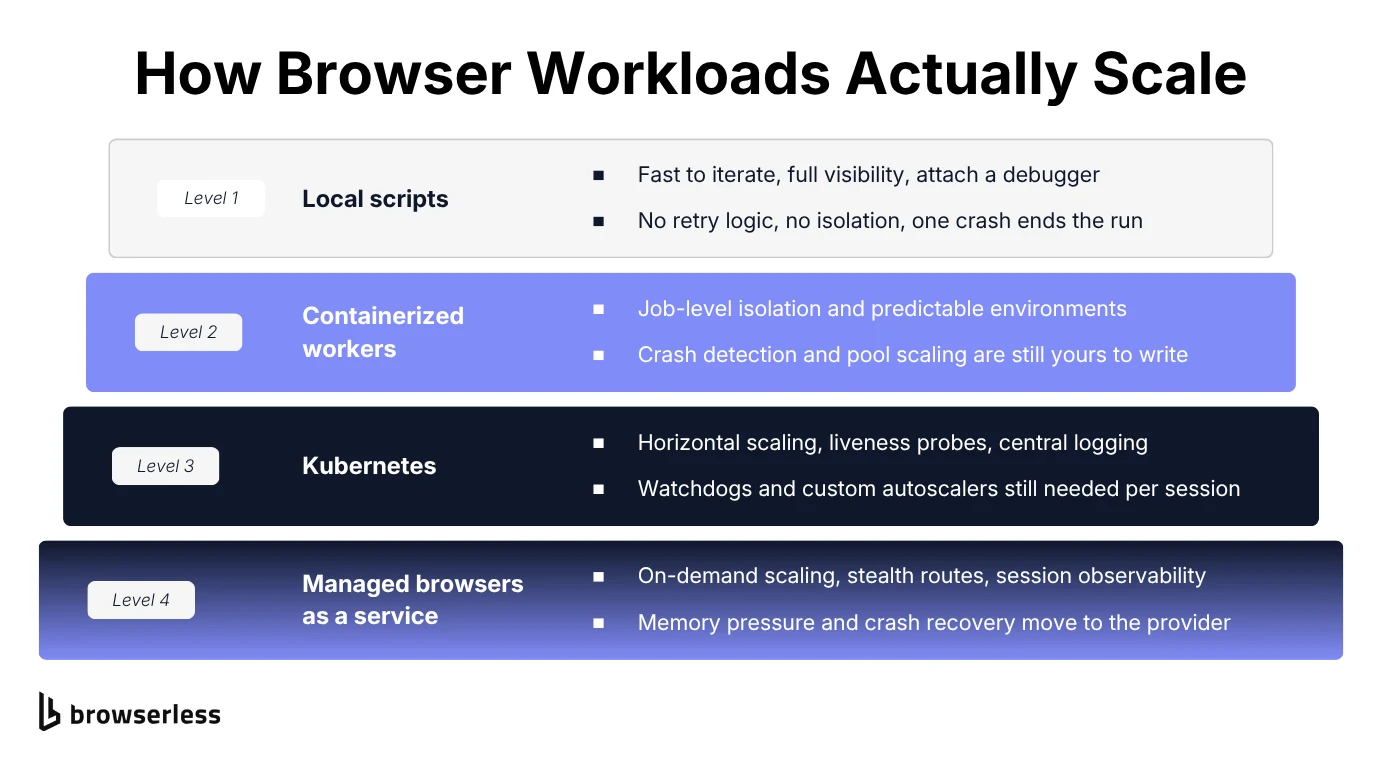
Browser workloads tend to climb the same four rungs on the way up, from a local script to managed browser infrastructure.
Level 1: local scripts
Everything starts here for good reason, with instant iteration, the terminal right there, and zero setup cost. You can see every step, attach a debugger, record the session, or drop a breakpoint halfway through and poke at the page.
Scale is where the local setup runs out of road. With no retry logic, session monitoring, or fault recovery, a browser crash takes the whole script down with it, and cranking up concurrency slams local CPU and memory into a ceiling fast. There's no isolation between runs either, so one hung session or leaked page drags down everything else on the machine.
Level 2: containerized workers
Packing the headless logic into Docker is usually the first move toward repeatability, and it buys you job-level isolation, an environment that behaves the same everywhere, and a clean fit with whatever CI/CD platform you already run.
What Docker doesn't give you is any of the operations around it. Crash detection, pool scaling, and timeout enforcement are all still on you, and you end up maintaining a second layer of control scripts that start containers, hand out work, and sweep up dead sessions. Skip the caps and health probes and you'll hit resource exhaustion sooner than you'd think.
Level 3: Kubernetes
Kubernetes gives you orchestration that scales sideways on demand, and when traffic spikes or a queue backs up, more pods appear. You also get liveness probes, memory limits, and centralized logging, all of which you'll want by the time the stack is complicated enough to need them.
The catch is that browser sessions behave nothing like the stateless APIs Kubernetes was built around. They leak memory, crash without warning, and hold system-level locks. So you end up writing watchdogs for zombie processes, custom autoscalers against CPU and memory thresholds, and pod lifecycle rules that account for cold starts and session TTLs. Kubernetes handles the orchestration, but session-level stability is still your problem.
Level 4: managed browsers as a service
Browsers as a Service (BaaS) changes who runs the browser. The three levels above all kept the fleet on your infrastructure and argued about how best to manage it. Level four hands the fleet to somebody else and leaves your automation code more or less where it is.
That last part is the easiest bit to show, as Browserless BaaS speaks CDP and an existing Puppeteer script keeps its shape once you swap launch() for connect():
import puppeteer from "puppeteer-core";

const browser = await puppeteer.connect({
  browserWSEndpoint: `wss://production-sfo.browserless.io?token=${process.env.BROWSERLESS_API_KEY}`,
});

try {
  const page = await browser.newPage();
  await page.goto("https://news.ycombinator.com", { waitUntil: "domcontentloaded" });
  console.log("Page title:", await page.title());
} finally {
  await browser.close();
}
That finally block matters more here than it did locally. Throw between connect and close against a remote browser and you've leaked a billed session that sits there until it times out. Note puppeteer-core in place of the full package too, since there's no local Chrome to download.
Past that one line, the rest of the change is everything you get to stop maintaining. Memory pressure, zombie detection, and CAPTCHA handling become the provider's problem, and a crashed browser is a failed connect you retry, not a box you have to go and clean up. Sessions can be watched, debugged, and replayed while they run, which covers the performance monitoring you'd otherwise be building yourself.
Build vs. buy: should you use a BaaS?
Both paths get you to production headless browsers, and the only real question is which set of problems you'd rather live with.
DIY stacks
Running it yourself gives you every dial there is. You can pin browser versions, tweak launch arguments, patch detection vectors, and wire the whole thing into the CI/CD and observability pipelines you already have. If you need an experimental Chromium build, an unusual proxy setup, or tuning for one particularly stubborn target, nobody else gets to set your timeline.
That control comes with weight, though, and it's the kind that keeps coming back. The watchdogs and pool managers from the levels above are the build cost; the running cost is that bot detection changes on somebody else's schedule, so stealth patches that worked last quarter expire without telling you.
At small scale that shows up as the occasional wobble. At larger scale it becomes somebody's whole job, and every hour spent on it is an hour not spent on the product.
Browserless
Browserless is level four as a product, the same pool, watchdogs, and stealth patching you'd build at levels two and three, hosted and tuned. The question left is whether that trade fits your team.
It usually does when demand spikes unpredictably and provisioning for the peak means paying for idle capacity all month, when AI agents or crawlers run at volume, or when compliance wants an auditable trail. It usually doesn't when your volume is flat enough that one container covers it, or when you genuinely need a patched Chromium build that nobody else ships.
Either way, you're getting the same infrastructure you'd have built yourself, tuned and hosted, reached through the Playwright, Puppeteer and REST interfaces your code already speaks, or through the BAP SDK if you want CAPTCHA solving built into the client.
Conclusion
Headless browsers cover a lot of ground, from scraping and PDF generation to authenticated workflows, and none of it is especially hard until it has to run reliably at volume. That's the point where resource management and detection resistance stop being details and turn into the entire job.
You can own that layer and keep every dial, or hand it off and spend the time on the automation itself. If you want to see the difference for yourself, sign up for a Browserless account and point an existing Puppeteer or Playwright script at it.
Headless browser FAQs
What are headless browsers used for?
Mostly for the work a plain HTTP request can't do, like scraping sites that render client-side, walking authenticated flows, generating PDFs and screenshots, and running full rendering tests. The difference is that a headless browser runs the JavaScript, keeps the session, and touches the DOM the same way a person's browser would.
Do I need a headless browser, or will an HTTP request do?
Start with the HTTP request and only escalate if you have to, since a plain request is faster, cheaper, and gives detection nothing to look at when the data is already in the response body. Reach for a browser when the content arrives via JavaScript after load, when the flow needs session state one request can't carry, or when you want the rendered result and not the markup. Going browser-first makes you slower and easier to block.
Can a website detect a headless browser?
Yes, if it isn't configured carefully, and the clearest tell is navigator.webdriver, which reports that the browser is under automation, not that it's headless. Chrome sets it under --enable-automation, which automation tools pass by default, and for a plain --headless run alike. Connecting through a Browserless stealth route patches that and the other common giveaways, which lowers the odds of a block without making the session invisible. The bot detection and fingerprinting section above gets into the mechanics.
Why use a service like Browserless?
Running the browsers is rarely the interesting part of the job. Browserless takes concurrency, stealth, and CAPTCHA solving off your plate, so AI agents, scraping pipelines, and user simulations scale without anyone on your side babysitting a browser pool.
How do I reduce the chance of being detected?
Detection resistance is layered, never solved in one go, and stacks up stealth routes or launch flags to normalize automation fingerprints, input realism to match human behavior, residential proxies for network diversity, and BAP's built-in solving for whatever challenges survive all of that. Each layer lowers the odds, and none of them makes a session undetectable.
What legal concerns should I watch for?
Respect site boundaries by honoring robots.txt directives and terms of service. Handle personally identifiable information (PII) responsibly, and keep audit logs of what your automation did so you can defend it on both legal and ethical grounds if you ever have to.
How do I keep sessions stable at scale?
Set a hard session timeout and a maximum concurrency, and treat both as limits you enforce, not defaults you inherit. Recycle browser instances on a fixed cadence in place of letting them run forever. Memory climbs on a long-lived instance even when your own code leaks nothing. Alert on queue depth and memory per session, not on failures, since both start moving well before anything breaks.