
TL;DR
- User agents help servers identify the client. They influence how content is delivered, whether access is granted, and how automation is detected.
- Customizing user agents improves automation stability. Matching real browser strings and behaviors can help scripts avoid being blocked or flagged.
- Spoofing user agents carries both legal and ethical risks. Responsible use means maintaining consistency, transparency, and avoiding the impersonation of protected services.
Introduction
What is a user agent? A user agent is a small piece of text that your web browser or script sends during an HTTP request to identify the client's software and operating system to the web server. The user-agent header typically includes the browser type, version number, operating system, and, occasionally, the device type. Understanding what a user agent string contains is important in 2026 because it directly influences how websites deliver content, apply bot protection, and enforce API access rules. Whether you're building websites, running automated tests, or scraping data, the user agent you send plays a big role in how servers respond. In this article, we'll break down real-world use cases, common formats, how to customize the browser user agent, and what to consider from an ethical and legal standpoint.
Understanding user agents: what they are and how they work
The technical role of a user agent
Modern browsers also expose "Client Hints" headers (like Sec-CH-UA) and the JavaScript navigator.userAgentData API to share user agent data in a more granular, privacy-aware way. These signals are increasingly used in conjunction with the traditional user-agent header for tailoring content and detecting bots on the client side.
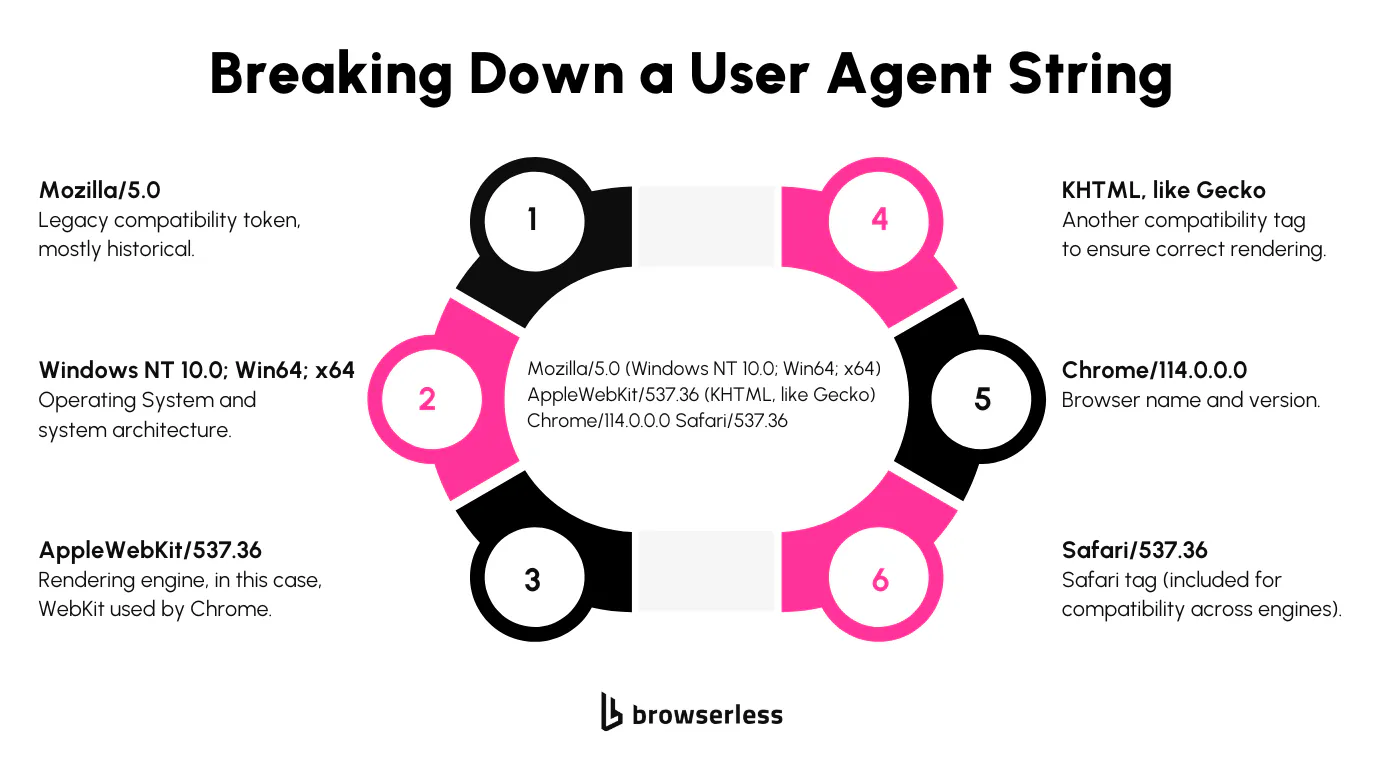
Every time your browser or an automation script makes an HTTP request, it sends a User-Agent header. This header contains a structured string that informs the server of the type of client making the request. It typically includes the browser name and version, the operating system, the device type, and the rendering engine. The goal is to give the server context so it can respond appropriately.
Here's a user agent example from a recent version of Google Chrome running on Windows:
Mozilla/5.0 (Windows NT 10.0; Win64; x64) AppleWebKit/537.36 (KHTML, like Gecko) Chrome/130.0.0.0 Safari/537.36
This user agent string may appear messy, but it follows a specific format that most web servers are designed to interpret. Each segment plays a role in identifying the client environment, from the rendering engine used to the OS architecture.
Automation tools like Puppeteer and Playwright replicate this behavior, allowing them to blend in with real browsers. Without a proper user agent, many websites won't respond the way you'd expect.
How servers rely on user agents to make decisions
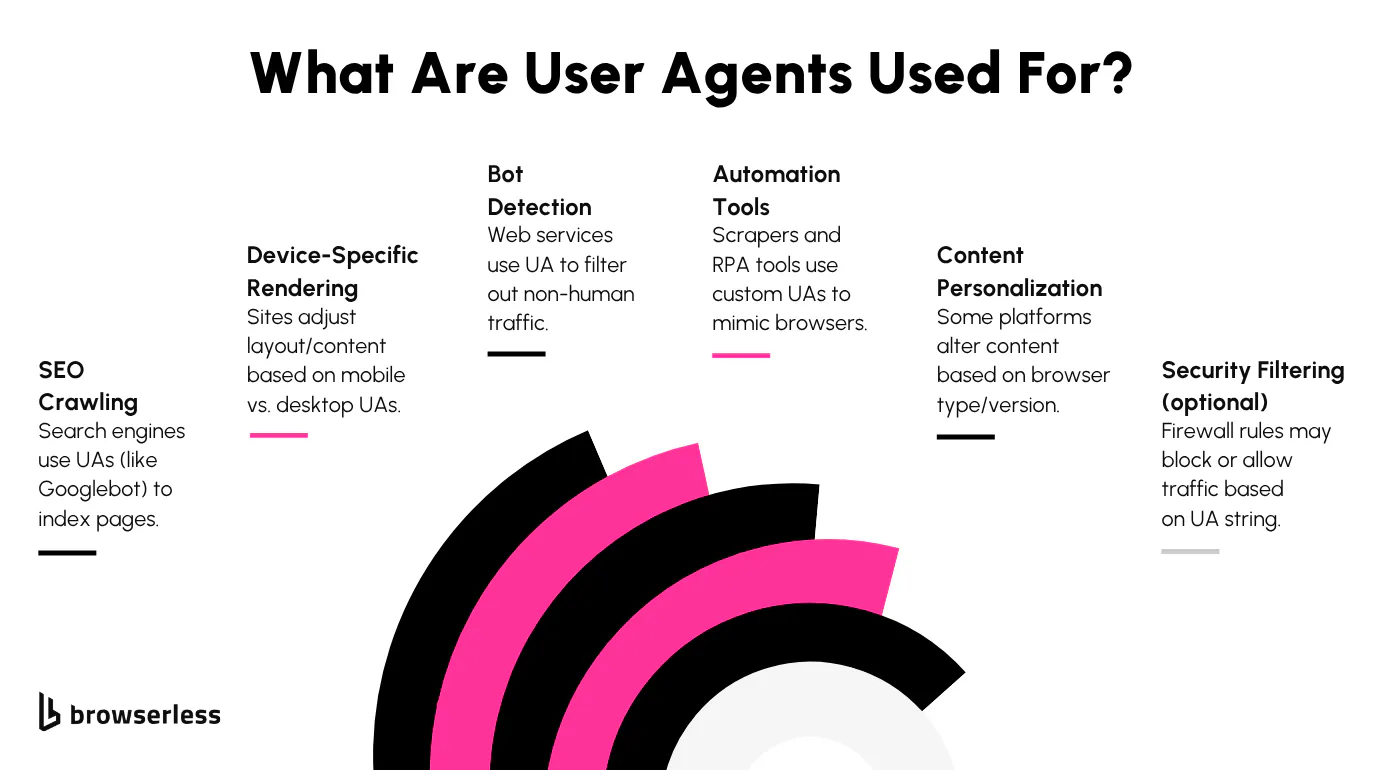
Web servers use the user agent string to guide how content is delivered. A mobile browser might get a lightweight version of the homepage. A legacy browser could be redirected to a fallback page. Some sites serve different content entirely based on which rendering engine or platform is detected. This makes the user agent a core input in how the site configures itself during that request cycle, with the response varying depending on the device type and browser type it sees.
It also plays a big part in bot detection. If a server sees a user agent that matches known scraping tools or one that's incomplete or malformed, it might serve a CAPTCHA, throttle the request, or block access outright.
Tools like Browserless expose this layer for full customization. That means developers can control the user agent header precisely, whether they're debugging frontend behavior or building a scraping stack that mirrors how real browsers operate. Matching your user agent string to actual browser capabilities is often the difference between reliable automation and being blocked immediately.
Here's why swapping your user agent barely helps anymore, even with a full device profile:
Common use cases for user agents
Adapting website behavior and powering search crawlers
User agents are one of the primary signals websites use to adapt website behavior. If a site detects a mobile browser user agent, it may serve a stripped-down version of the web page, optimized for touch interactions and smaller screens. Desktop user agents trigger more complex layouts and heavier assets. The user agent allows this decision to occur before the page is fully rendered, enabling content to be adjusted at the response level for multiple devices.
Search engines use specialized user agents, such as Googlebot or Bingbot, to identify themselves while crawling the web. Sites use these identifiers to determine how their content is indexed or blocked.
For example, many use their robots.txt file to manage what parts of a site are accessible to specific bots. Webmasters often treat known search engine user agents as trusted, and many platforms give them broader access than standard visitors.
Automation scripts and scrapers that mimic real browsers
Automation frameworks like Puppeteer and Playwright often rely on user agent customization to make scripts appear more like human visitors.
When a script sends a request using a default or empty user agent, it typically gets flagged. Most anti-bot systems are trained to detect those patterns. Mimicking a current, real browser UA can reduce the likelihood of triggering rate limits, CAPTCHA, or outright blocks.
Scrapers go further by rotating user agents to simulate traffic from multiple devices or users. Some workflows use pools of tested UA strings tied to real-world browser and OS combinations.
Others modify only the base user agent while matching it to expected headers and rendering behavior. It's not enough to copy a Chrome string; you need to align it with how Chrome behaves.
Without that consistency, detection systems can flag mismatches between what your UA claims to be and how your script interacts with the page.
How to customize or spoof a user agent
Setting custom user agents in popular tools
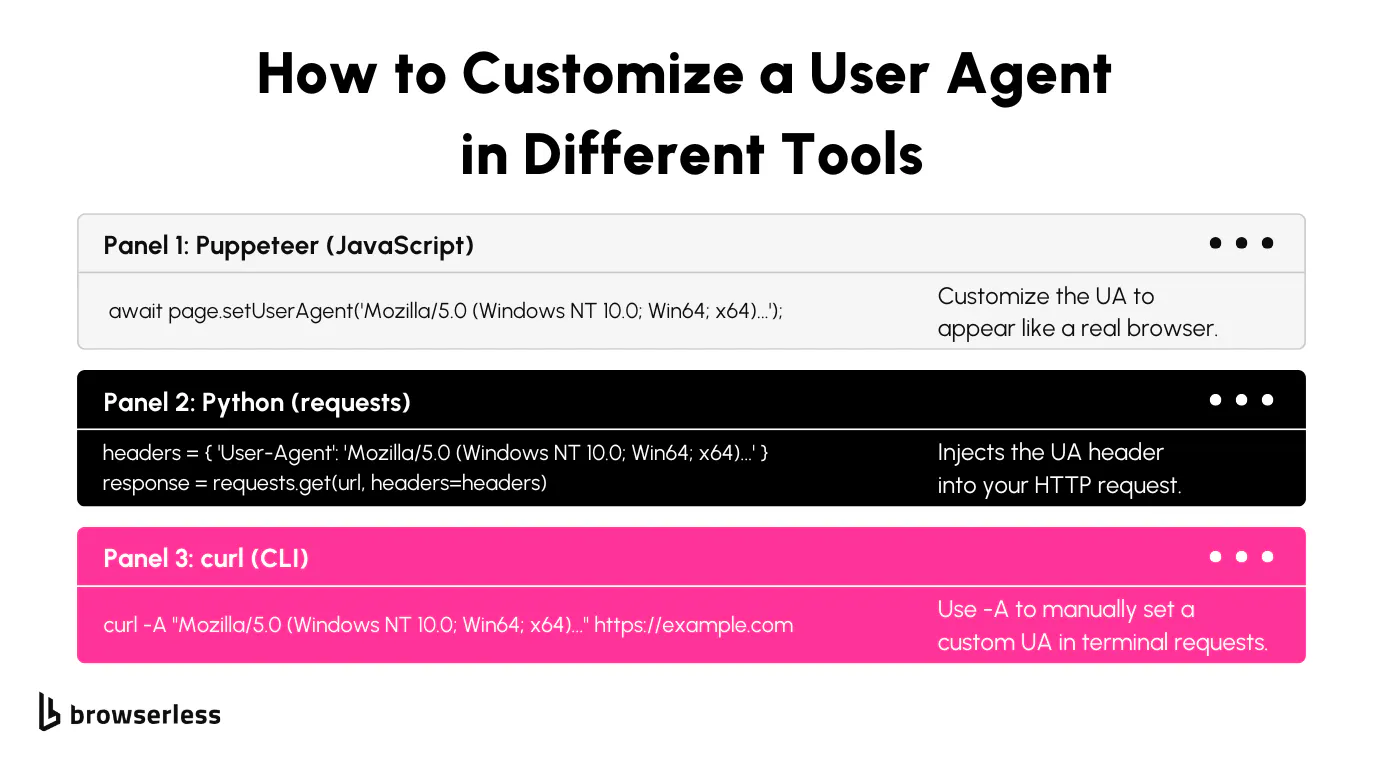
Most automation libraries make it easy to set or override the user agent string. In Puppeteer, you can use page.setUserAgent() to specify exactly what your browser context will report. Playwright has a similar method under the context object.
With Python's requests library, you can pass the user agent as part of the headers dictionary. For curl, the -A flag (or --user-agent) lets you define the string directly in the terminal or shell script. For quick manual testing inside a web page, a user agent switcher browser extension is a low-effort way to swap between different default values without touching code.
Each tool handles headers slightly differently, but they all offer sufficient flexibility to make the user agent appear like a real browser. This can be helpful when accessing content tailored to specific devices or when a site refuses to load for clients with incomplete headers. What you send in the user agent string can influence everything from layout rendering to whether a server blocks the request entirely.
Spoofing headless UAs to look more human
Spoofing refers to modifying your user agent to make your traffic appear as if it's coming from a regular browser, rather than an automation tool.
Headless browsers often include "HeadlessChrome" in their UA string, which is an instant signal to anti-bot systems. Replacing it with a standard Chrome or Firefox user agent helps avoid basic filters that look for that keyword.
The trick isn't just about swapping text. A good spoof also matches the behaviors and features associated with the claimed browser. For example, if you say you're Chrome 130, your automation needs to support the rendering and JavaScript capabilities that come with it.
Tools like Browserless help automate much of this process, pairing tested user agents with browser configurations that replicate real-world environments. However, advanced bot detection systems may still require manual tuning, such as modifying navigator properties, WebRTC settings, or screen resolution, to ensure full alignment.
Ethical boundaries when customizing your user agent
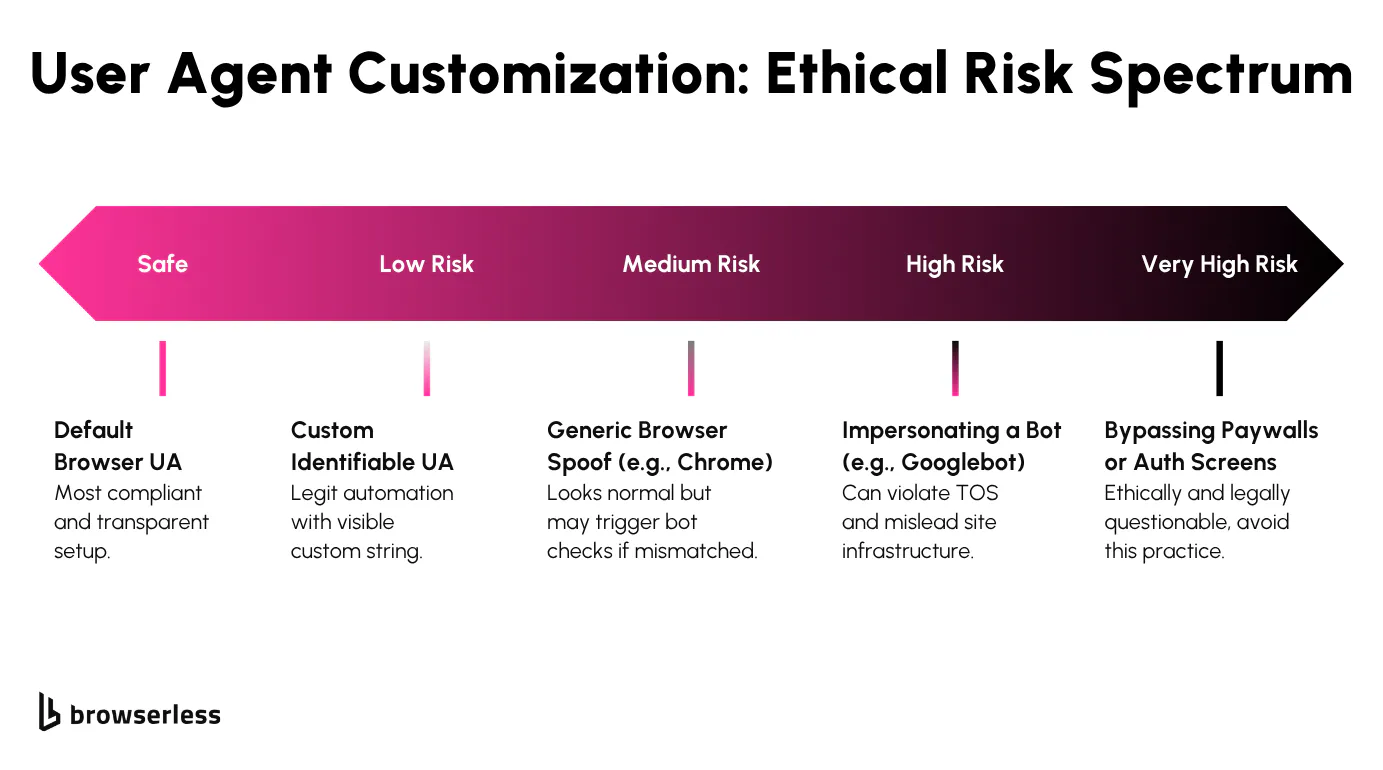
It's not difficult to impersonate nearly any user agent, but there are good reasons to avoid pretending to be a crawler, such as Googlebot or Bingbot.
These bots are treated with a high level of trust, and faking them can result in swift and permanent bans. In some jurisdictions, it could even cross legal lines if used to extract data under false pretenses.
A more sustainable practice is to use valid, up-to-date browser user agents that reflect real versions and platforms. Avoid mixing mobile and desktop traits, or using a modern UA with a browser version that doesn't support newer features.
Mismatches between your user agent string and the browser behavior it's supposed to represent are one of the main ways detection systems flag automation.
Maintaining alignment between headers and browser behavior
When customizing your user agent, ensure that other client headers and behaviors align with what the UA claims. For example, if your script says it's running Chrome on Windows, the rendering fingerprint, screen resolution, and input behavior should also reflect that. Automation platforms like Browserless help align these layers to avoid discrepancies.
Misalignment creates detection patterns. Servers can check for inconsistencies between user agent strings, WebGL outputs, media capabilities, or installed fonts.
A well-configured scraper should resemble a single, consistent, and coherent browser session, rather than a mix of traits derived from different environments. Getting this part right takes some testing, but it helps reduce friction and keeps automation more reliable over time.
Risks and ethical considerations
How user agents affect detection and compliance
User agents are often the first element that servers inspect when deciding whether to allow or restrict access. Strings that include terms like HeadlessChrome, or those that don't match a valid browser version, tend to raise flags quickly.
They can trigger rate-limiting, CAPTCHA challenges, or outright blocks. Even well-formed UAs can cause issues when paired with inconsistent behavior, such as automated timing or missing headers.
Spoofing a user agent can also complicate legal exposure. While sending a different UA string isn't inherently illegal, it becomes riskier when paired with actions that cross access boundaries, like scraping authenticated content or pretending to be a crawler like Googlebot.
In such cases, spoofed headers can contribute to legal claims under statutes like the CFAA in the U.S. or similar laws in other jurisdictions. Accuracy, transparency, and proper access logic help reduce these risks.
Ethical automation and testing with Browserless
Browserless helps developers avoid detection while maintaining clean practices. It utilizes real-world user agents tied to actual Chromium builds, and its stealth routes align the headless environment with how real browsers behave, helping you avoid basic detection systems. This makes it easier to build repeatable, production-safe scraping flows without having to over-engineer header spoofing or fingerprint evasion.
If you're working with custom configurations, it's worth testing your user agent setup to ensure it's working as expected. A site like whatismybrowser.com shows how your script appears to servers. Mismatches between UA, headers, and behavior can break workflows or lead to access problems. Keeping those pieces aligned lets your automation run more consistently and stay under the radar.
Conclusion
User agents are a core part of how browsers and scripts interact with the web. They shape the content you see, determine how smoothly automation runs, and affect how likely you are to be flagged as a bot. Developers who understand how user agents work and how to configure them responsibly can build more reliable, compliant systems. If you're looking to test or fine-tune your automation workflows, Browserless offers tools that make it easier to work with user agents in a controlled and transparent way. Sign up for a free account and see how Browserless handles user agents in your automation stack.
User agent FAQs
What is a user agent?
A user agent is a small piece of text sent by web browsers or automation scripts in HTTP requests to identify the client's software, browser version, and operating system to the web server.
What is a user agent header?
The user-agent header is the specific HTTP request header that carries the user agent string from the client to the web server. Browsers, scripts, and tools set it automatically on every request, and servers read it to determine the browser type, version number, operating system, and device type before deciding what content to serve.
Why do websites check user agents?
Websites use user agents to tailor responses based on the client, delivering mobile layouts, blocking bots, or serving different content depending on browser capabilities.
Can I change or spoof a user agent string?
Yes, most automation tools let you modify the user agent string. However, spoofing should be done carefully and ethically, without impersonating services like Googlebot.
How do bots use user agents to avoid detection?
Bots often use real-looking user agent strings to avoid detection systems. When combined with other tactics, such as header alignment and behavioral matching, this helps reduce blocks.
Is it legal to spoof a user agent?
Spoofing a user agent isn't inherently illegal, but it may become problematic if used to bypass authentication, violate terms of service, access protected content, or impersonate services like Googlebot. In such cases, it may lead to legal exposure under laws such as the CFAA in the U.S. or similar regulations in other jurisdictions.