
Last updated on: February 20, 2026
If you work with real estate,you've almost definitely ended up on Zillow - and then immediately wished you could export Zillow data instead of copy-pasting it by hand. In fact, real estate data is one of the most valuable inputs companies can use for pricing models, market research, and investor dashboards.
The problem: scraping Zillow at scale is not as simple as firing off a few fetch calls. You're dealing with JavaScript-heavy pages, SPA routing, bot detection, CAPTCHAs, and the usual mix of IP blocks and rate limiting.
In this guide, you'll build a Zillow scraper in Node.js that:
- Navigates directly to Zillow search results using BrowserQL (BQL) to handle bot detection and CAPTCHAs automatically
- Hands the browser session off to Puppeteer for flexible DOM interaction and data extraction
- Extracts data from Zillow property cards (URL, address, price, and details) into structured formats like JSON
You'll do this with a hybrid approach: BQL running on Browserless handles the hard parts (navigation, stealth, CAPTCHA solving), and Puppeteer takes over for the actual scraping logic. This treats Browserless as a production-grade web scraping API rather than running Chrome on your own servers.
Along the way, we'll talk about why this hybrid approach works better than pure Puppeteer for heavily protected sites, how residential proxies help you look like a normal browser, and what you should think about before scraping Zillow data.
This isn't a full web scraping tutorial from scratch - you already ship code - but it will give you a solid Zillow web scraper you can adapt to your own workflows.
What You'll Build: a Zillow Web Scraper Function
The market your Zillow scraper taps into is enormous, and so is its potential. Grand View Research estimates the global real estate market at about $4.13 trillion in 2024, with projections of $5.85 trillion by 2030 (around 6.2% annual growth from 2025 onward).
By the end, you'll have a function like this:
const properties = await getZillowProperties("california", "sale");
Given a location (city, state, address, or zipcode) and a property type (sale or rent), your Zillow scraper will:
- Construct the right Zillow search URL for your query
- Use BQL to navigate to that URL through Browserless's stealth infrastructure with residential proxies
- Automatically handle any CAPTCHA challenges that Zillow presents
- Hand the live browser session to Puppeteer so you can extract data with full DOM access
- Extract real estate listings (address, price, URL, and other property details)
The result is a JavaScript array of Zillow property data that you can:
- Feed into a pricing model
- Store in a database for market research
- Join with internal data for real estate agents or your own CRM
- Export as CSV or JSON for downstream tools
Before You Scrape Zillow: Terms, Scope, and Ethics
Before you point a scraper at https://www.zillow.com, you should be clear about what you're doing:
- Only scrape publicly available data
- Check Zillow's terms of service and follow them
- Respect rate limits and avoid flooding a single URL
- Back off on repeated 4xx / 5xx errors
- Treat CAPTCHA and anti-bot tooling as a hard boundary
Nothing in this blog post is legal advice. The goal is to show you how to programmatically extract data from a complex, JavaScript-heavy site without doing obviously reckless things.
Why a BQL + Puppeteer Hybrid Approach?
If you've tried scraping Zillow with plain Puppeteer, you've probably hit the PerimeterX "Press & Hold" CAPTCHA wall immediately - often before the homepage even loads. Zillow's bot detection is aggressive, and a standard headless browser connection usually gets blocked on the first request.
Manual CAPTCHA bypass doesn't reliably work because PerimeterX validates more than click timing - it checks browser fingerprints and behavioral signals.
That's why this guide uses a hybrid approach:
- BrowserQL (BQL) handles navigation, stealth, residential proxies, and CAPTCHA solving.
- Puppeteer connects to the already-unblocked browser session and performs DOM extraction.
This separation of concerns means BQL gets you through the front door, and Puppeteer does the scraping work.
Step 1 - Get a Browserless Account
To get started, first create a Browserless account.
Browserless gives you hosted headless browsers with anti-blocking features, bot detection handling, and CAPTCHA solving so you can focus on parsing logic instead of infrastructure.
At a high level, Browserless provides:
- REST endpoints for BrowserQL (BQL)
- A WebSocket endpoint for Puppeteer or Playwright reconnection
- Token-based authentication
- Residential proxies, IP rotation, session persistence
Sign up for a free account, grab your API key from the dashboard, and keep it handy.
Step 2 - Set Up a Node.js Project for Scraping Zillow
You'll use BQL API and Puppeteer Core to control the remote browser. Puppeteer Core is just the "driver" - it doesn't download its own Chromium binary, which is exactly what you want when you already have browsers running in Browserless.
Initialize a project and install dependencies:
npm init -y
npm install puppeteer-core
Create a file called zillow-scraper.js:
import puppeteer from "puppeteer-core";

const BROWSERLESS_API_KEY = "YOUR_BROWSERLESS_API_KEY";

function sleep(ms) {
  return new Promise((resolve) => setTimeout(resolve, ms));
}

async function getZillowProperties(location, listingType) {
  const searchSlug = location.toLowerCase().replace(/\s+/g, "-");
  const zillowSearchUrl =
    listingType === "rent"
      ? `https://www.zillow.com/${searchSlug}/rentals/`
      : `https://www.zillow.com/${searchSlug}/`;

  return [];
}

(async () => {
  const properties = await getZillowProperties("california", "sale");
  console.log(JSON.stringify(properties, null, 2));
})();
Step 3 - Use BQL to Navigate and Handle Bot Detection
BQL will help bypass or solve CAPTCHA if it appears, then it'll reconnect to Puppeteer so you can continue the next step, fetching the data by identifying selectors.
async function bqlNavigateAndSolve(targetUrl) {
  const queryParams = new URLSearchParams({
    token: BROWSERLESS_API_KEY,
    timeout: 5 * 60 * 1000,
    proxy: "residential",
    proxyCountry: "us",
    proxySticky: "true",
  }).toString();

  const query = `
    mutation ZillowSetup($url: String!) {
      goto(url: $url, waitUntil: domContentLoaded, timeout: 60000) {
        status
        time
      }

      solve(timeout: 45000) {
        found
        solved
        time
      }

      reconnect(timeout: 60000) {
        browserWSEndpoint
      }
    }
  `;

  const endpoint = `https://production-sfo.browserless.io/stealth/bql?${queryParams}`;

  const response = await fetch(endpoint, {
    method: "POST",
    headers: { "content-type": "application/json" },
    body: JSON.stringify({
      query,
      variables: { url: targetUrl },
    }),
  });

  const { data } = await response.json();

  return {
    browserWSEndpoint:
      data.reconnect.browserWSEndpoint + `?token=${BROWSERLESS_API_KEY}`,
    solveResult: data.solve,
  };
}
Step 4 - Extract Zillow Property Data with Puppeteer
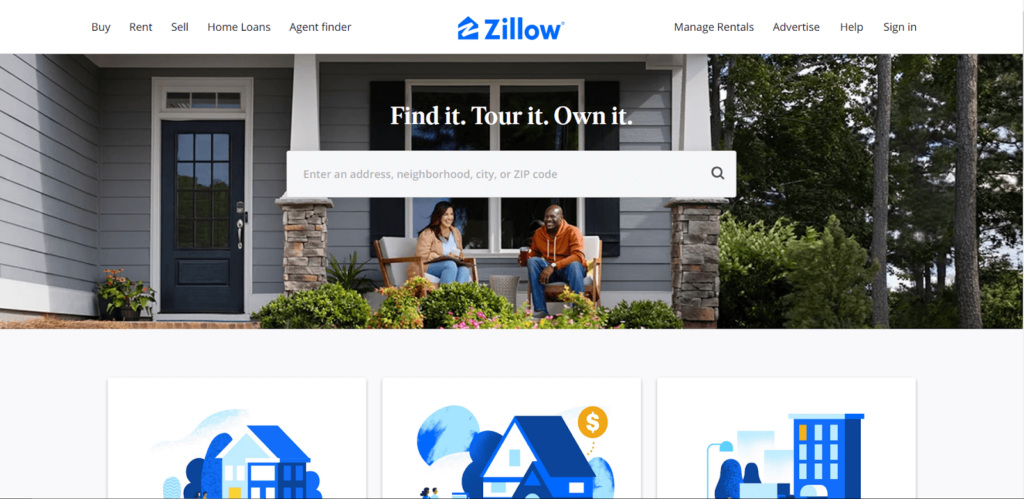
By now, your browser has avoided bot detection with BQL, and we'll now hand off the remaining scraping behavior to Puppeteer. You'll see cards for each property in the current Zillow listings. Your goal now is to extract real estate data from each card into a clean JSON structure.
If you inspect the DOM, you'll see Zillow renders each property card as an article element with data-test="property-card". Inside each card, you'll find the address, price, a link to the property page, and other details.
async function getZillowPropertiesInfo(page) {
  return page.evaluate(() => {
    const cards = [
      ...document.querySelectorAll('article[data-test="property-card"]'),
    ];

    return cards
      .map((card) => {
        const addressEl = card.querySelector("address");
        const priceEl = card.querySelector('[data-test="property-card-price"]');
        const linkEl = card.querySelector("a");

        if (!addressEl || !priceEl || !linkEl) return null;

        const detailItems = [...card.querySelectorAll("li")];

        return {
          url: linkEl.href,
          address: addressEl.innerText,
          price: priceEl.innerText,
          details: detailItems.map((li) => li.innerText.trim()).filter(Boolean),
        };
      })
      .filter(Boolean);
  });
}
A couple of important details for web scraping Zillow:
- The results page is an SPA, and Zillow fetches more properties as you scroll. To extract real estate listings that aren't in view yet, you'll need to scroll the page first.
- If you want all Zillow listings for a search URL, implement a simple "scroll to bottom, wait, extract; repeat" loop until no new cards appear.
For a first pass, you can just scrape the visible cards, which is often enough for smaller data collection tasks or demos.
Step 5 - Full Zillow Scraper Example
Now that you have the building blocks, you can assemble a complete Zillow scraper that:
- Connects to Browserless using BQL
- Bypasses the CAPTCHA when present
- Connects to Puppeteer once anti-bot measures have been applied
- Takes a screenshot of the site
- Extracts data from Zillow's property cards
import puppeteer from "puppeteer-core";

const BROWSERLESS_API_KEY = "YOUR_API_KEY_HERE";
const SCREENSHOT_DIR = "./screenshots";

function sleep(ms) {
  return new Promise((resolve) => setTimeout(resolve, ms));
}

async function saveScreenshot(page, name) {
  const path = `${SCREENSHOT_DIR}/${name}.png`;
  await page.screenshot({ path, fullPage: false });
  console.log(`Screenshot saved: ${path}`);
}

// ---------------------------------------------------------
// Step 1: Use BQL to navigate to Zillow and solve CAPTCHA
// ---------------------------------------------------------
async function bqlNavigateAndSolve(targetUrl) {
  const queryParams = new URLSearchParams({
    token: BROWSERLESS_API_KEY,
    timeout: 5 * 60 * 1000,
    proxy: "residential",
    proxyCountry: "us",
    proxySticky: "true",
  }).toString();

  const query = `
    mutation ZillowSetup($url: String!) {
      goto(url: $url, waitUntil: domContentLoaded, timeout: 60000) {
        status
        time
      }

      solve(timeout: 45000) {
        found
        solved
        time
      }

      reconnect(timeout: 60000) {
        browserWSEndpoint
      }
    }
  `;

  const endpoint = `https://production-sfo.browserless.io/stealth/bql?${queryParams}`;

  console.log(`BQL: Navigating to ${targetUrl} ...`);
  const response = await fetch(endpoint, {
    method: "POST",
    headers: { "content-type": "application/json" },
    body: JSON.stringify({
      query,
      variables: { url: targetUrl },
    }),
  });

  if (!response.ok) {
    const text = await response.text();
    throw new Error(
      `BQL request failed (${response.status}): ${text.substring(0, 300)}`,
    );
  }

  const { data, errors } = await response.json();

  if (errors) {
    console.error("BQL errors:", JSON.stringify(errors, null, 2));
    throw new Error("BQL returned errors");
  }

  console.log("BQL goto status:", data.goto.status, `(${data.goto.time}ms)`);
  console.log("BQL solve:", JSON.stringify(data.solve));
  console.log("BQL reconnect endpoint received");

  return {
    browserWSEndpoint:
      data.reconnect.browserWSEndpoint + `?token=${BROWSERLESS_API_KEY}`,
    solveResult: data.solve,
  };
}

// ---------------------------------------------------------
// Step 2: Connect Puppeteer and interact with Zillow
// ---------------------------------------------------------
async function getZillowPropertiesInfo(page) {
  return page.evaluate(() => {
    const cards = [
      ...document.querySelectorAll('article[data-test="property-card"]'),
    ];
    return cards
      .map((card) => {
        const addressEl = card.querySelector("address");
        const priceEl = card.querySelector('[data-test="property-card-price"]');
        const linkEl = card.querySelector("a");
        if (!addressEl || !priceEl || !linkEl) return null;

        // FIX: Zillow renders details (beds, baths, sqft) as <li> elements, not nested spans
        const detailItems = [...card.querySelectorAll("li")];

        return {
          url: linkEl.href,
          address: addressEl.innerText,
          price: priceEl.innerText,
          details: detailItems.map((li) => li.innerText.trim()).filter(Boolean),
        };
      })
      .filter(Boolean);
  });
}

async function getZillowProperties(location, listingType) {
  // ----------------------------------------------------------
  // Approach: Use BQL to navigate directly to the search URL
  // This avoids needing the homepage search box entirely
  // and handles the CAPTCHA in one shot.
  // ----------------------------------------------------------
  const searchSlug = encodeURIComponent(location.toLowerCase().replace(/\s+/g, "-"));
  let zillowSearchUrl;
  if (listingType === "rent") {
    zillowSearchUrl = `https://www.zillow.com/${searchSlug}/rentals/`;
  } else if (listingType === "sale") {
    zillowSearchUrl = `https://www.zillow.com/${searchSlug}/`;
  } else {
    zillowSearchUrl = `https://www.zillow.com/${searchSlug}/`;
  }

  console.log(`Target search URL: ${zillowSearchUrl}`);

  // Step 1: BQL handles navigation + CAPTCHA + returns websocket for Puppeteer
  const { browserWSEndpoint, solveResult } =
    await bqlNavigateAndSolve(zillowSearchUrl);

  // Step 2: Connect Puppeteer to the BQL session
  console.log("Connecting Puppeteer to BQL session...");
  const browser = await puppeteer.connect({ browserWSEndpoint });
  const pages = await browser.pages();
  const page = pages[pages.length - 1];
  await page.setViewport({ width: 1920, height: 1080 });

  const title = await page.title();
  const url = page.url();
  console.log(`Connected! Title: "${title}", URL: ${url}`);
  await saveScreenshot(page, "bql-zillow-01-connected");

  // Check if we're on the results page or still blocked
  if (title.includes("denied") || title.includes("Access")) {
    console.log("WARNING: Still on CAPTCHA page after BQL solve.");
    console.log("The PerimeterX CAPTCHA may not be solvable via BQL solve().");
    await browser.close();
    return [];
  }

  // Wait a moment for results to fully render
  await sleep(3000);

  // Check for property cards
  try {
    await page.waitForSelector('article[data-test="property-card"]', {
      timeout: 15000,
    });
    console.log("Property cards detected");
  } catch {
    console.log("No property cards found. Checking page state...");
    await saveScreenshot(page, "bql-zillow-02-no-cards");
    const currentTitle = await page.title();
    console.log("Current title:", currentTitle);
  }

  await saveScreenshot(page, "bql-zillow-03-results");

  // Step 3: Extract property data
  const properties = await getZillowPropertiesInfo(page);
  console.log(`Found ${properties.length} properties`);

  await browser.close();
  return properties;
}

// ---------------------------------------------------------
// Main execution
// ---------------------------------------------------------
(async () => {
  try {
    const properties = await getZillowProperties("california", "sale");
    console.log(JSON.stringify(properties, null, 2));
  } catch (err) {
    console.error("Script failed:", err.message);
  }
})();
From here, you can:
- Export Zillow data to CSV
- Load it into a database for longer-term data collection
- Join Zillow property data with your own internal data for richer analysis
Why not just use a Zillow API?
Historically, Zillow has offered APIs for limited use cases, but they don't give you full coverage of every Zillow listing or every field you might want, and access is tightly controlled. That's why a lot of teams end up building a Zillow scraper or a custom Zillow scraper API on top of headless browsers instead of relying on a single official Zillow API endpoint.
Browser-based scraping has trade-offs - more moving parts, more ways to get blocked - but it also gives you:
- Access to the same Zillow property pages that a normal user sees
- Control over the exact search URL, filters, and listing status
- The ability to extract real estate listings exactly as rendered, which is useful when you care about text and layout
If your workflow depends on a stable, documented API, start by checking Zillow's official docs. If you need to scrape publicly available property data from live pages, a web scraping setup like this is often the only practical option.
Using Browserless as a Managed Zillow Scraper API
The examples above use Browserless as a remote browser you control with BQL and Puppeteer, but you can also treat Browserless as a higher-level Zillow scraper API.
In practice, that means:
- Letting Browserless handle headless browsers, TLS, and anti-bot behavior
- Using Browserless features like CAPTCHA solving and IP rotation when you start hitting hard limits
If you're building a production Zillow web scraper that runs continuously, wraps multiple zipcodes or locations, and extracts data across thousands of pages, offloading the browser management to a web scraping API like Browserless keeps your stack simpler and more reliable over time.
FAQ: Quick Answers About Scraping Zillow
Is scraping Zillow legal?
You should only scrape publicly available data, stay within Zillow's terms of service, and avoid anything that looks like bypassing authentication or access controls. When in doubt, talk to a lawyer - not just another developer.
Can I do this with requests and HTML only?
Not easily. Zillow is a JavaScript-heavy SPA, so a simple requests call to the HTML won't give you the final rendered listings. You could try to reverse-engineer internal APIs, but those are brittle and prone to breakage. Using headless browsers is more robust for long-term data collection.
What if my Zillow scraper returns an empty array?
That usually means the CAPTCHA failed, the listing interstitial didn't resolve correctly, or Zillow changed the DOM. Add logging, try different search terms, and re-inspect the DOM with Chrome Developer Tools to keep your parsing logic up to date. Sometimes you just need to rerun after a cooling-off period.
Can I adapt this to other real estate sites?
Yes. The same pattern - headless browsers, our BQL tool, and DOM-based extraction - works for most real estate listings sites. You'll just need to update selectors, code, search flows, and any site-specific bot detection handling.
If you want to go beyond a single script and build a sustainable Zillow scraping pipeline, Browserless is the easiest way to run headless browsers with sensible defaults for anti bot detection, CAPTCHA handling, and IP behavior, so you can focus on how you extract real estate data rather than how you keep Chrome alive in production.